9
No. Name Description
8
PIR sensor
Triggers the air ionizer when detecting human body near the
display.
9
NFC sensor
• Tap NFC card for AMS login.
• Use touch pen to launch EZWrite. See Using touch pen to
launch EZWrite on page 13 for details.
10
Ambient light sensor Detects the ambient light around the display.
11
IR signal receiver Receives infrared signals from remote control.
12
Power
• Tap to enter energy saving mode.
• Press and hold for 4 seconds or more to power off.
13
Home Returns to the main screen.
14
Return Returns to the previous menu.
15
Menu Enters the function menu.
16
Volume down Decreases the volume.
17
Volume up Increases the volume.
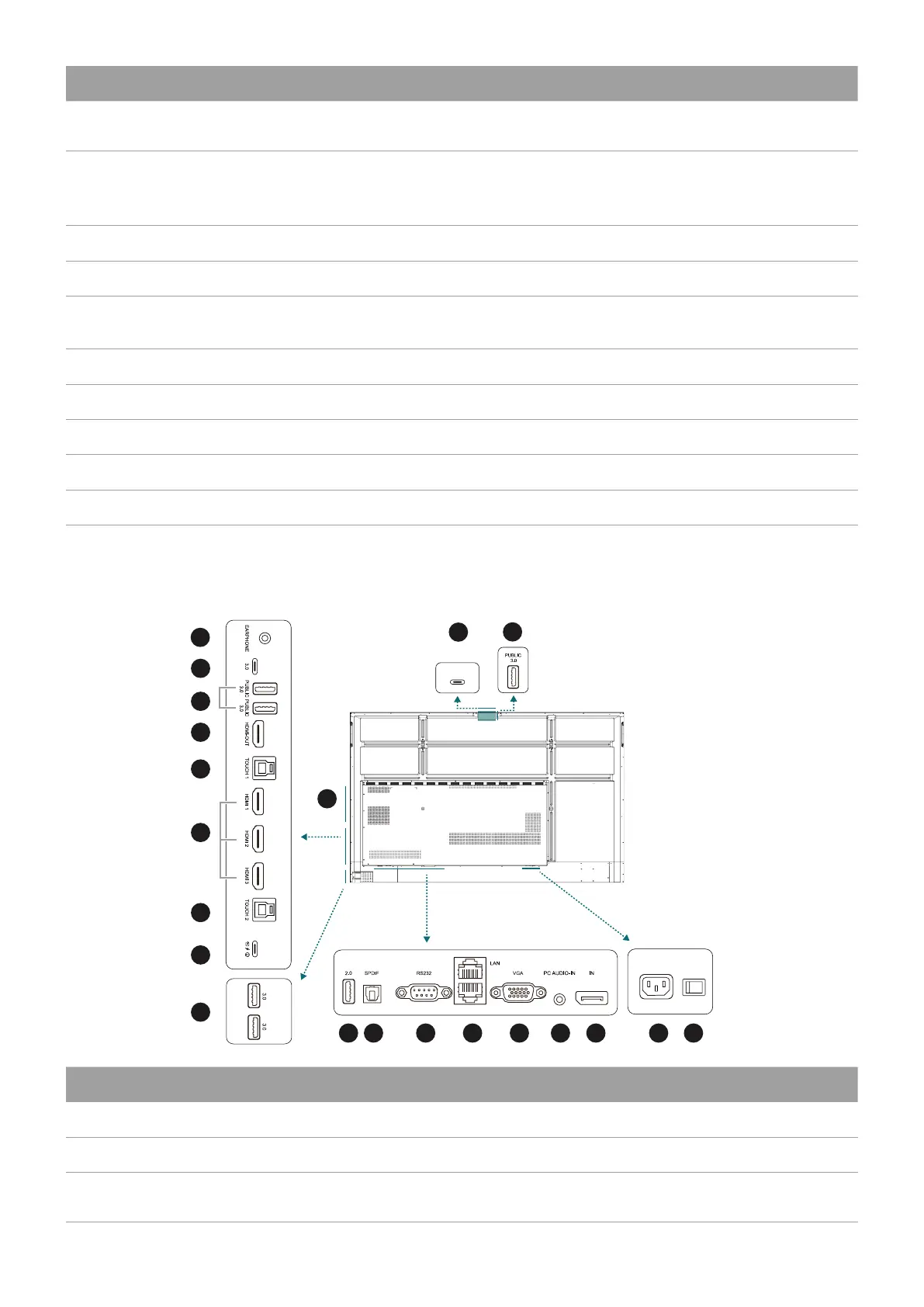
Rear panel
See Connections on page 14 for details.
2
3
4
5
5
6
7
8
10
9
11 12
1
13 14 15 16 17 18
20
19
3.0
No. Name Description
1
EARPHONE Connects to external speakers or earphones.
2
Type-C Connects to USB-C devices for data transfer.
3
USB 3.0
Connects USB devices such as keyboards, mouse, and USB flash
drives.



 To Next Page