Operation 47
Selecting a color temperature*
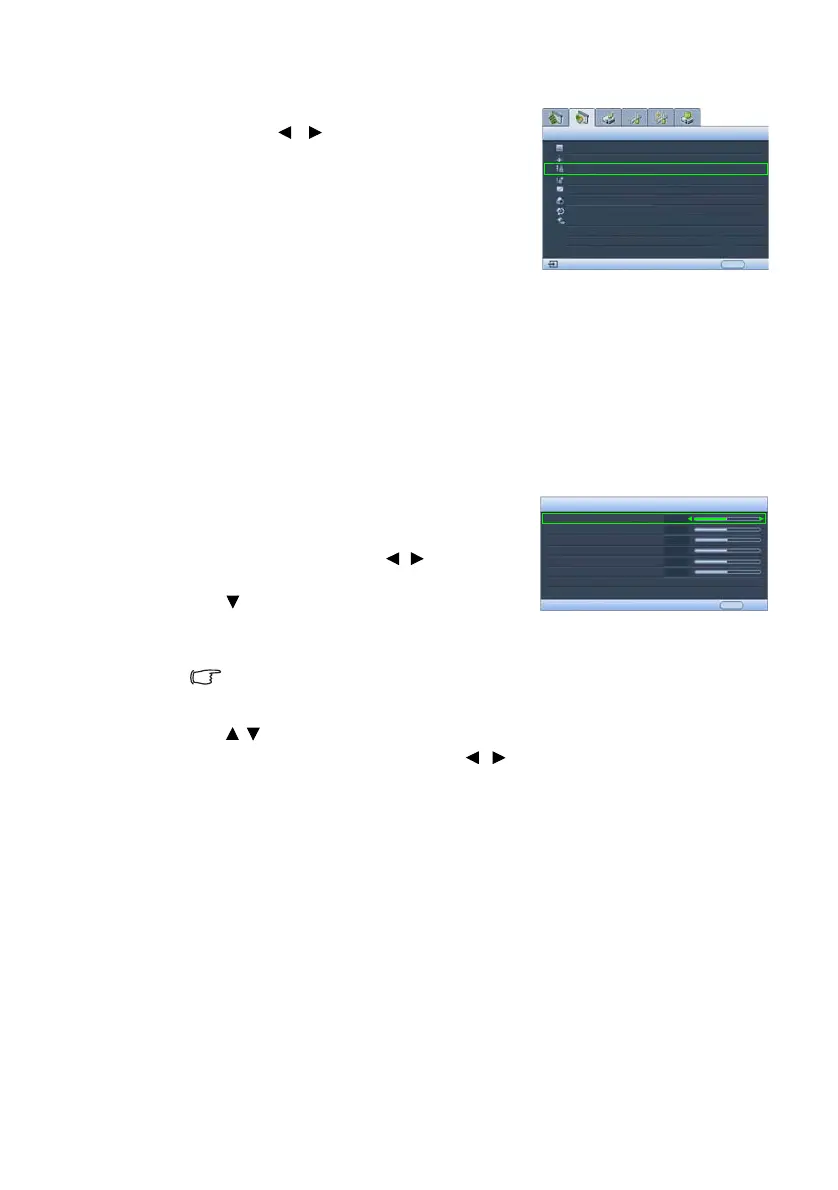
Highlight Color Temperature and select a preferred
setting by pressing / on the projector or remote
control.
There are several color temperature settings available.
1. Lamp Native: With the lamp’s original color
temperature and higher brightness. This setting is
suitable for environments where high brightness
is required, such as projecting pictures in well lit
rooms.
2. War m: Makes pictures appear reddish white.
3. Normal: Maintains normal colorings for white.
4. Cool: Makes pictures appear bluish white.
5. User 1/User 2/User 3: Recalls the settings
customized in the Color Temp User_ Fine Tuning
menu. See "Setting a preferred color temperature"
on page 47 for details.
Setting a preferred color temperature
To set a preferred color temperature:
1. Highlight Color Temperature and select User 1,
User 2, or User 3 by pressing / on the
projector or remote control.
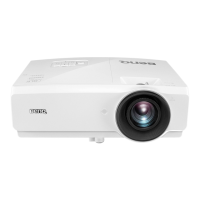
2. Press to highlight Color Temp User_ Fine
Tuning and press ENTER. The Color Temp User_
Fine Tuning page displays.
The menu name ‘User_’ corresponds with
the setting selected in Color Temperature.
3. Press / to highlight the item you want to
change and adjust the values by pressing / .
• Red Gain/Green Gain/Blue Gain: Adjusts the
contrast levels of Red, Green, and Blue.
• Red Offset/Green Offset/Blue Offset: Adjusts
the brightness levels of Red, Green, and Blue.
4. To save and leave the settings, press MENU once
or EXIT twice.
Black Level
Clarity Control
Color Temperature
Picture -- Advanced
Analog RGB
0 IRE
EXIT Back
Normal
Color Temp User_ Fine Tuning
Gamma Selection
Color Management
Color Space Transfer
Signal Shuttle
Default
Gamma 2
Color Temp User 1 Fine Tuning
Red Gain
EXIT Back
Green Gain
Blue Gain
Red Offset
Green Offset
Blue Offset
*About color temperatures:
There are many different shades
that are considered to be "white"
for various purposes. One of the
common methods of representing
white color is known as the “color
temperature”. A white color with a
low color temperature appears to
be reddish white. A white color
with a high color temperature
appears to have more blue in it.
+50
+50
+50
+50
+50
+50


 To Next Page