Operation 55
Adjusting the sound
The sound adjustments made as below will have an effect on the projector speaker and, if
using external speakers, on the audio output signal.
Be sure you have made a correct connection to the projector audio input(s) and, if using
external speakers, to the projector audio outputs. See "Connecting Audio device" on page 29
for details.
Muting the sound
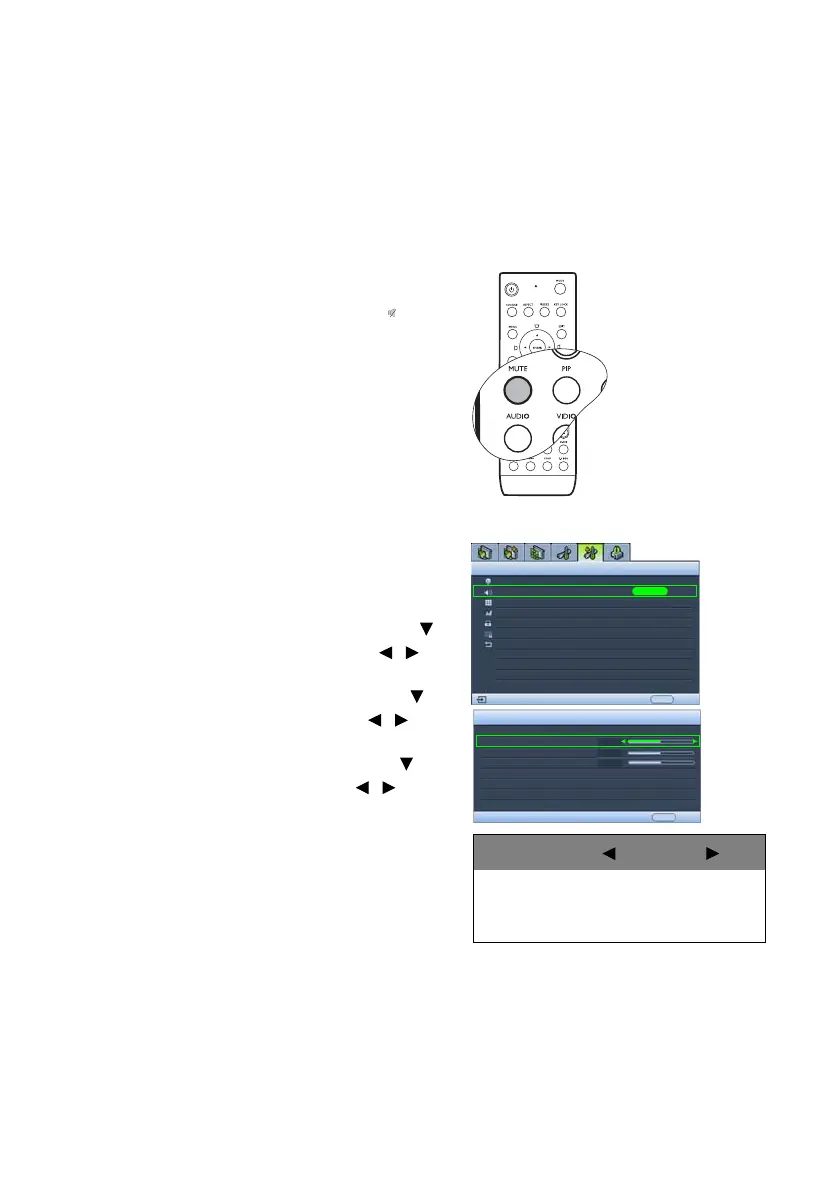
Press MUTE on the remote control to
temporarily turn off the sound. While the
sound is off, the screen will display in the
upper right corner of the screen.
To restore the sound, press MUTE again.
You can also toggle the audio between on and
off in the Advanced Setup > Audio menu. See
the OSD picture on this page for details.
Other sound adjustments
1. Press AUDIO on the remote control to
display the Audio page.
(The secondary option to access the
Audio menu is to press MENU to open
the OSD menu, highlight Audio in the
Advanced Setup menu, and press
ENTER.)
2. To adjust the sound volume, press to
highlight Vol ume and press / to
adjust the level.
3. To adjust the sound treble, press to
highlight Tre ble and press / to
adjust the level.
4. To adjust the sound bass, press to
highlight Bass and press / to
adjust the level.
Audio
Mute
EXIT Back
Volume
Treble
Bass
+5
Off
+5
+5
Lamp
Audio
Pattern
High Altitude Mode
Password
Key Lock
Reset All Settings
Advanced Setup
EXIT BackAnalog RGB
ENTER
Off
Selection Pressing
Volume
Treble
Bass
smaller
weaker
weaker
louder
stronger
stronger



 To Next Page