Operation 57
Shutting down the projector
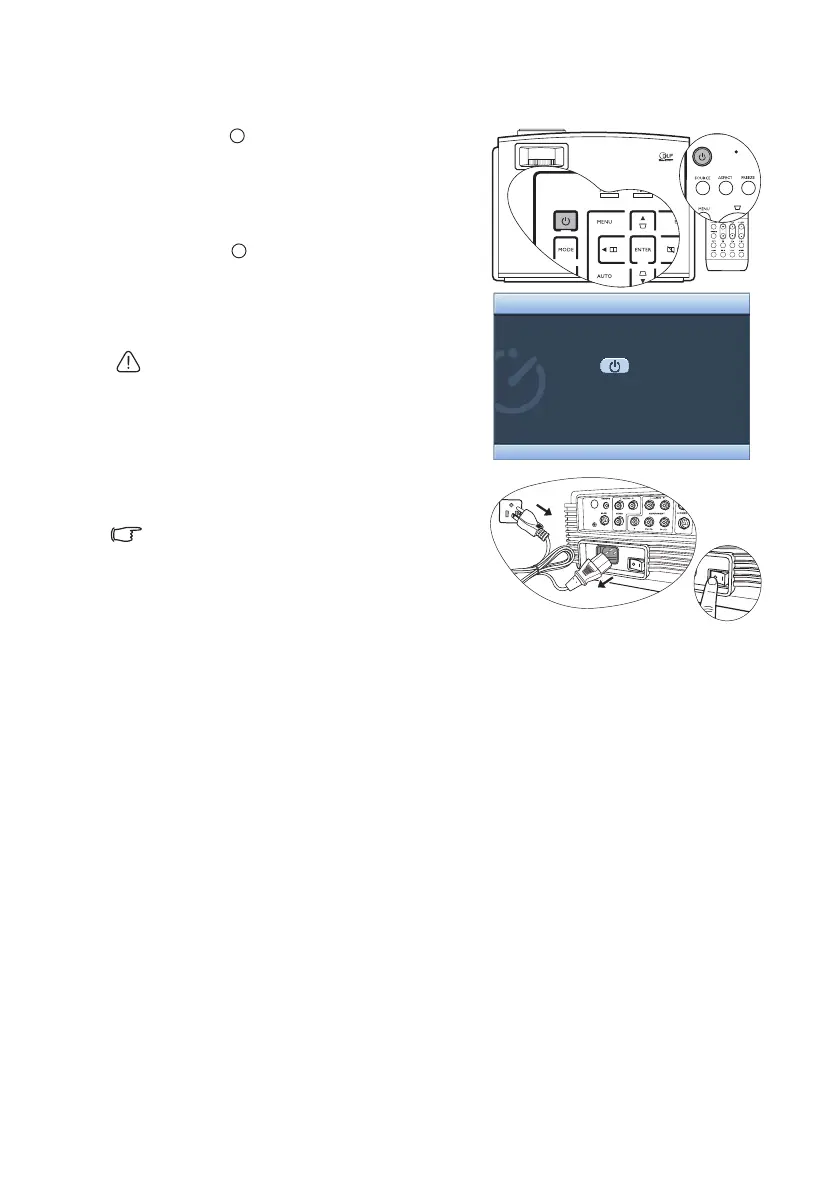
1. Press Power on the remote control or
projector and a confirmation message will
display prompting you.
If you don't respond in a few seconds, the
message will disappear.
2. Press Power a second time. The Power
indicator light flashes orange, the
projection lamp shuts down, and the fans
will continue to run for approximately 90
seconds to cool down the projector.
To protect the lamp, the projector will not
respond to any commands during the cooling
process.
3. The Power indicator light is a steady
orange once the cooling process has
finished and fans stop.
4. Disconnect the power cord from the wall
socket.
To save your time, you can unplug the projector
as soon as it is turned off without waiting for the
cooling time. The projector will continue cooling
down even if it is unplugged so that you can pack
up the projector and go. During the projector's
off-line cooling, you cannot restart it.
Press again to power off.
Power Off
Press any other button to cancel.
I
I
I
I


 To Next Page