10
Introduction
English
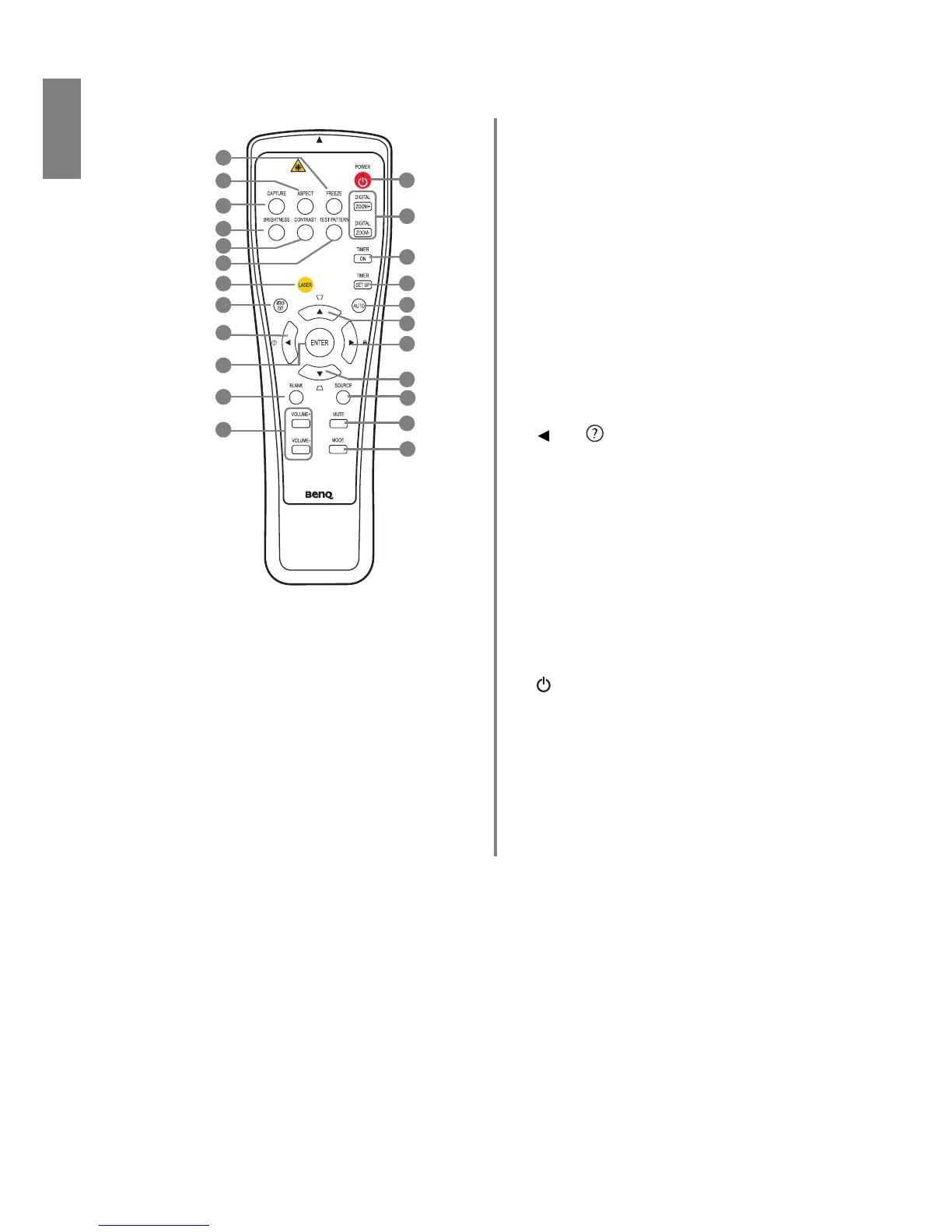
Remote control
1. FREEZE
Freezes the projected image. See "Freezing the
image" on page 36 for details.
2. ASPECT
Selects the display aspect ratio. See "Selecting the
aspect ratio" on page 30 for details.
3. CAPTURE (This function is not available with the
SP920P series)
4. BRIGHTNESS
Adjusts brightness. See "Adjusting Brightness" on
page 32
for details.
5. CONTRAST
Adjusts contrast. See "Adjusting Contrast" on page
32 for details.
6. TEST PATTERN
Displays the test pattern. See "Test Pattern" on
page 45 for details.
7. LASER
Emits visible laser pointer light for presentation
purposes. See "Operating the LASER pointer" on
page 11 for details.
8. MENU/EXIT
Turns on the On-Screen Display (OSD) menu.
Goes back to previous OSD menu, exits and saves
menu settings. See "Using the On-Screen Display
(OSD) menus" on page 24 for details.
9. Left/
Starts the FAQ function. See "Utilizing FAQ
function" on page 36 for details.
10. ENTER
Activates the selected On-Screen Display (OSD)
menu item.
11. BLANK
Used to hide the screen image. See "Hiding the
image" on page 36 for details.
12. VOLUME+/VOLUME-
Adjusts the sound level. See "Adjusting the sound"
on page 38 for details.
13. POWER
Toggles the projector between standby mode and
on. See "Starting up the projector" on page 23,
"Shutting down the projector" on page 40 for
details.
14. DIGITAL ZOOM+/DIGITAL ZOOM-
Magnifies or reduces the projected image size. See
"Magnifying and searching for details" on page 29
for details.



 To Next Page