24
Operation
English
Using the On-Screen Display (OSD) menus
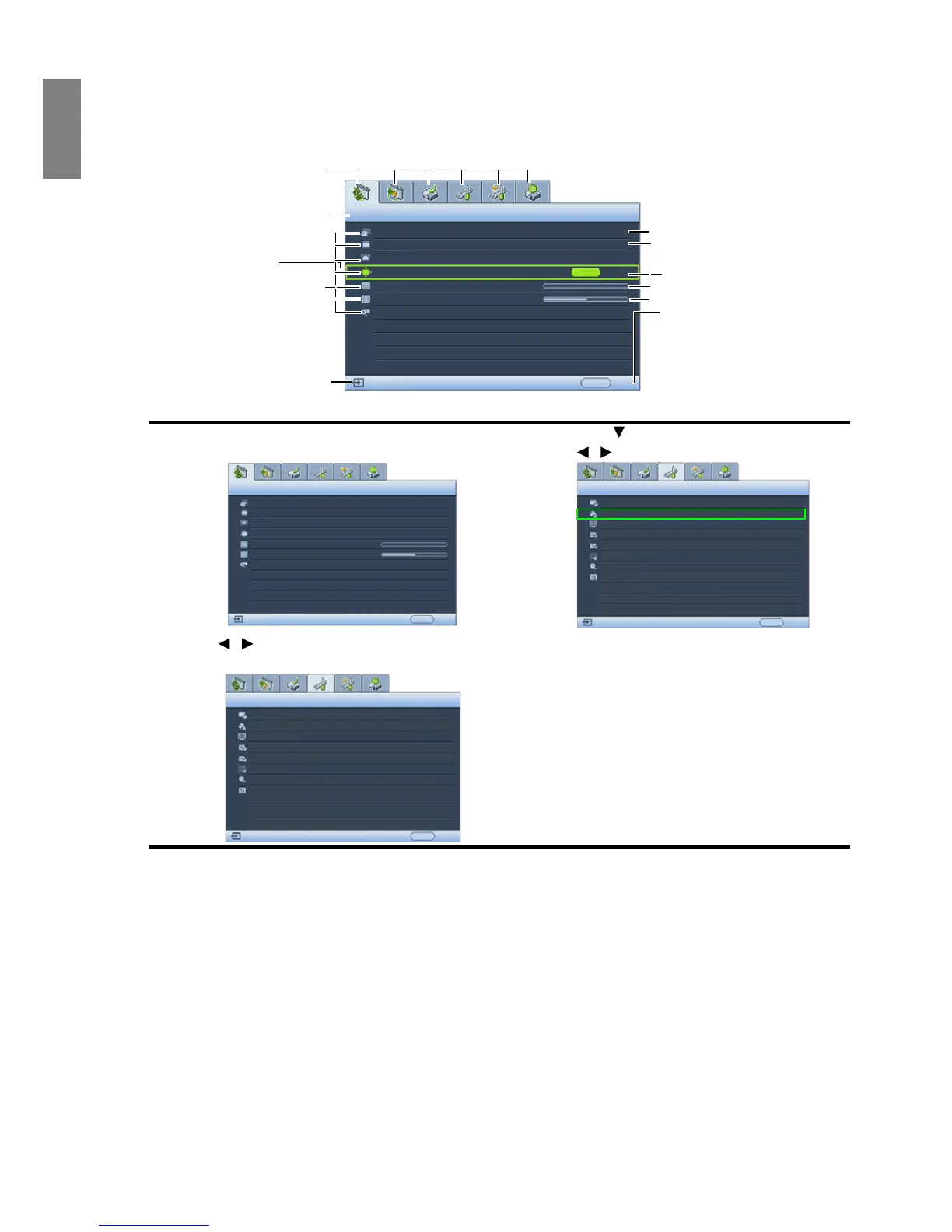
The projector is equipped with On-Screen Display (OSD) menus for making various adjustments and settings.
Below is the overview of the OSD menu.
To use the OSD menus, please set the OSD menu to your familiar language first.
Securing the projector
Using a security cable lock
The projector has to be installed in a safe place to prevent theft. Otherwise, purchase a lock, such as a Kensington
lock, to secure the projector. You can locate a Kensington lock slot on the left side of the projector. See item 10 on
page 8 for details.
A Kensington security cable lock is usually a combination of key(s) and a lock. Refer to the lock’s documentation
for finding out how to use it.
1. Press MENU/EXIT on the projector or remote control
to turn the OSD menu on.
2. Press to highlight Language and press
/ to select a preferred language.
3. Use / to highlight the SYSTEM SETUP: Basic
menu.
4. Press MENU/EXIT twice* on the projector
or remote control to leave and save the
settings.
*The first press leads you back to the
main menu and the second press closes
the OSD menu.



 To Next Page