Chapter 4. Operation
20
7. Utility
7-1. Information
You can check the information of disc, drive and system by this function. By
pressing / , each disc or drive’s information will show on the LCD.
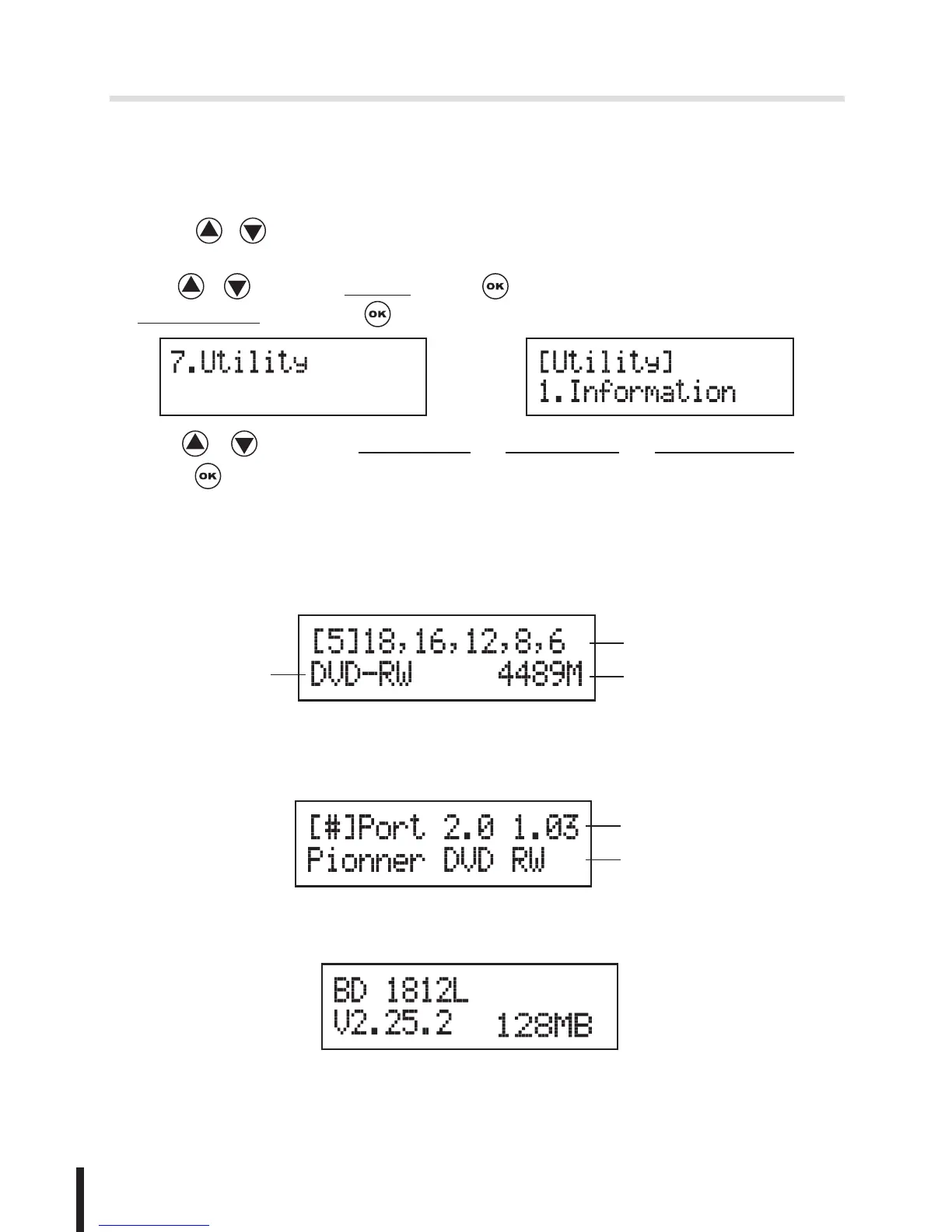
1. Use / to select 7.Utility, press to enter the sub menu. Then,select
1.Information and press .
2. Use / to select 1.Disc Info. or 2.Drive Info or 3.System Info., and
press to see the related information.
3. The information will show on the LCD as below:
•
Disc Info.: You can check the format of disc, burning speed supported
and total capacity. If the disc has data inside, you also can check the size
of data.
Burning Speed
Capacity/Data size
Disc Format
•
Drive Info.: The version, model No. and brand name can be checked
here.
Drive version
Brand name
•
System Info.: The model No. and firmware version can be checked here.


 To Next Page