EasyManua.ls Logo

BestDuplicator BD18xxL Controller - Step 4: Save and Print to Duplicator

BestDuplicator BD18xxL Controller
48 pages
Print Icon
To Next Page IconTo Next Page
To Previous Page IconTo Previous Page
Loading...
Appendix
37
Note:
If LightScribe template cannot be executed normally under Window® 7,
please try to click right button on the mouse on the LightScribe icon and
select " Run as administrator" to execute the function.
4
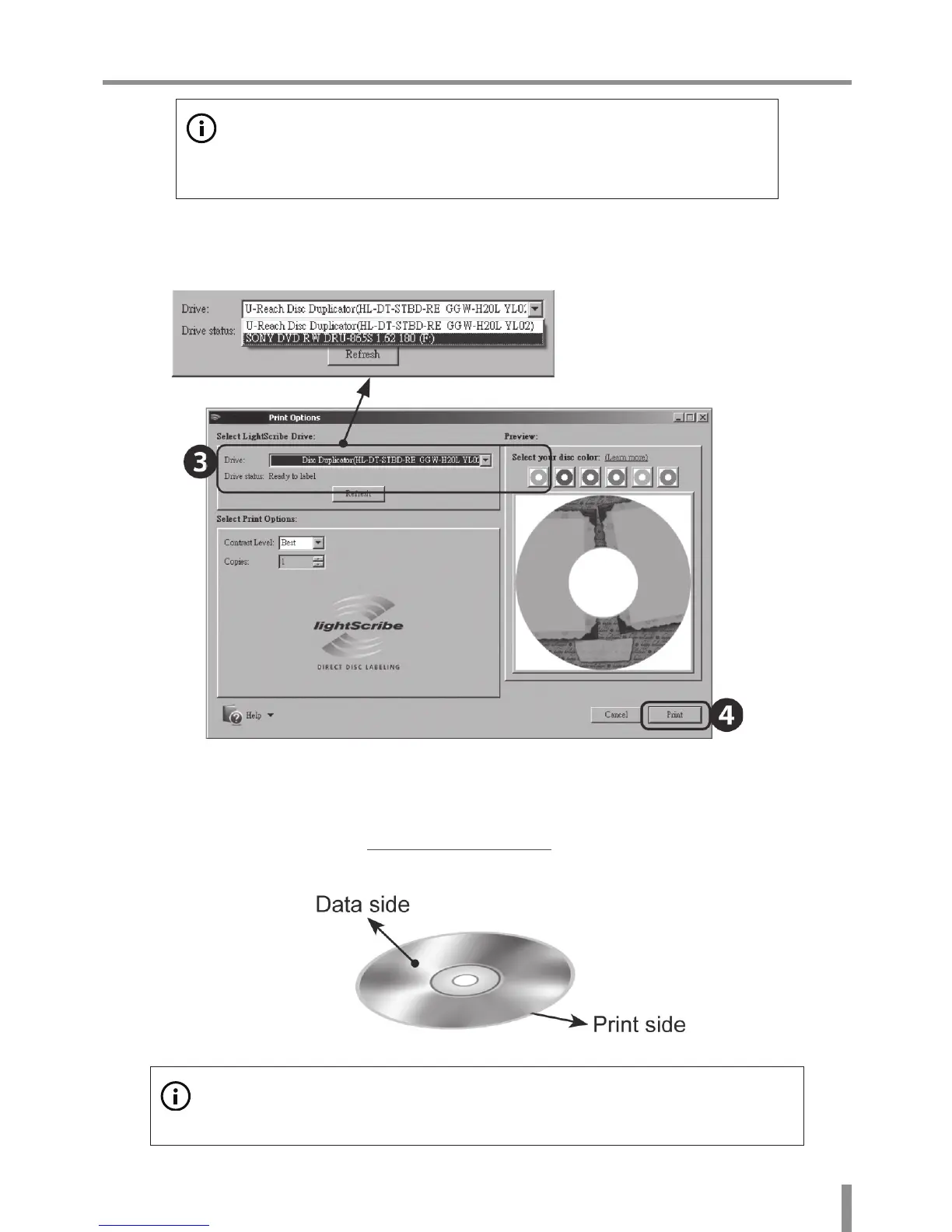
Click the Print to save the lightScrbe image .LSI file to a USB stick or a Disc.
資料面
標籤刻印面
5
Plug the USB drive or Disc into Duplicator.
6
Select the utility function 7-8.PRINT LS Label. The system will read the image
into the duplicator and start printing the LightScribe label.
資料面
標籤刻印面
Note:
When doing the LightScribe printing, please turn over the disc. The print side is
face down and data side is face up.