10
Note:
MP3andWMA(WindowsMediaAudio)music
lesaredigitalaudiolesthatarecompressed
to allow more files to be stored.This unit
canplay MP3/WMA and video directly from
files contained on a CD-R/RW, DVD-ROM,
DVD+RW, DVD-RW, DVD+R, DVD-R and
DVD-VIDEO, oranSDcardor USBDevice.
Manytypesofsoftwareareavailable forcon-
verting audio filesinto MP3/WMA formats.
Nero orRoxio Easy CD Creator arerecom-
mended.This unitcanplayMP3(MPEG1,2,
2.5AudioLayer3).However,theMP3record-
ing media and accepted formats are limited.
Entering ID3 Tag
ThisunitsupportsID3tagversion2.0.
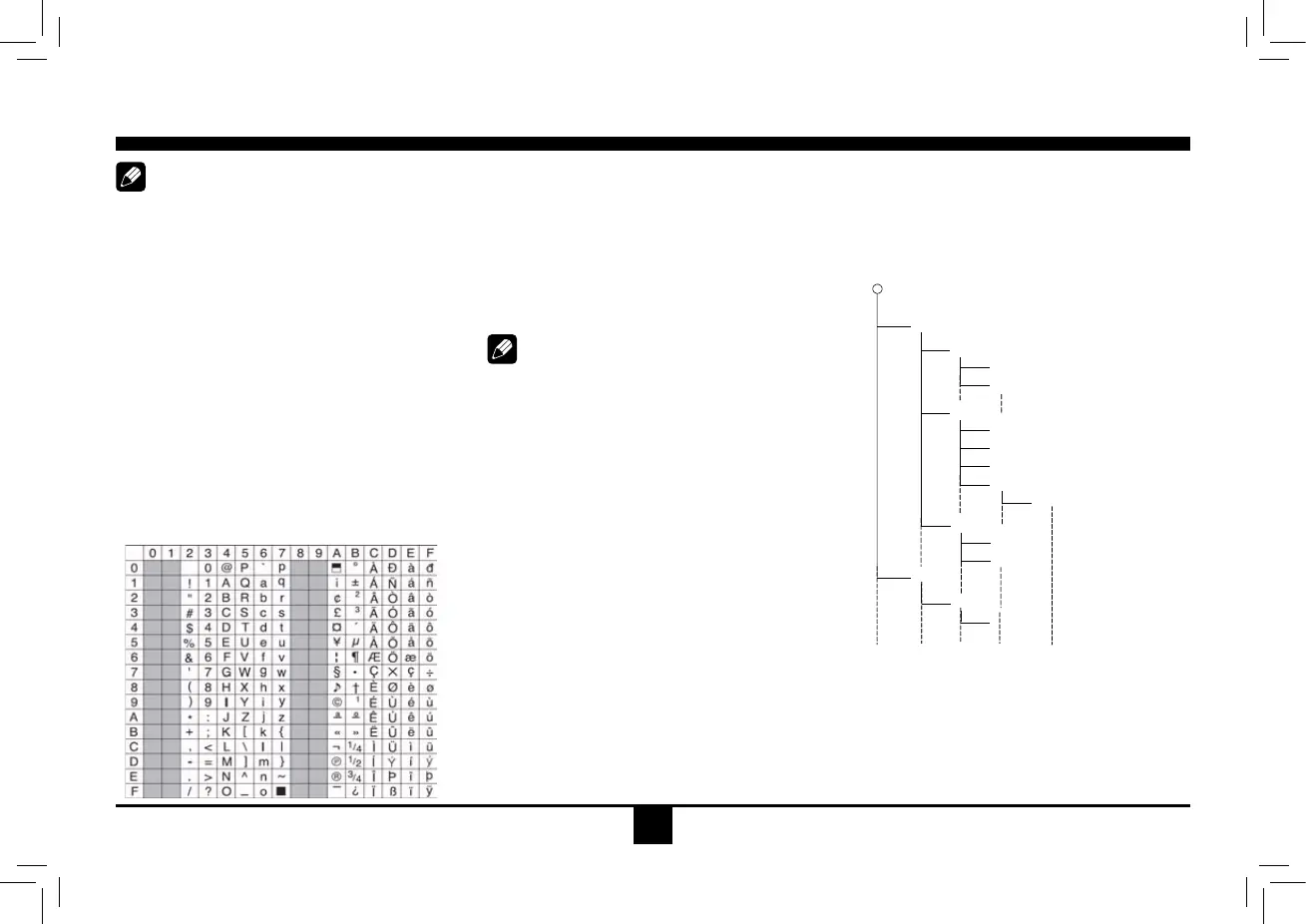
For charactercodes,referto the tableto the
below.
Entering File and Folder Names
Namesusing the codelistcharacters arethe
only file names and folder names that can
be entered and displayed. Using any other
character willcausetheleandfoldernames
tobedisplayedincorrectly.Theunitrecognizes
and plays only files with the MP3/WMA
extension.
Note:
Alenameenteredwithcharactersnotonthe
code list may not play correctly.
Electronic Shock Protection
• 10secondsforCD-DA(CDA)
• >45secondsfor MP3recordedat 44.1kHz,
128kbps
• >90secondsforWMArecordedat44.1kHz,
128kbps
Bit Rates
The unit supports bit rates from 32 - 320 kbps.
MP3 Playing Order
When selected for play, files and folders
(FolderSearch,FileSearchor FolderSelect)
areaccessedin the orderinwhich they were
written to the media.Asa result, theorderin
which they are expected to be played may
notmatchtheorderinwhichtheyareactually
played. You may be able to set the order in
which MP3/WMA files are to be played by
assigning file names beginning with play
sequence numbers such as "01" to "99". For
example, a medium with thefollowing folder/
lehierarchy issubjectto Folder Search, File
SearchorFolderSelectasshownbelow.
()
0
1
2
♪①
♪
②
5
♪⑧
♪⑦
6
7
♪⑨
♪
③
3
4
♪④
♪
⑤
♪⑥
Layer1 Layer 2 Layer 3 Layer 4 Layer5
○ Root Folder
Folder
♪ File
The player will only recognize three folder
levelsand doesnot displayfolderscontaining
onlyother folders.Intheexampleabove,the
unitwilldisplayfolders3, 4,6, and8, butnot
2 and 7 since they do not contain any tracks
directly.Folder5isnotrecognizedatallsince
itisatthefourthlevel.
Disc Mode


 To Next Page