11
Time
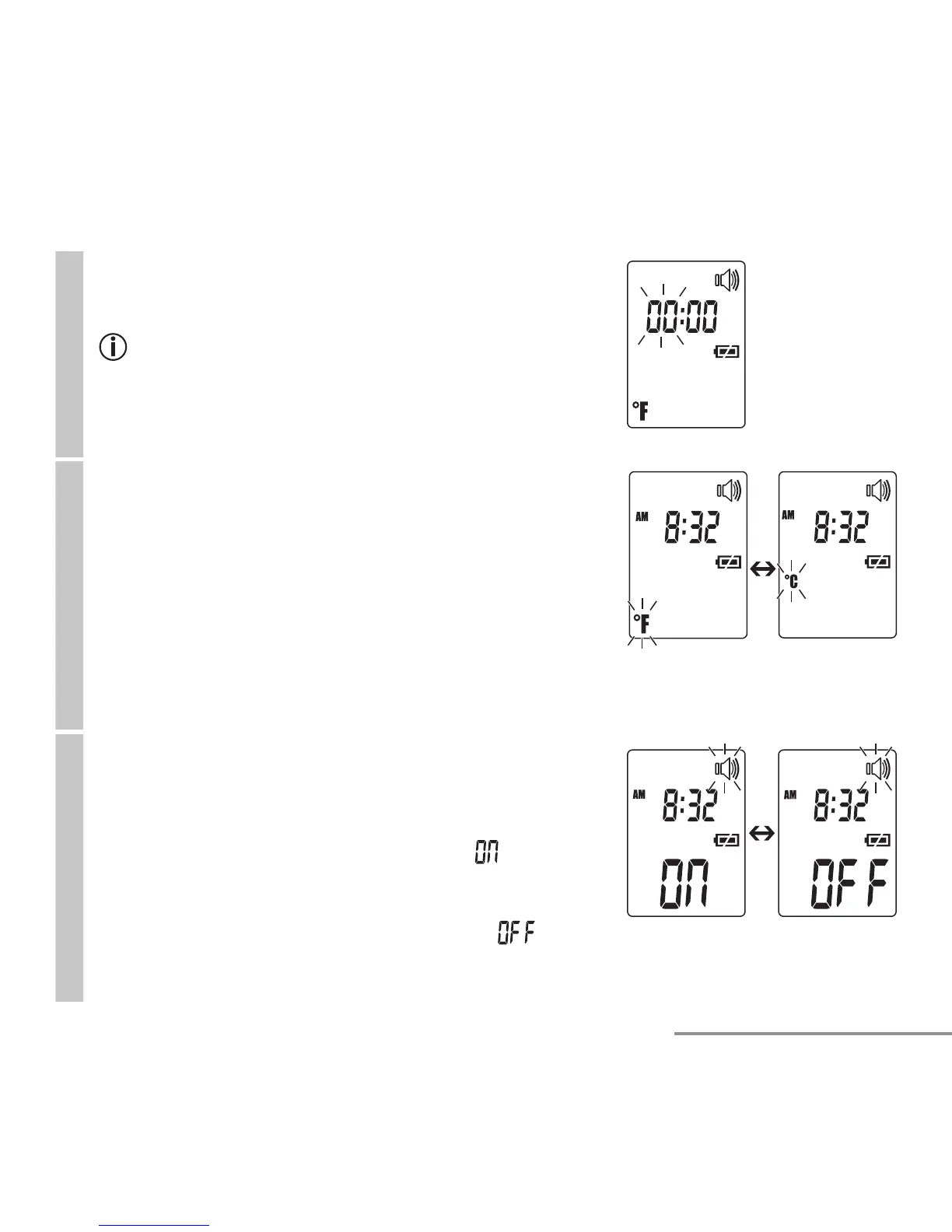
The time flashes in the display (fig. 4).
• Use the MODE/MEM button to set the time and
confirm with the LIGHT/SET button.
In the 12h format, the time is displayed as AM/PM.
Fig. 4
Temperature meas. unit
The temperature measurement unit flashes in the display
(fig. 5).
You can set the device to display the temperature in
degrees Fahrenheit (°F) or degrees Celsius (°C).
• To display the temperature in Celsius, select °C using
the MODE/MEM button and confirm with the LIGHT/
SET button.
• To display the temperature in Fahrenheit, select °F
using the MODE/MEM button and confirm with the
LIGHT/SET button.
Fig. 5
Acoustic signal
The acoustic signal symbol flashes in the display (fig. 6).
You can activate/deactivate the acoustic signals (device
activation, measurement in progress, measurement
completion).
• To activate the acoustic signals, select using the
MODE/MEM button and confirm with the LIGHT/SET
button.
• To deactivate the acoustic signals, select using
the MODE/MEM button and confirm with the LIGHT/
SET button.
Fig. 6


 To Next Page