Operation
beyerdynamic SPACE Personal Speakerphone 11/14
Using Business Mode
In Business Mode, a maximum of one device can be
paired with the beyerdynamic SPACE Personal Speaker-
phone. The pairing li is automatically deleted when the
speakerphone is disconnected or switched o.
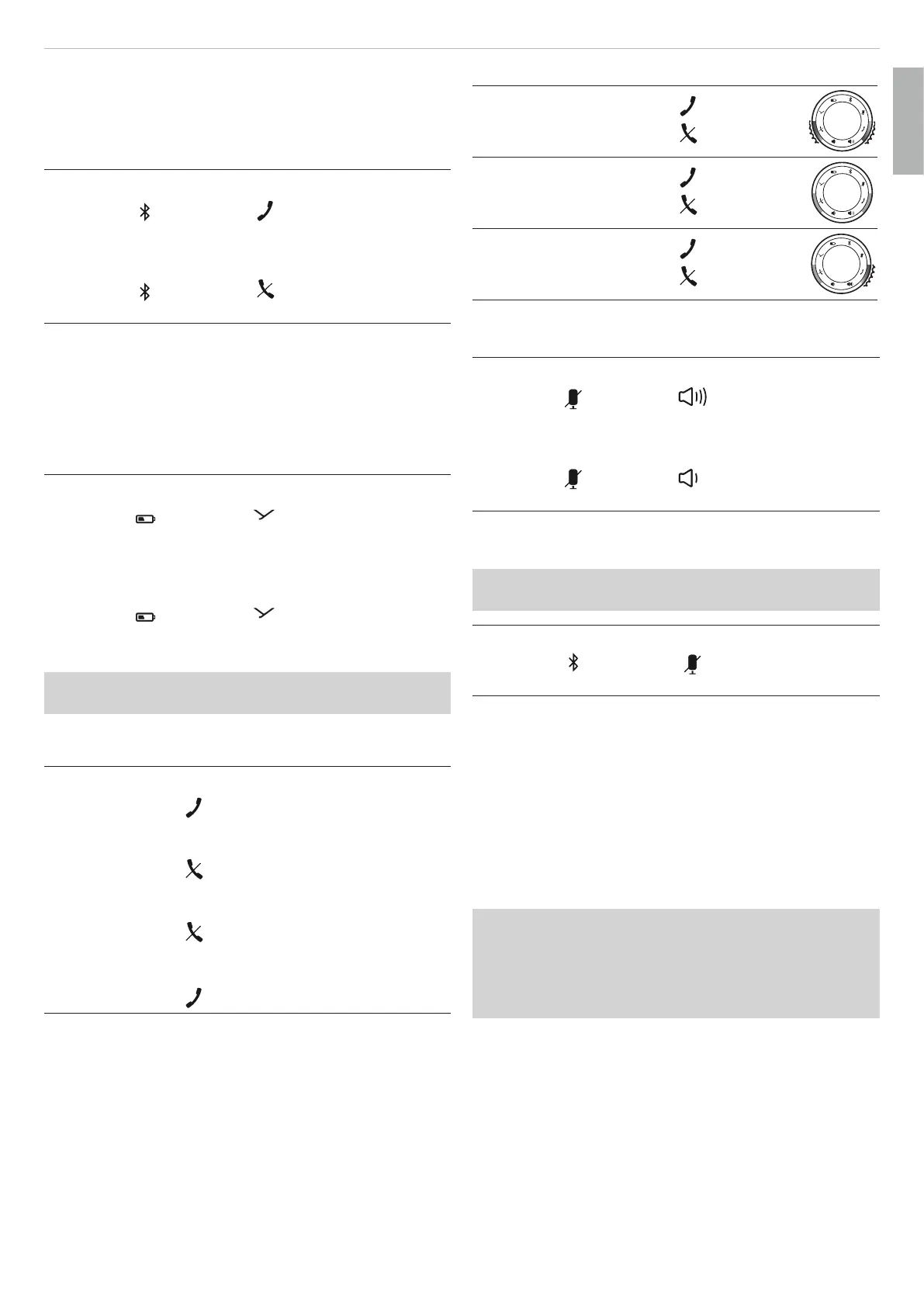
To call up Business Mode:
► Press the
button and button simultaneously
for 1 to 3sec.
To deactivate Business Mode:
► Press the
button and button simultaneously
for 1 to 3sec.
Using Stealth Mode
In Stealth Mode, the illumination of the LED ring on the
beyerdynamic Personal Speakerphone can be switched
o without switching o the speakerphone.
Operating in Stealth Mode increases battery life during
operation.
To activate Stealth Mode:
► Press the
button and button simultaneously
for 1 to 3sec.
The lighting on the LED ring goes out.
To deactivate Stealth Mode:
► Press the
button and button simultaneously
for 1 to 3sec.
The lighting on the LED ring comes on.
Stealth Mode is also deactivated when the speaker-
phone is switched o and on again.
Controlling calls
To accept a call:
► Briefly press the
button.
To end a call:
► Briefly press the
button.
To reject a call:
► Briefly press the
button.
To switch a call or accept a second call:
► Briefly press the
button.
LED display for calls:
Incoming call
flashes green
flashes red
Call in progress
eady green
eady red
Call on hold
flashes green
eady red
Using voice messages
To activate voice messages:
► Press the
button and button simultaneously
for 1 to 3sec.
To deactivate voice messages:
► Press the
button and button simultaneously
for 1 to 3sec.
Resetting to factory settings
All personal data is deleted if the device is reset to the
factory settings!
To reset to factory settings:
► Press the
button and button simultaneously
for 3 to 4sec.
Settings for be sound
To achieve the be possible sound with your beyerdy-
namic SPACE Personal Speakerphone via Bluetooth®,
please observe the following practical tips:
1. Set the volume to minimum on your beyerdynamic
SPACE Personal Speakerphone and to maximum on the
playback device.
2. Then adju the volume only on your beyerdynamic
SPACE Personal Speakerphone and not on the play-
back device.
This applies only to playback devices that do not auto-
matically synchronise the volume. On playback devices
that automatically synchronise the volume (e.g. iPhone,
iPad, various Android smaphones), the volume on the
speakerphone is always identical to the volume of the
playback device.
3. Deactivate any audio eects that may be present in
the soware of the playback device.
English


 To Next Page
 Loading...