Help with problems / FAQ
12/14 beyerdynamic SPACE Personal Speakerphone
Attaching a Kensington lock
To attach and lock the lock
1. Loop the lock cable around a secure anchor and
inse the lock head into the Kensington socket of your
Personal Speakerphone.
2. Lock the lock with the enclosed key.
To open and remove the lock
1. Open the lock with the enclosed key.
2. Pull the lock head out of the Kensington socket and
remove the lock with the lock cable.
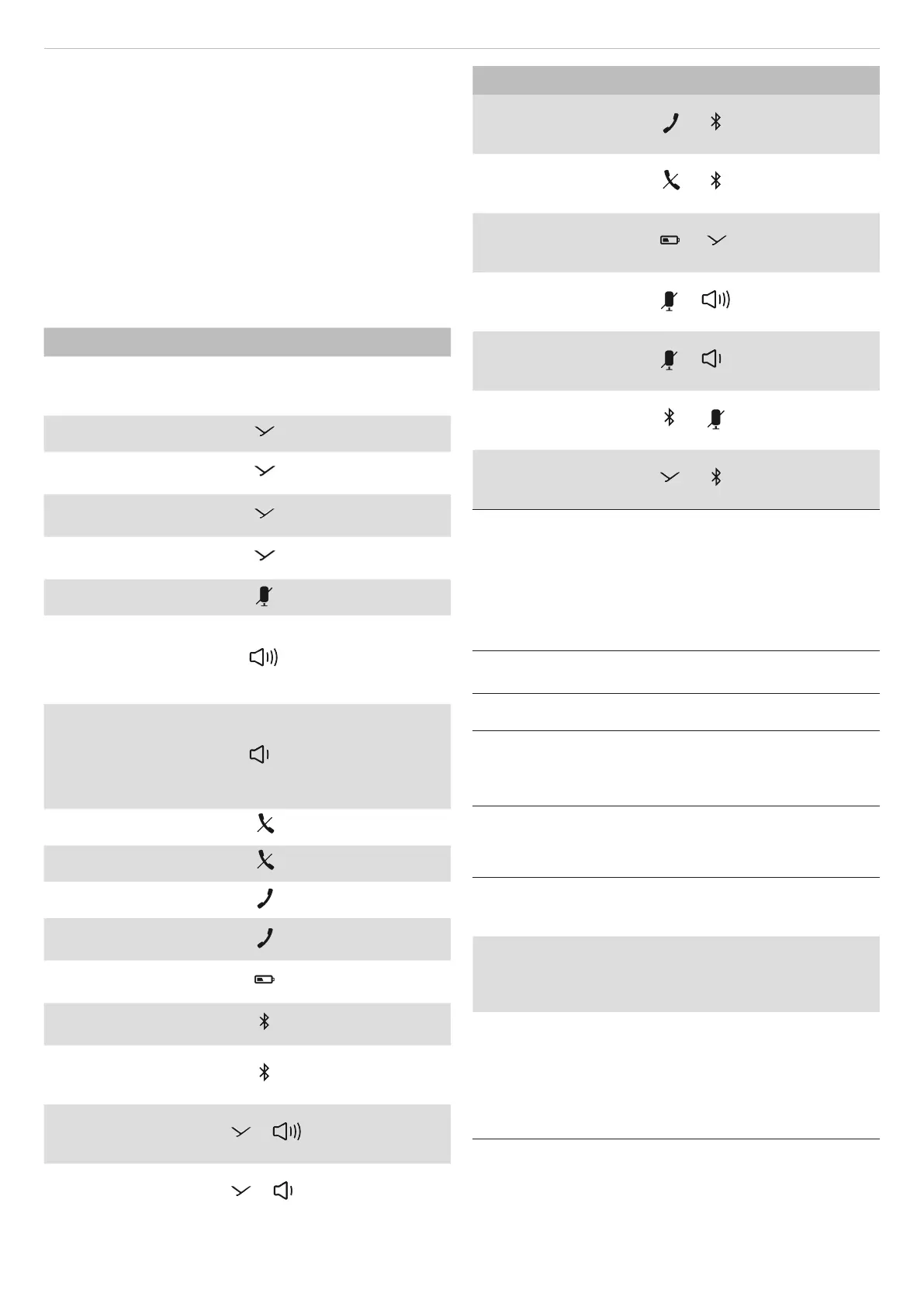
Overview of operating functions
Function Operation
To switch on and o ► Press the on/o
button for 1 to 3
sec.
To a/op playback
► Press briefly
Next track
► Briefly press
twice
Previous track
► Briefly press
three times
To call up the personal
assiant
► Press for 1 to
3sec
To mute/unmute
► Press briefly
To increase volume
► Tap to increase
in ages
► Hold to increase
continuously
To decrease volume
► Tap to decrease
in ages
► Hold to
decrease
continuously
To end a call
► Press briefly
To reject a call
► Press briefly
To answer a call
► Press briefly
To switch calls
► Briefly press
twice
To display the battery
atus
► Press briefly
To pair
► Press for 1 to
3sec
To delete pairing and
pairing li
► Press and hold
for at lea
10sec
To switch on Sound-Ac-
tivated Lighting Mode
+
► Press simulta-
neously for 1 to
3sec
To to switch o on
Sound-Activated Light-
ing Mode
+
► Press simulta-
neously for 1 to
3sec
Function Operation
To switch on Business
Mode
+
► Press simulta-
neously for 1 to
3sec
To switch o Business
Mode
+
► Press simulta-
neously for 1 to
3sec
To activate/deactivate
Stealth Mode
+
► Press simulta-
neously for 1 to
3sec
To switch on voice mes-
sages
+
► Press simulta-
neously for 1 to
3sec
To switch o voice
messages
+
► Press simulta-
neously for 1 to
3sec
To reset to factory
settings
+
► Press simulta-
neously for 3 to
5sec
To activate/deactivate
cascading
1)
+
► Press simulta-
neously for 1 to
3sec
1)
Can only be used if the second device is detected within 5 m
range and indicated by the Bluetooth®-LEDs.
HELP WITH PROBLEMS / FAQ
beyerdynamic SPACE Personal Speakerphone will not
switch on
Battery is empty or almo
empty.
► Charge the battery.
No audio output.
There is no Bluetooth® con-
nection.
► Connect beyerdynamic
SPACE Personal Speaker-
phone with the playback
device.
The beyerdynamic SPACE Personal Speakerphone does
not appear among the available Bluetooth® devices in
the playback device.
The beyerdynamic SPACE
Personal Speakerphone is
switched o.
► Switch on the beyerdy-
namic SPACE Personal
Speakerphone.
The beyerdynamic SPACE
Personal Speakerphone is
not in connection mode.
► Set the beyerdynamic
SPACE Personal Speak-
erphone to connection
mode.
There is already a Blue-
tooth® connection to
another playback device.
► Disconnect the Blue-
tooth® connection to the
other playback device
and connect the beyer-
dynamic SPACE Personal
Speakerphone to the
desired device.


 To Next Page
 Loading...