9.
ENGLISH
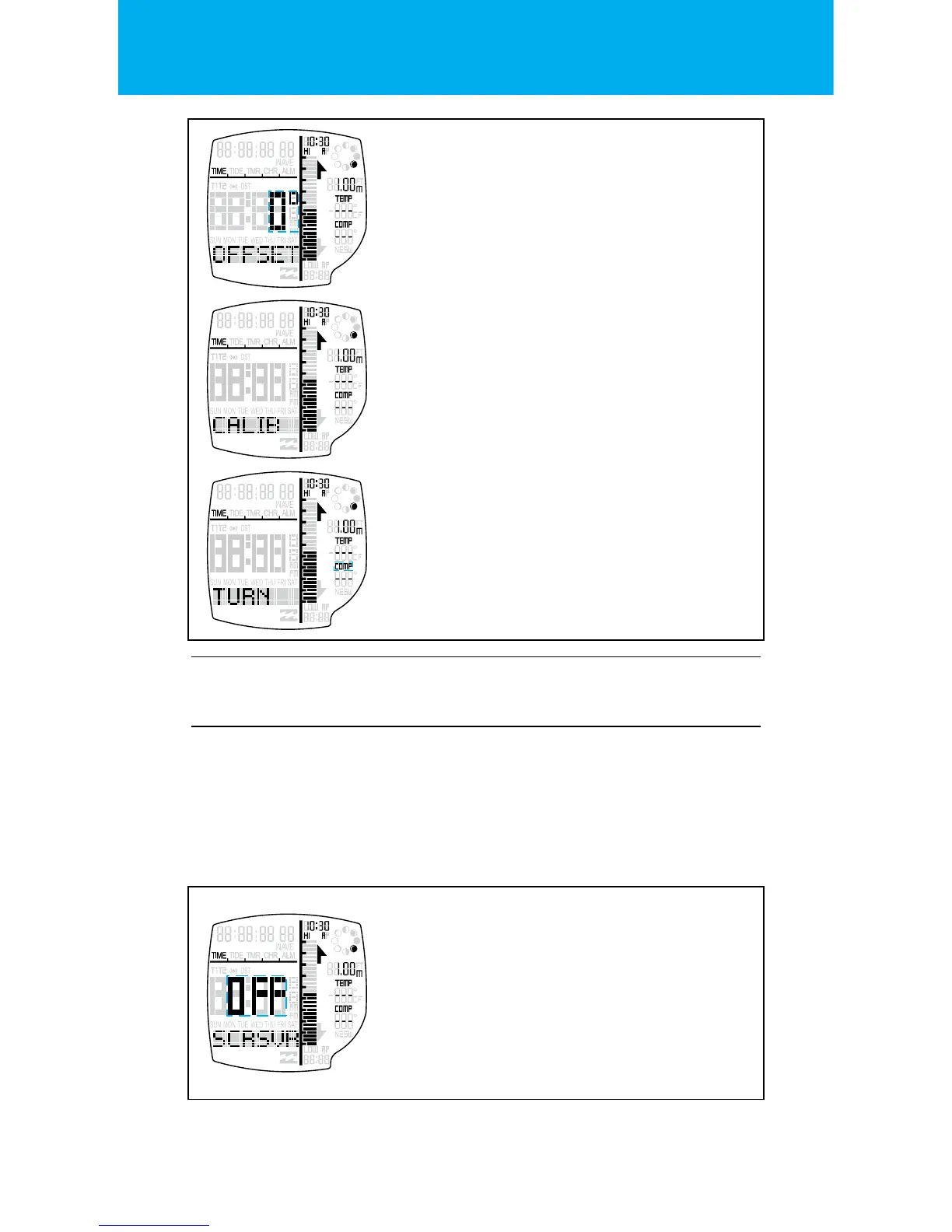
COMPASS OFFSET
The compass oset is the next setting after the
DATE FORMAT in the TIME SETTING STATE.
Press the START button or the RESET button to
change the COMPASS OFFSET.
Press the MODE button to go to the
next setting.
COMPASS CALIBRATE
The compass must be calibrated before use for
accurate readings.
Press the START button to calibrate the watch.
Your watch will instruct you to TURN.
COMPASS TURN CLOCKWISE
Take the watch o and hold it level, slowly turn
clockwise. The watch should take 1 minute
of slow rotating to complete the calibra-
tion. Or this can be manually stopped by
pressing RESET.
Press the MODE button to go to the
next setting.
SCREENSAVER
The Screensaver ON/OFF is the next setting
after the COMPASS CALIBRATE in the TIME
SETTING STATE.
The screensaver can be toggled ON/OFF by
pressing the START button or the RESET button.
Exit the setting state by pressing the
LIGHT button.
SETTING THE SCREENSAVER:
The screensaver is automatically set to OFF by default.
If you want to turn this ON you can do this in the
TIME SETTING STATE.
If ON, when the watch is inactive for 30 seconds, “PHASER”
will scroll once and will stay until a key press is done.


 To Next Page