11.
ENGLISH
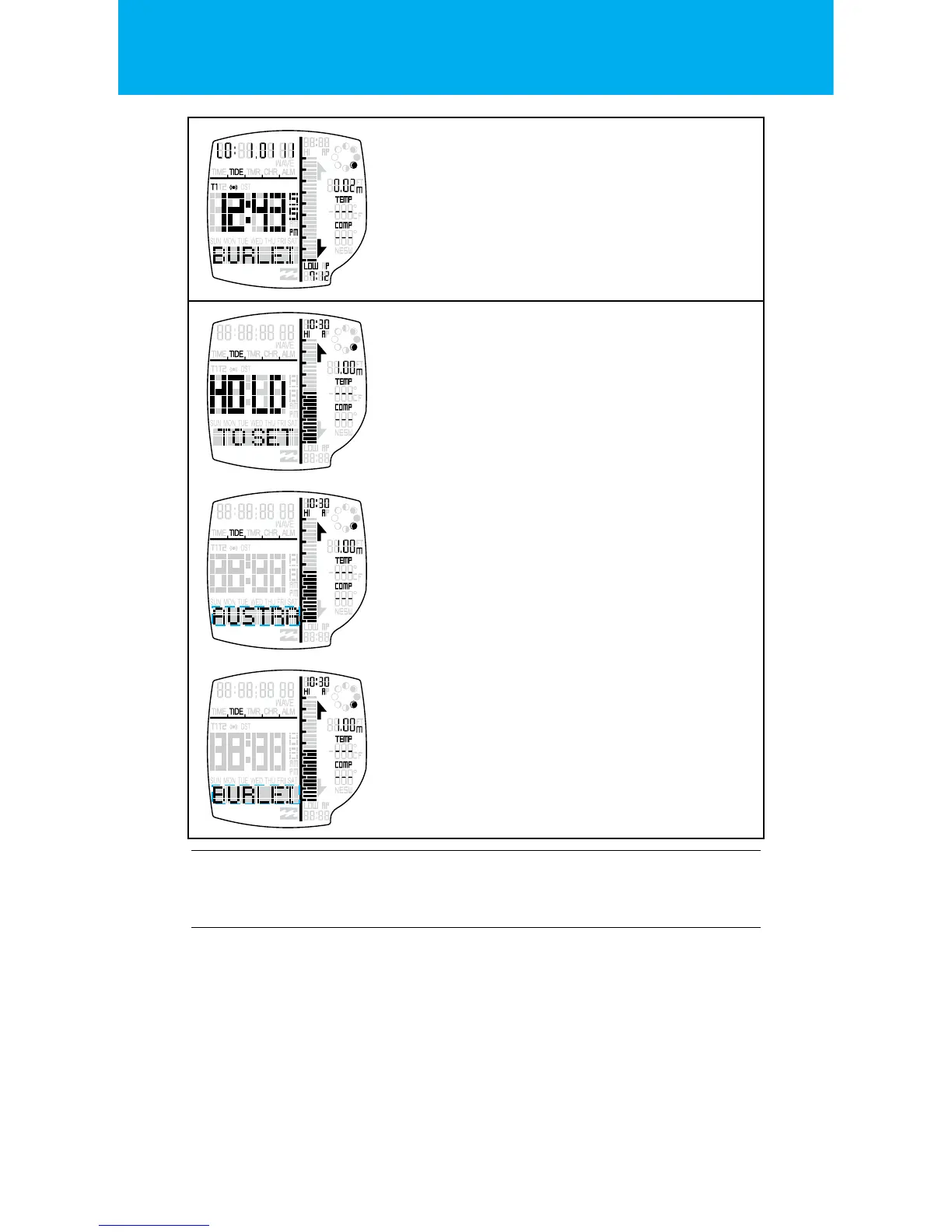
SCROLL TIDE DATA
Press the START button or RESET button to
scroll up or down through the future approach-
ing tide’s data for the LOCAL BEACH.
Hold the START button or RESET button to
return to the current time’s approaching
Tide data.
SETTING STATE FOR TIDES
Hold LIGHT button to enter the SETTING STATE.
One second after the depression of the button,
the HOLD TO SET banner will display.
One second further and the CONFIRMATION
tone will sound o.
SETTING STATE FOR TIDES
Press the START button to increment &
the RESET button to decrement the Local
Country setting.
Zone name will scroll left once.
Press the MODE button to go to the
next setting.
SETTING STATE FOR TIDES
Press the START button to increment & the
RESET buttons to decrement the Local
Beach setting.
Beach name will scroll left once.
Exit the setting state by pressing the
LIGHT button.
SETTING THE SPOT X TIDE:
We have tried to t as many preset beaches as possible
(over 295) into our tide watch, unfortunately we can not
preset all beaches. So we have equipped our watch with
a Spot X averaging tide function. To set your customized
local beach you will need to nd out the next local HIGH
tide time (Tide time information can be easily found on
the internet).


 To Next Page