17.
ENGLISH
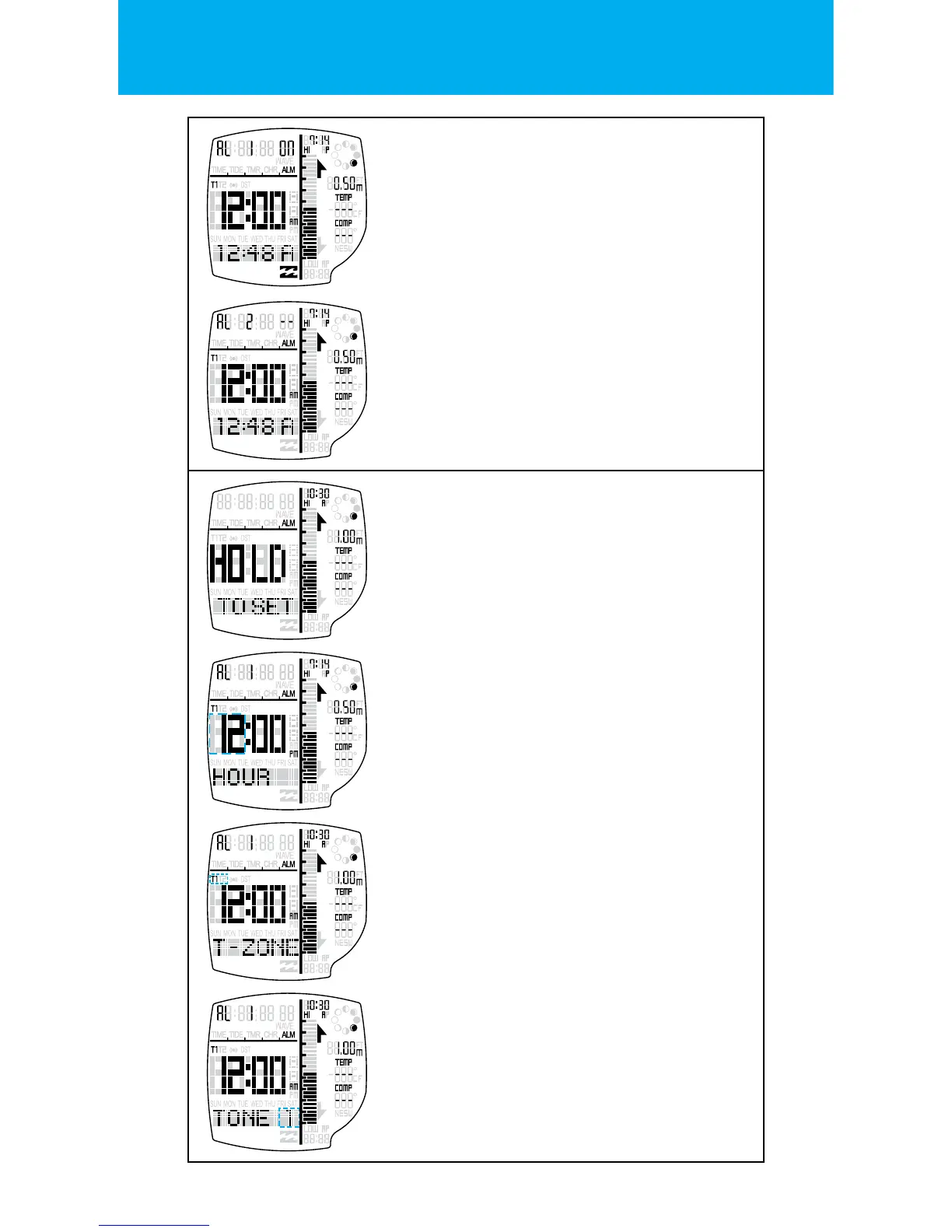
TOGGLE ALARM ON/OFF
Press the START button to toggle the Alarm
ON or -- (OFF).
When the Alarm is triggered, the chosen time
zone and Alarm icon will blink and the ALARM
melody will chime.
SETTING STATE FOR ALARMS
Hold LIGHT button to enter the SETTING STATE.
One second after the depression of the button,
the HOLD TO SET banner will display.
TIME ZONE DEPENDENCY
Press the START button & the RESET buttons to
change the time zone dependency.
Press the MODE button to go to the
next setting.
ALARM CHIME
Press the START button & the RESET buttons to
change the alarm chime.
There are 3 x dierent alarm chimes to
choose from.
Exit the setting state by pressing the
LIGHT button.
NEXT ALARM
Press the RESET button to scroll through the
two daily Alarms.
There are 2 x daily Alarms you can set for each
time zone.
HOUR/MINUTE
Press the START button to increment & the
RESET buttons to decrement the hour setting.
Press the MODE button to go to the
next setting.
Press the START button to increment & the
RESET buttons to decrement the minute setting.
Press the MODE button to go to the
next setting.


 To Next Page