7.
ENGLISH
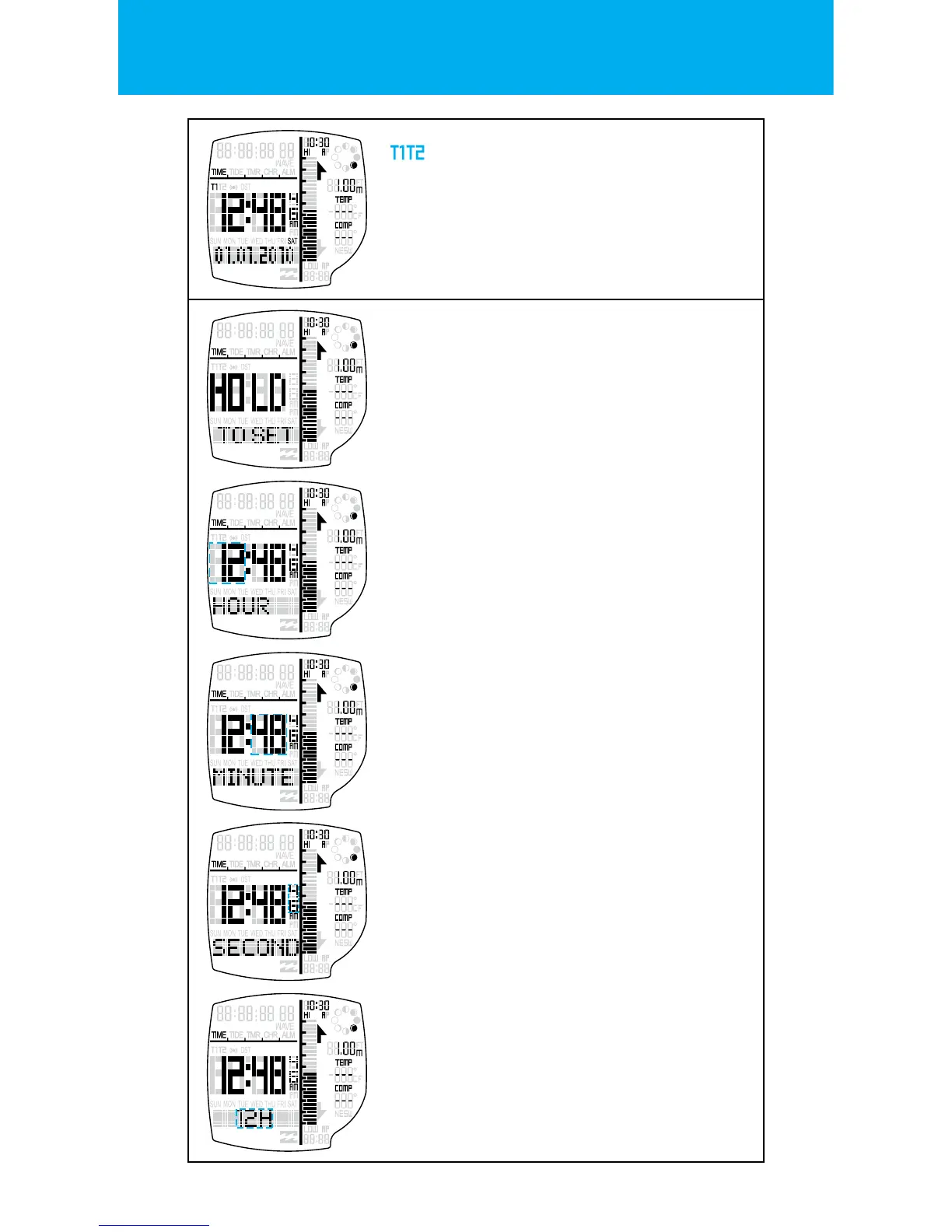
TIME ZONES
Press the START button to peek the back-
ground time zone. Hold the START button to
toggle the foreground time zone.
The KEY TONE will chime when the new time
zone has been set.
SETTING STATE FOR TIME
Hold LIGHT button to enter the SETTING STATE.
One second after the depression of the button,
the HOLD TO SET banner will display.
One second further and the CONFIRMATION
tone will sound o.
HOUR
Press the START button to increment & the
RESET buttons to decrement the hour setting.
(Hold the buttons for 2 seconds to speed up
the increment or decrement)
Press the MODE button to go to the
next setting.
HOUR FORMAT
The hour can be displayed in 24hr (military
time) or in 12hr (AM & PM).
Press the START button or the RESET button to
change the HOUR FORMAT setting.
Press the MODE button to go to the
next setting.
MINUTE
Press the START button to increment & the
RESET buttons to decrement the minute set-
ting. (Hold the buttons for 2 seconds to speed
up the increment or decrement)
Press the MODE button to go to the
next setting.
SECONDS
Press the START button or the RESET button to
reset the seconds setting to zero.
Press the MODE button to go to the
next setting.


 To Next Page