33
provided by your ISP
Auth. Protocol: Default is Auto. Your ISP advises on using Chap or Pap.
IP Address: Your WAN IP address. Leave this at 0.0.0.0 to automatically obtain an IP
address from your ISP.
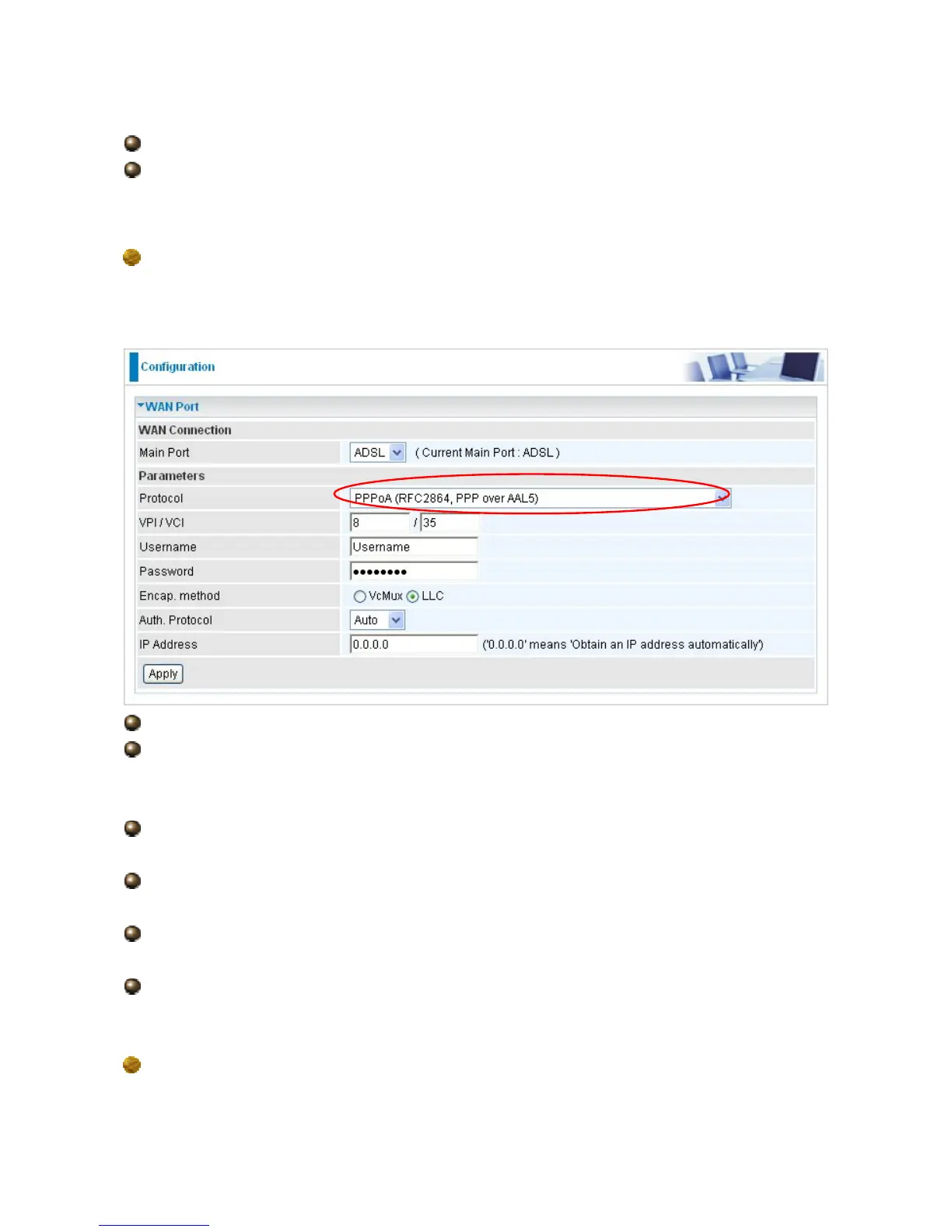
PPPoA Connection
PPPoA stands for Point to Point Protocol over ATM Adaptation Layer 5 (AAL5). It provides
access control and billing functionality in a manner similar to dial-up services using PPP.
VPI/VCI: Enter the VPI and VCI information provided by your ISP.
Username: Enter the username provided by your ISP. You can input up to 128
alphanumeric characters (case sensitive). This is in the format of “username@ispname”
instead of simply “username”.
Password: Enter the password provided by your ISP. You can input up to 128
alphanumeric characters (case sensitive).
Encap. method: Select the encapsulation format, the default is LLC. Select the one
provided by your ISP
Auth. Protocol: Default is Auto. Your ISP should advises you on whether to use Chap
or Pap.
IP Address: Your WAN IP address. Leave this at 0.0.0.0 to automatically obtain an IP
address from your ISP.
MPoA Connection




 To Next Page