15
name and the search will jump to the first entry
in the Phonebook beginning with that letter.
5 Press UP or DOWN button to scroll through
the other records.
6 Press EXIT button repeatedly to return to standby
mode or wait until the program times out.
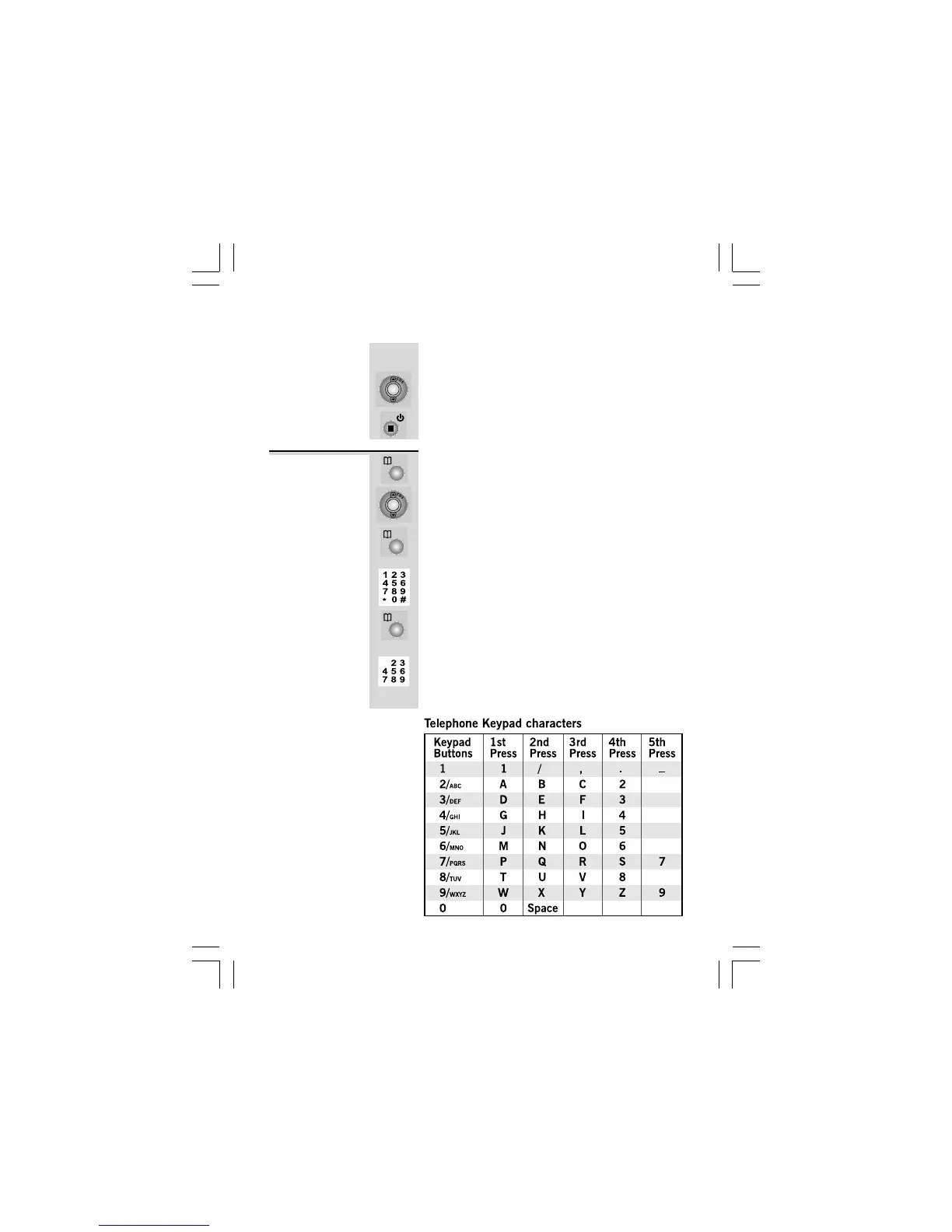
1 Press PHONEBOOK button.
Ö The display shows
SEARCH ADDSEARCH ADD
SEARCH ADDSEARCH ADD
SEARCH ADD
, with the
‘SEARCH’ option blinking.
2 Press UP or DOWN button to select
‘
ADDADD
ADDADD
ADD
.’
3 Press PHONEBOOK button to confirm.
Ö The display shows the cursor blinking on the
number field.
4 Input the telephone number, maximum of 24
digits.
5 Press PHONEBOOK button to confirm.
Ö The display shows the cursor blinking on the
name field.
6 Input the name, maximum of 15 characters
using keypad buttons 2/ABC to 9/WXYZ.
Ö Refer to the table below to get the following
characters.
To add a
new record
into the
Phonebook
Phonebook continue...




 To Next Page