BF (E1) 05/2016 page 26/58
6.4.5 Setting the interface mode and, if appropriate, the printer interval
1. Press down button for approx. 5 seconds.
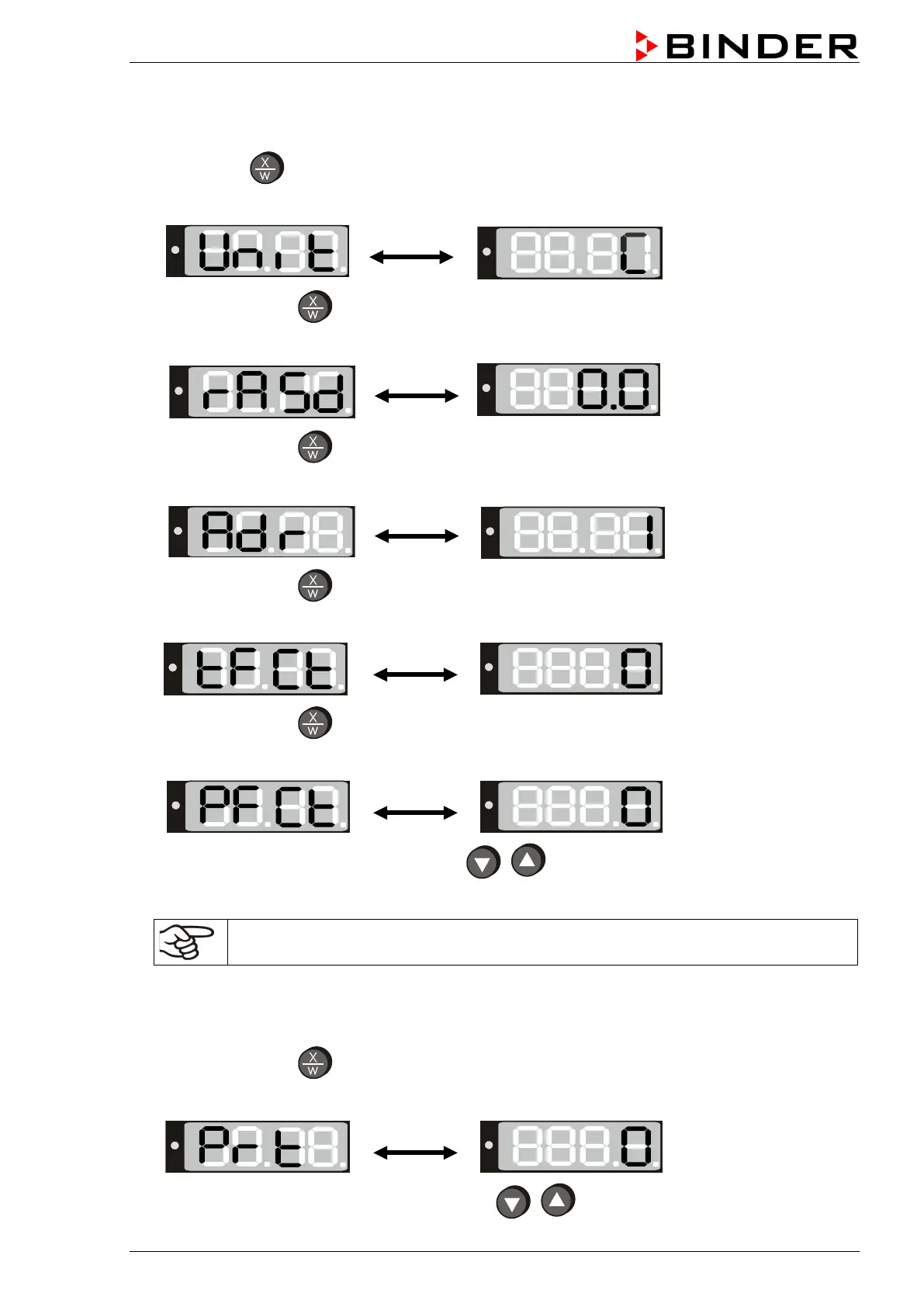
The display alternately shows “unit” and the temperature unit:
2. Press again button
.
The display alternately shows “rASd” and the set-point gradient:
3. Press again button
.
The display alternately shows “Adr” and the chamber address:
4. Press again button
The display alternately shows “tFCt” and the timer function:
5. Press again button
The display alternately shows “PFCt” and the actual setting of the interface mode:
6. Set the desired interface mode with buttons
.
Settings: Modbus = “0” printer = “1”
In case of temperature data acquisition by the communication software APT-COM™
(option, chap. 8.2) interface mode ”0” (Modbus) must be selected.
The setting is automatically adopted after 2 seconds.
If interface mode “1” (printer) has been selected, the printer interval for the automatic output can be set
in an additional menu step:
7. Press again button
The display alternately shows “Prt” and in the entry level the actual setting of the printer interval:
8. Set the desired value from 0 to 255 with buttons
.



 To Next Page