EasyManua.ls Logo

Bio-Tek ELx405 - User Manual

Bio-Tek ELx405
250 pages
Print Icon
To Next Page IconTo Next Page
Loading...
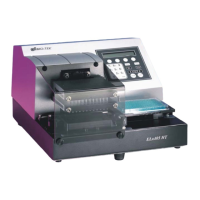
ELx405
Microplate Washer
Operator’s Guide
For all models:
ELx405
ELx405 Select
ELx405 Magna
ELx405 HT
ELx405 Select CW

Table of Contents

Questions and Answers

Summary

Chapter 1: Introduction

Introducing the ELx405

Overview of the ELx405 Microplate Washer and its key features.

ELx405 Washer Variations

Details the different models of the ELx405 washer, including their specific features.

Compatibility With the Bio-Stack System

Explains how ELx405 models integrate with the Bio-Stack Microplate Stacker.

Hardware Features

Lists the physical and functional hardware components of the ELx405 washer.

Software Features

Details the capabilities and user interface of the ELx405 washer's onboard software.

Package Contents

Lists all items included in the ELx405 washer shipping package.

Optional Accessories

Describes available optional accessories for enhancing ELx405 washer functionality.

Specifications

Provides technical specifications for the ELx405 washer, including microplates, electrical, physical, environmental, and manifold types.

Performance Specifications

Outlines key performance metrics like average residual volume and dispense precision.

Technical Support

Information on how to contact Bio-Tek for technical assistance, troubleshooting, and service.

Applications Support

Details Bio-Tek's application laboratory services for scientific applications.

Chapter 2: Installation

Unpacking and Inspecting the Instrument

Step-by-step instructions for safely unpacking and inspecting the ELx405 washer and its accessories.

Removing the Manifold Shipping Bracket

Procedure for removing the protective manifold shipping bracket before operation.

Setting Up the Washer

Guidelines for proper operating environment and installing the microplate carrier.

Connecting the Tubes and Bottles

Instructions for correctly connecting waste and supply tubing and bottles for optimal operation.

Connecting the Power Cord

Guidance on connecting the power cord, including safety warnings for power rating and grounding.

Serial Port for Communication With Other Devices

Information about the RS-232 serial port for data transfer and service.

Verifying Performance

Steps to verify proper operation of the ELx405 washer after installation using the System Self Test.

Installation of the Washer for Operation with the Bio-Stack

Instructions for setting up the ELx405 for use with the Bio-Stack Microplate Stacker.

Repackaging and Shipping

Procedures for safely repackaging and shipping the ELx405 washer for service or repair.

Chapter 3: Operation

ELx405 Front Panel

Overview of the ELx405 washer's front panel, including the LCD display and keypad layout.

Keypad Description

Explanation of the function of each key on the ELx405 washer's keypad.

Entering Program Names

Instructions on how to create unique names for wash programs using the washer keypad.

System Startup

Steps for powering on the ELx405 washer and its initial self-test sequence.

Main Menu

Description of the primary menu structure and navigation options available on the ELx405 washer.

Programs

Overview of the different program types (Wash, Prime, Dispense, Aspirate, Soak, Link) that can be created.

Operation With the Bio-Stack

Guidance on operating the ELx405 washer in conjunction with the Bio-Stack Microplate Stacker.

General Usage Guidelines

Important recommendations for optimal washer performance and troubleshooting before running programs.

Wash

Detailed instructions on how to run, define, edit, copy, and delete Wash programs.

Prime

Procedures for managing Prime programs, including running, defining, editing, copying, and deleting.

Dispense

Comprehensive guide to running, defining, editing, copying, and deleting Dispense programs.

Aspiration

Steps for operating Aspiration programs: running, defining, editing, copying, and deleting.

Soak

Information on defining, editing, copying, and deleting Soak programs, and their use in Link programs.

Linking Programs

How to create and manage Link programs, which combine multiple wash, prime, dispense, and soak sequences.

Setup Utilities

Explanation of various utility functions for configuring the ELx405 washer, such as RS-232, Sensor, Adjust, PARK, BIOSTACK.

ELx405 Washer Menu Maps

Visual representations of the ELx405 washer's menu structure for navigation.

Chapter 4: Preventive Maintenance

Overview

Introduction to the Preventive Maintenance (PM) regimen for the ELx405 washer.

Recommended Maintenance Schedule

A schedule outlining recommended maintenance tasks and their frequencies for the ELx405 washer.

Required Materials

Lists all materials and supplies necessary for performing maintenance procedures on the ELx405 washer.

Warnings & Precautions

Critical safety warnings and precautions to observe before performing any maintenance on the ELx405 washer.

Maintenance Programs

Details on the pre-defined onboard maintenance programs available for the ELx405 washer.

Prime Programs

Information on default Prime programs used in maintenance routines and their parameters.

Rinse;Soak the Fluid Path

Procedures for daily maintenance, including rinsing the fluid path and using specific maintenance programs.

Clean Components

Instructions for periodic cleaning of various ELx405 washer components like bottles, carrier, manifold, and tubes.

Decontaminate the Washer

Procedures for decontaminating the ELx405 washer, especially after use with bio hazardous materials.

Prepare for Storage or Shipment

Steps for preparing the ELx405 washer for long-term storage or shipment, including the LONG_SHUTDOWN program.

Replace Components

Guidance on replacing wearable components such as o-rings and channel-end seals.

Chapter 5: Performance Verification;Qualification Tests

Overview

Introduction to instrument verification, including IQ, OQ, and PQ activities for the ELx405 washer.

Verification Schedule

Recommended intervals for performing verification tests like System Self Test, Evacuation Efficiency, and Dispense Precision.

Installation Qualification (IQ)

Procedures to confirm the washer is correctly installed and configured for laboratory use.

Operational Qualification (OQ)

Steps to verify the washer operates to specification initially and over time, including routine checks.

Performance Qualification (PQ)

Procedures to confirm the washer consistently meets laboratory test requirements, typically performed monthly.

System and Checksum Tests

Details on performing System Self Tests and Checksum Tests to verify hardware and software integrity.

Liquid Tests

Procedures for performing Evacuation Efficiency and Dispense Precision tests using specific solutions.

Appendix A: Troubleshooting

Overview

Introduction to troubleshooting the ELx405 washer, including a checklist of common issues.

Troubleshooting Charts

Detailed tables listing problems, possible causes, and solutions for washer operation issues.

Appendix B: Error Codes

Error Codes

Explanation of the four-digit error code system displayed on the ELx405 washer.

General Errors

List of noncritical (General) error codes and their probable causes and solutions.

Fatal Errors

Information on serious (Fatal) errors requiring immediate attention and troubleshooting steps.

Bio-Stack Errors

Error codes related to Bio-Stack operation or communication issues with the ELx405.

Appendix C: Chemical Compatibility

Components and Materials Composition

Lists washer components and their material composition for chemical compatibility reference.

Appendix D: Default Programs

Default Programs

Table listing default Wash, Prime, Dispense, Aspirate, and Maintenance programs available on the washer.

Appendix E: Changing the Manifolds

Changing Manifolds in HT Models With the 96-Tube Manifold

Step-by-step instructions for changing manifolds on specific HT models.

Bio-Tek ELx405 Specifications

General IconGeneral
TypeMicroplate Washer
Residual Volume<2 µL/well
Power Supply100-240 VAC, 50/60 Hz
Plate Types Supported96-well
Wash ModesSoak
Dispense Volume50-1000 µL/well
Wash Volume Range50 to 1000 µL
Dispense Volume Range50 to 1000 µL