Page 12 / 41 IFU_MAL_EN_V6
5.3 ASSEMBLING YOUR MALLYA TO THE INSULIN PEN
CAUTION
The Mallya base and button must be correctly attached onto the pen, otherwise, data will not
be transferred.
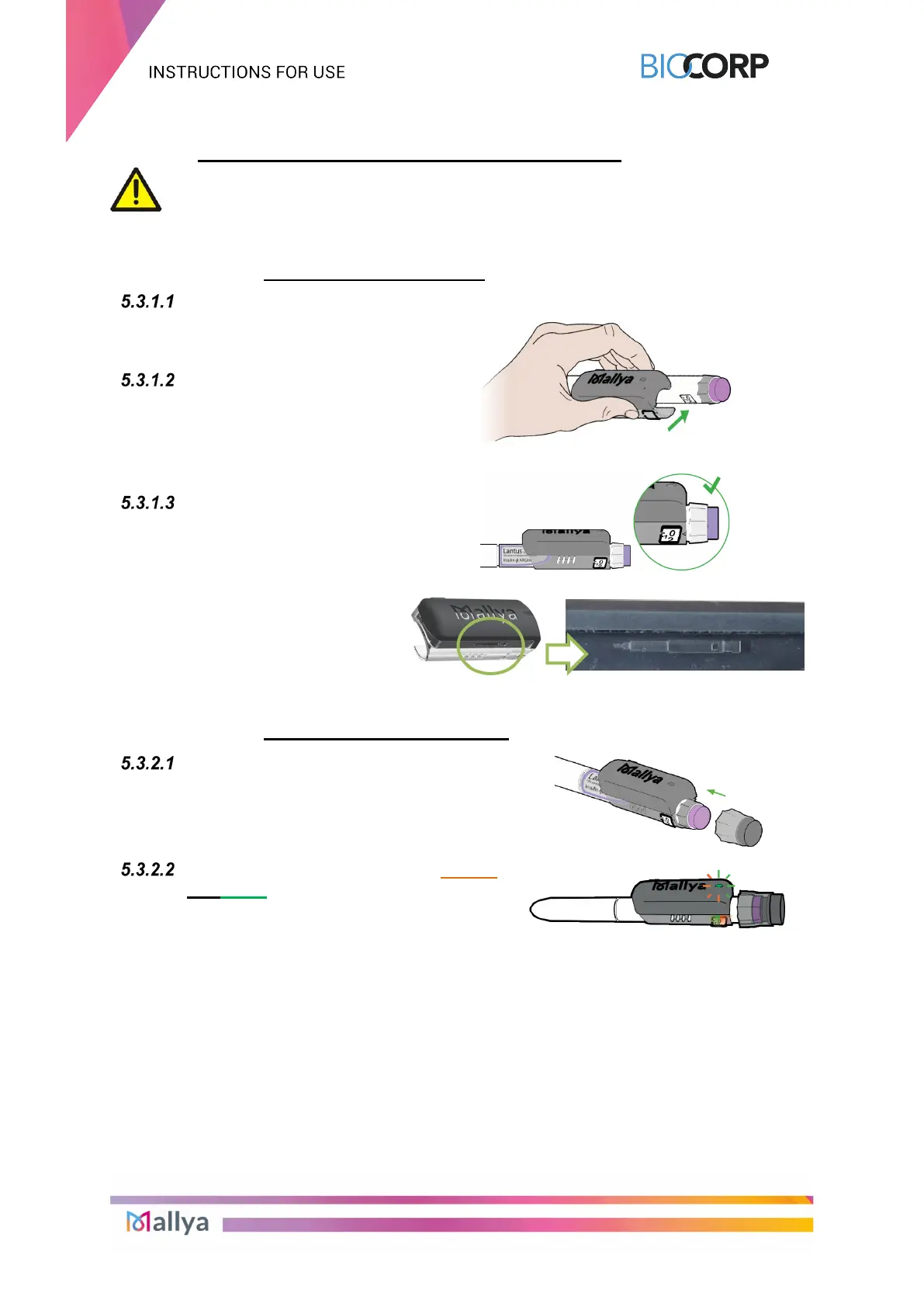
5.3.1 ATTACHING BASE TO PEN
Hold the Mallya base so
that the clear square
plastic window is facing
you
Align the Mallya base clear
square plastic window with
the pen dose window, then
snap the base
Make sure the Mallya base
window is perfectly aligned
with the pen dose window.
A pen symbol is represented on the
side of the Mallya
base to help you
position the pen in the correct
orientation (square window oriented
toward the top of the pen).
5.3.2 ATTACHING BUTTON TO PEN
Align the Mallya button’s grooves with the
dose injection button’s notches, then
insert the Mallya
injection button. Make sure the button is
properly attached and fully inserted.
The Mallya base LED will flash orange
and green when the button and base are
properly mounted onto the pen and when
the Mallya device is not yet paired.



 To Next Page