11
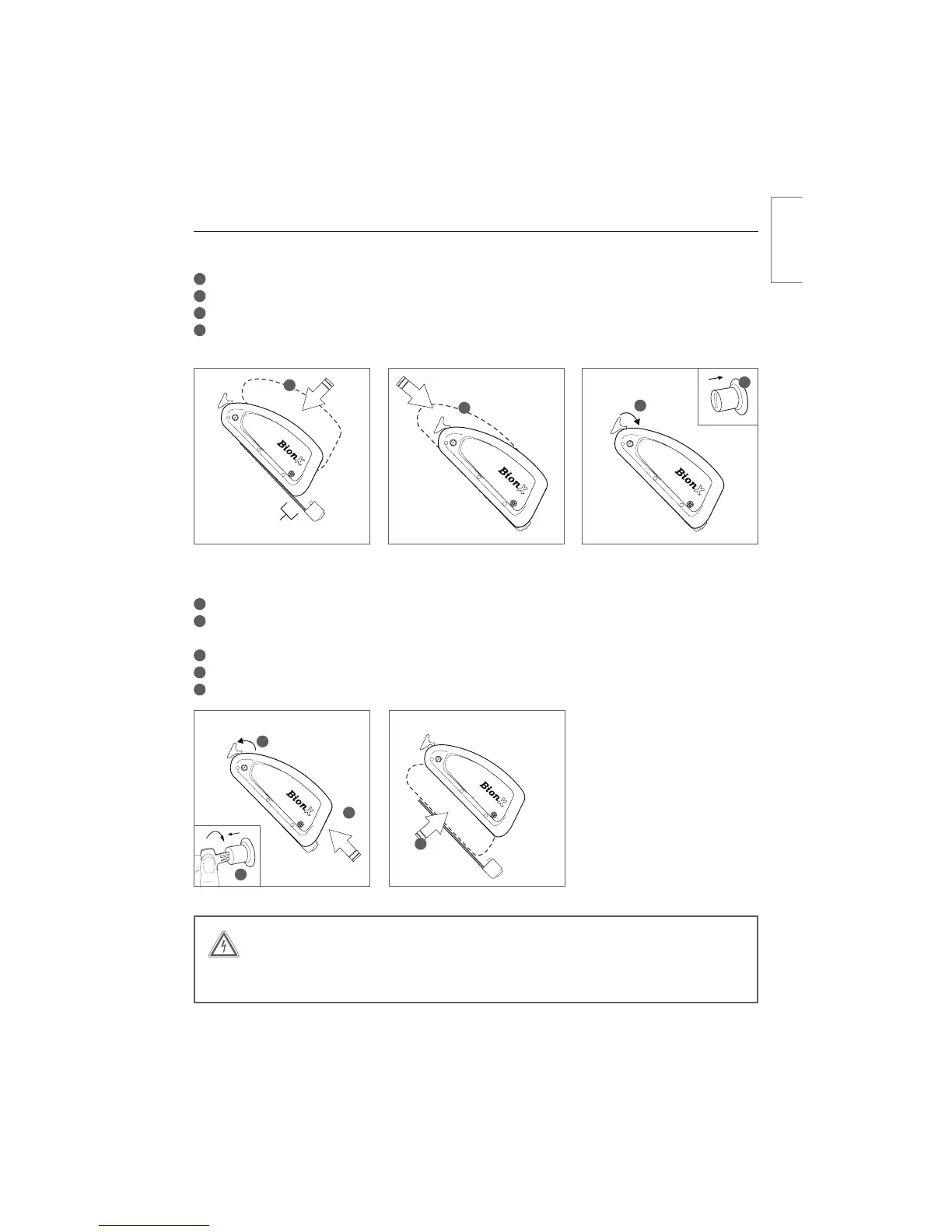
Inserting or Removing the Battery
Inserting the down tube battery
1
Place the battery onto the docking station
2
Slide the battery down the rail gently towards the connector
3
The release arm will begin to move to the closed position as the battery slides towards the connector
4
When the release arm is almost closed, hold it in place and simultaneously push in the lock cylinder –
ZPVXJMMIFBSBiDMJDLwXIFOUIFMPDLDZMJOEFSJTQSPQFSMZDMPTFE
Removing the down tube battery
1
5VSOPGGUIF#JPO9QSPQVMTJPOTZTUFNWJBUIFDPOTPMFOPJMMVTUSBUJPO
2
Lightly press on the battery release arm, insert the key and turn clockwise
The lock cylinder will pop out, freeing the battery release arm
3
Remove the battery by opening the release arm
4
Slide the battery upwards on the rail
5
Lift the battery to remove
001
001
2
3
4
5
WARNING
Do not force the battery release arm closed, or force the battery onto the battery dock.
This can damage the battery connector.
1” (25.4mm)
1
2
3
iDMJDLw
4
english



 To Next Page