12
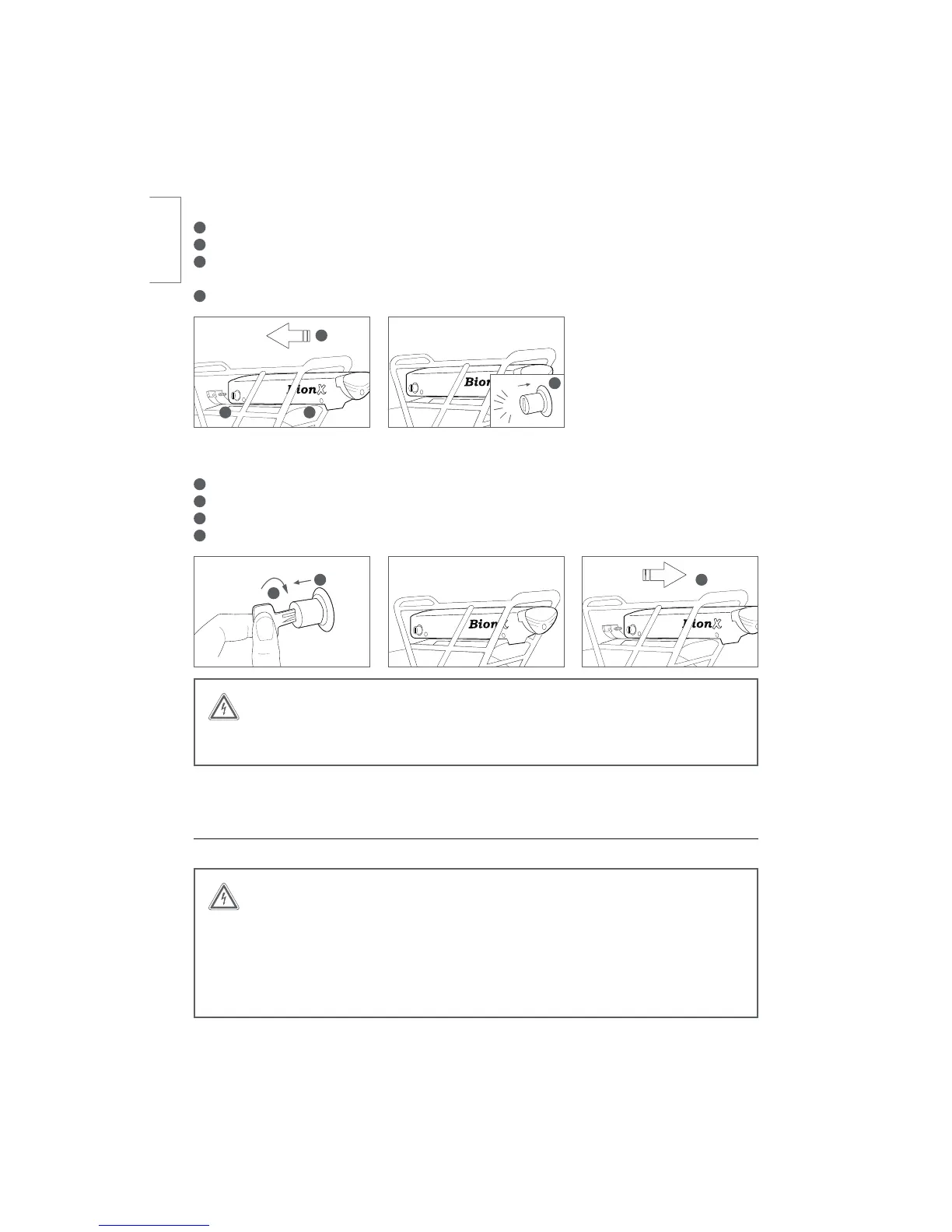
Inserting the rear rack battery:
1
0QFOUIFMPDLDZMJOEFSQMFBTFFOTVSFUIBUUIFLFZJTSFNPWFEGSPNUIFMPDLDZMJOEFS
2
Place the battery onto the battery docking station
3
Gently push the battery in a forward direction, towards the battery connector
Make sure the battery is inserted all the way, flush with the docking station cover
4
Push in the lock cylinder until a ‘click’ is heard
Removing of the rear rack battery:
1
5VSOPGGUIFTZTUFNWJBUIFDPOTPMFOPJMMVTUSBUJPO
2
Turn the key in the lock cylinder until it pops out
3
Remove the key from the lock cylinder
4
Pull the battery backwards, along the battery rail
Handling and Charging the Battery
WARNING
BionX batteries shall only be recharged with BionX chargers or BionX power supplies.
Never short circuit the battery by connecting the contacts of the battery. Never open
the battery, as this could damage the battery and possibly lead to overheating. The
battery cannot be serviced by the user. Opening the battery case voids all warranty and
product liability claims. Never use a battery which has obvious damage to the case(s) or
the battery connector.
001
001
2
3 4
WARNING
Do not force the battery onto the battery docking station. This can damage the battery
connector, or damage the rear light.
CLICK
1 2
3
4
english



 To Next Page