17
Operating the BionX Propulsion System
Turn the system on
Briefly push either top button on the console. The
battery will beep 4times and you will see a countdown,
this is the system perfoming a self check. After startup,
the system is always in NPEFOPNPUPSBTTJTU
CJLFPQFSBUJPO5PUVSOUIFTZTUFNPGGCSJFnZQVTI .
5IFCBUUFSZXJMMCFFQUJNFT"GUFSNJOVUFTPGiOP
PQFSBUJPOwUIFTZTUFNUVSOTPGGBVUPNBUJDBMMZ
Select Assistance/Generate level
Push LFZGPSNPSFMFTTBTTJTUTFFCBSimFMETw
BCPWFEJTQMBZi"w'SPN mode push key to
enter continuous Generate mode.
10
9
21
4 3
7
5
8
6
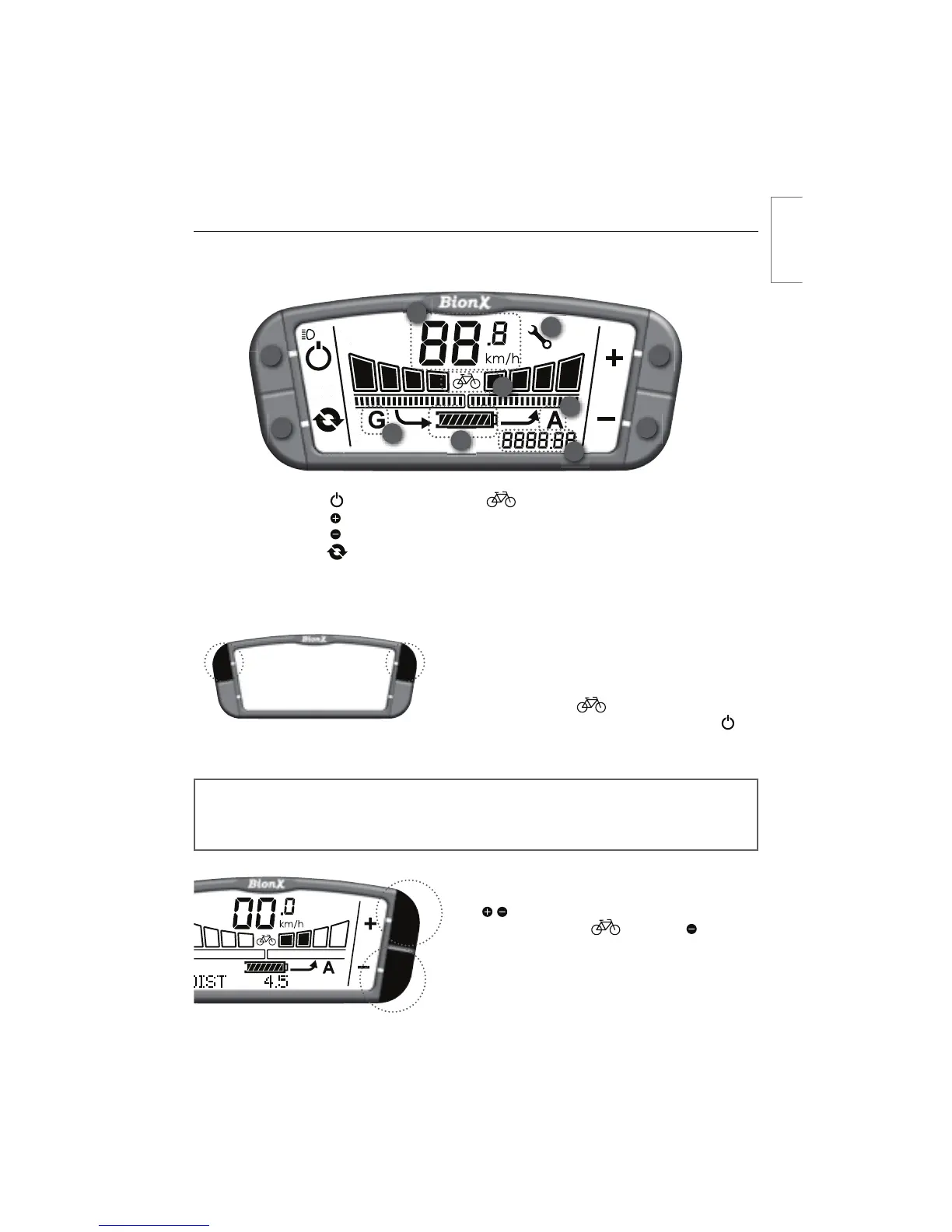
1. Power
2. Key
3. Key
4. Cycle
5. State-of-charge
indicator
6. CJDZDMFNPEF
7. Speedometer
5SJQEJTUBODFBWFSBHFTQFFE
DISPOPNFUFSPEPNFUFSDMPDL
"TTJTUMFWFM"
(FOFSBUFMFWFM(
11. Wrench symbol
G2 Console
NOTE
The system performs a self check approximately every hour. Do not be alarmed if the
system turns itself on briefly, and off again, or if the TOUCH PORT flashes momentarily.
11
english



 To Next Page