Need help?
Do you have a question about the Biostar TB250-BTC+ and is the answer not in the manual?
Safety, preparation, and handling guidelines for motherboard installation.
Identifies and describes the external ports on the motherboard's rear panel.
Step-by-step instructions for installing the CPU into the motherboard socket.
Guide for correctly mounting the CPU heatsink and fan assembly.
Instructions for installing DDR4 memory modules into the DIMM slots.
Instructions on updating the motherboard's BIOS using provided utilities.
Addresses common hardware and system issues with potential solutions.
 General
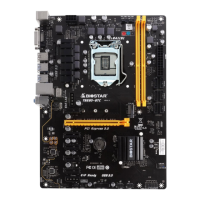
| Chipset | Intel B250 |
|---|---|
| CPU Socket | LGA 1151 |
| Form Factor | ATX |
| Memory Type | DDR4 |
| Maximum Memory | 32GB |
| Memory Slots | 2 |
| SATA 6Gb/s Ports | 6 |
| USB 2.0 Ports | 6 |
| Network | Realtek RTL8111H - 10/100/1000 Mb/s |
| RAID Support | RAID 0, 1, 5, 10 |
| PCIe Slots | 1 x PCIe 3.0 x16, 5 x PCIe 3.0 x1 |
| Audio | Realtek ALC887 8-Channel HD |
| M.2 Slots | 1 |
| USB 3.0 Ports | 6 (4 rear, 2 via header) |


 To Next Page