Additional Features
36
RESET Icon
The reset menu will reset the SiteHawk to default settings. All current data is
cleared including calibration, and all menus are reset to default. Saved data is
not affected by a reset.
1. Press the Menu icon.
2. Press RESET. A Reset dialog will open, click OK to confirm reset.
PNG Icon
Pressing PNG will save the current sweep display area as an image with a PNG
file type extension. The save path and filename will briefly be displayed at the
bottom of the screen. See
Figure 28
.
Note: If the Site Name option is set to ON an Edit SiteName
dialog box will be displayed each time screen shot is taken. See
Figure 26
.
Figure 28 PNG Screenshot
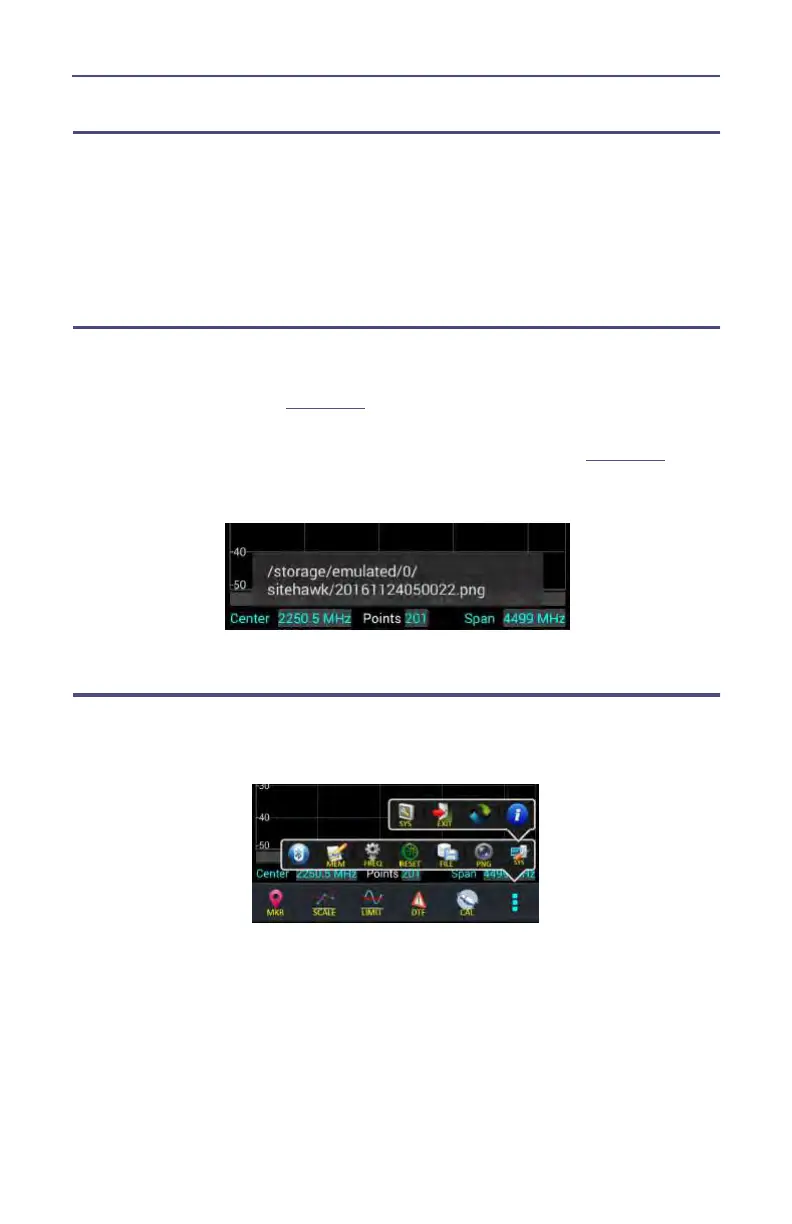
SYS Menu
SYS menu is access by pressing the Menu icon, then pressing the SYS icon.
Figure 29 SYS Menu










 To Next Page