IC5100 Manual
22/60
Mail / Phone Order (AVS) Sale MENU (A Type)
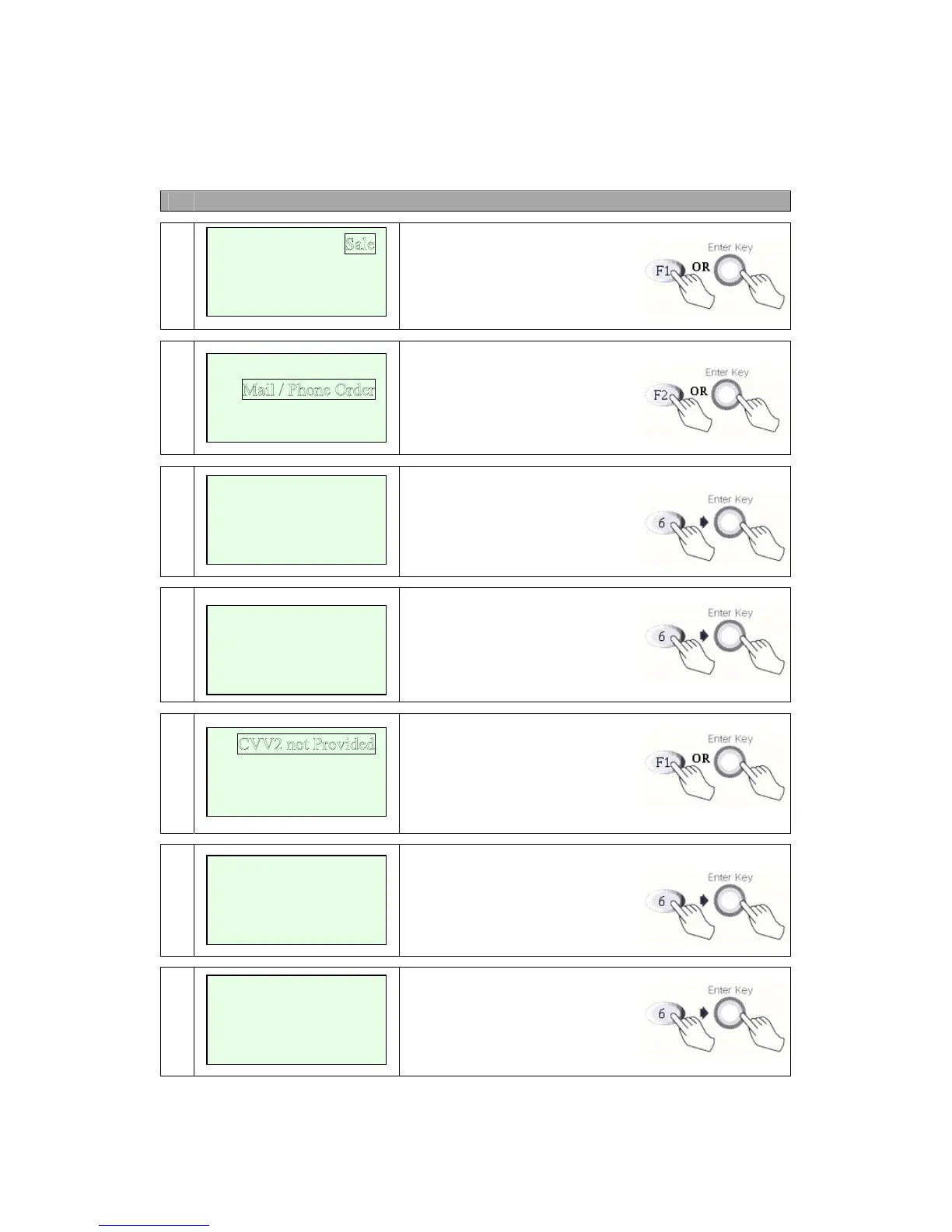
# Terminal Screen Descriptions for Key Operation and Summary
1
Press F1 or Enter key to begin
Sale transaction.
2
Press F2 for Mail / Phone Order.
3
Input Key Account Number.
4a
Manual Entry: Enter expiration
date and press enter.
4b
Display only when CVV2 pro-
cessing option is ON. Press F1,
F3, F4 and move to Step 6.
Press F2 and move to step 4c.
4c
Skip to step 6 after CVV2
is entered.
5
Note some hosts may only require
the house number and not the
street name. Enter Street Address.
Auth-Only
<- ->
Refund
Void
<- -> Off-line Sale
Key
Account Number
Enter Street Address
xxxxxxxxxxxx
CVV2 Present
CVV2 Illegible
CVV2 Not Presen
t
Enter CVV2 data
From Customer Card
Enter
Expiration Date
[ MM/YY]
/


 To Next Page