IC5100 Manual
9/60
Debit Sale MENU
# Terminal Screen Descriptions for Key Operation and Summary
A
1
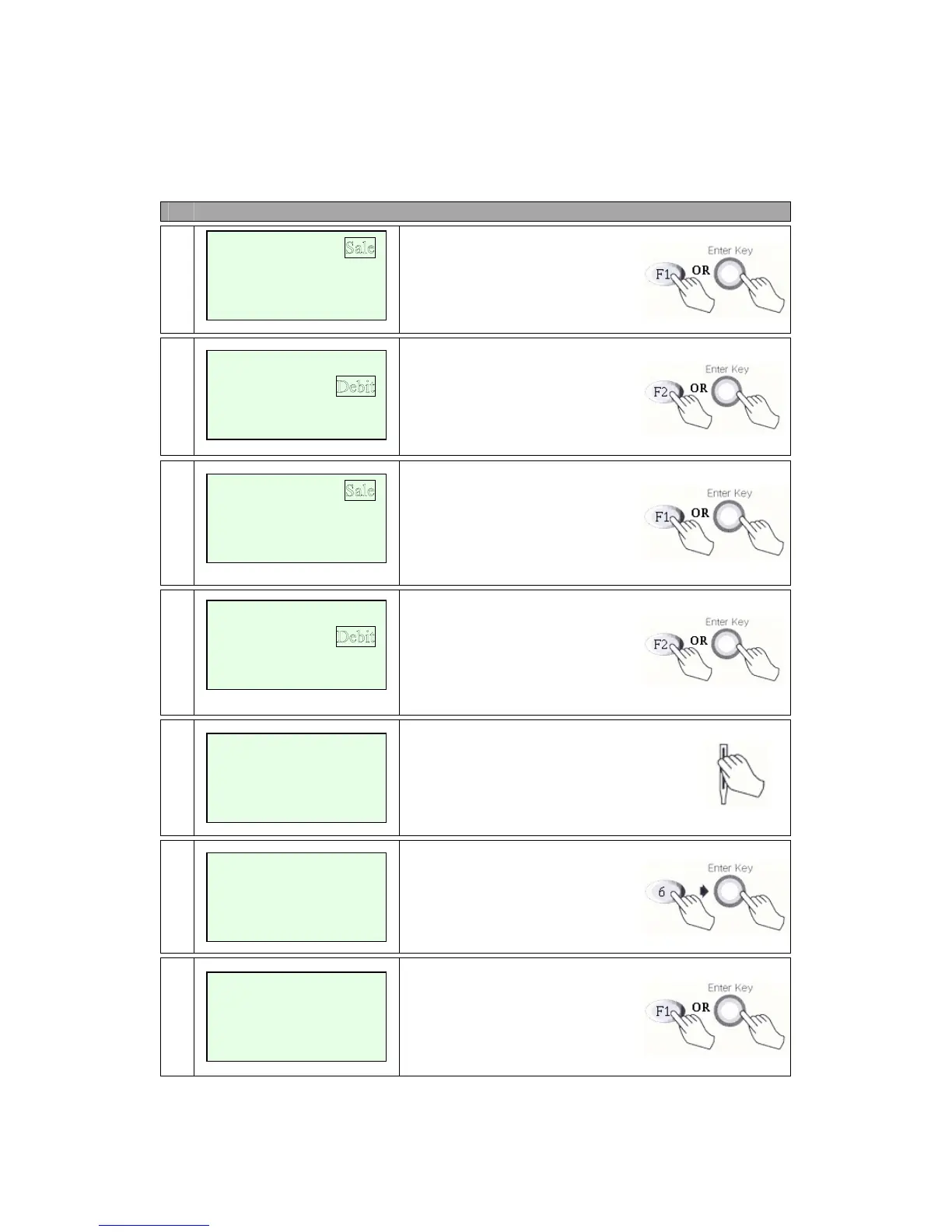
Press F1 or Enter key to begin
Sale transaction.
A
2
Press F2 for Debit Sale or Press
scroll key to highlight Debit
function then press the Enter key.
B
1
Press F1 or Enter key to begin
Sale transaction.
B
2
Press F2 for Debit Sale or Press
scroll key to highlight Debit
Function then press the Enter key.
3
Swipe Card.
4
Enter Amount.
Press Enter key.
A
5
Cash back?
No answer skip to step 6. (F2)
Yes answer show amount entry.
(F1)
Credit
Check
<- -> EBT
Refund
Void
<- -> Off-line Sale
Swipe Card
Cashback ? YES
NO
Amount $00.00
Enter Amount
$00.00
Refund
Void
<- -> Ticket Onl
y
Credit


 To Next Page