IC5100 Manual
5/60
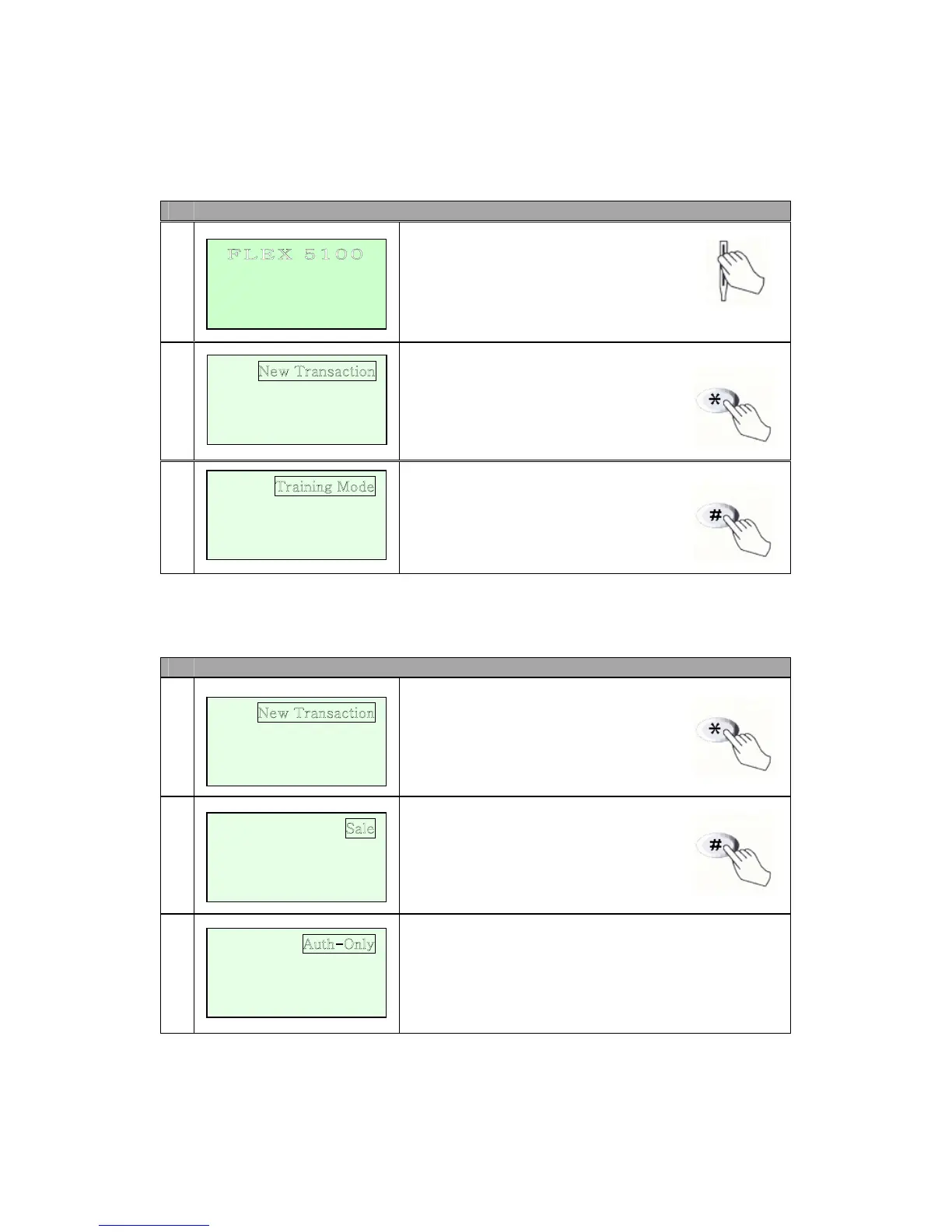
IDLE PROMPT / MAIN MENU
# Terminal Screen Descriptions for Key Operation and Summary
1
Enter or Swipe Card.
2
*, # keys are scroll menu.(1 line)
3
Displays next page of menu items.
*, # keys are scroll menu.(1 line)
New Transaction MENU
# Terminal Screen Descriptions for Key Operation and Summary
1
Press any key (0-9, *, #) to
Activate Main Menu.
Press Enter Key to select
New transaction function.
2
New Transaction Menu.
*, # keys are scroll menu.(1 line)
3
Bitel co., Ltd.
F L E X
5 1 0 0
SWIPE CARD
MAY 01, 03 23:51
Reports
Batch Functions
<- -> Setup
Reports
Batch Functions
Setup
Refund
Void
<- -> Off-line Sale
<- ->
Mail / Phone Order
<- ->


 To Next Page