EasyManua.ls Logo

BITEL IC5100 - IC5100 EMV Approval: Balance Inquiry; Balance Inquiry Process

BITEL IC5100
63 pages
Print Icon
To Next Page IconTo Next Page
To Previous Page IconTo Previous Page
Loading...
IC5100 Manual
42/60
IC5100 (EMV approval) / Balance Inquiry
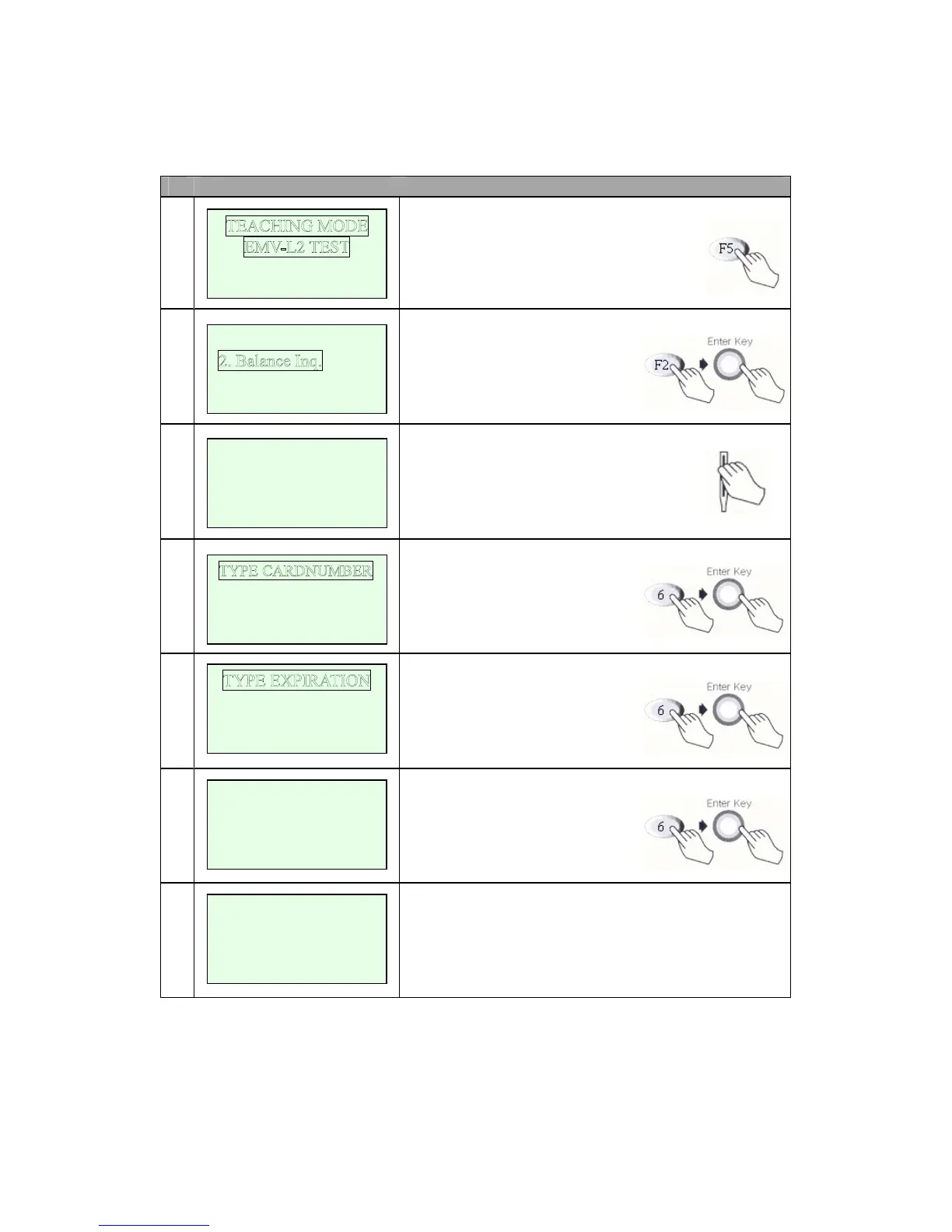
# Terminal Screen Descriptions for Key Operation and Summary
1
Press F5 key.
Enter Transaction Menu.
2
Select Balance Inquiry.
(F2 + Enter key)
3a
Swipe card(step 4) or
Key Input.(step 3b)
3b
Input card number.
3c
Input expiration date.
4
Input Amount.
5
Dialing and Data Transfer.
Transaction is successful.
And print out the receipt.
1. Credit Sale
3. Cash Advance
4. Next Pa
ge
SWIPE YOUR CARD
xxxxxxxxxxxxxxxxxx
Oct 14, 03[10:55]
SWIPE YOUR CARD
xxxxxxxxxxxxxxxxxx
YYMM : xxxx
INPUT AMOUNT
0.00
<Push Enter Ke
y>
Balance Inquiry
APPROVED