IC5100 Manual
28/60
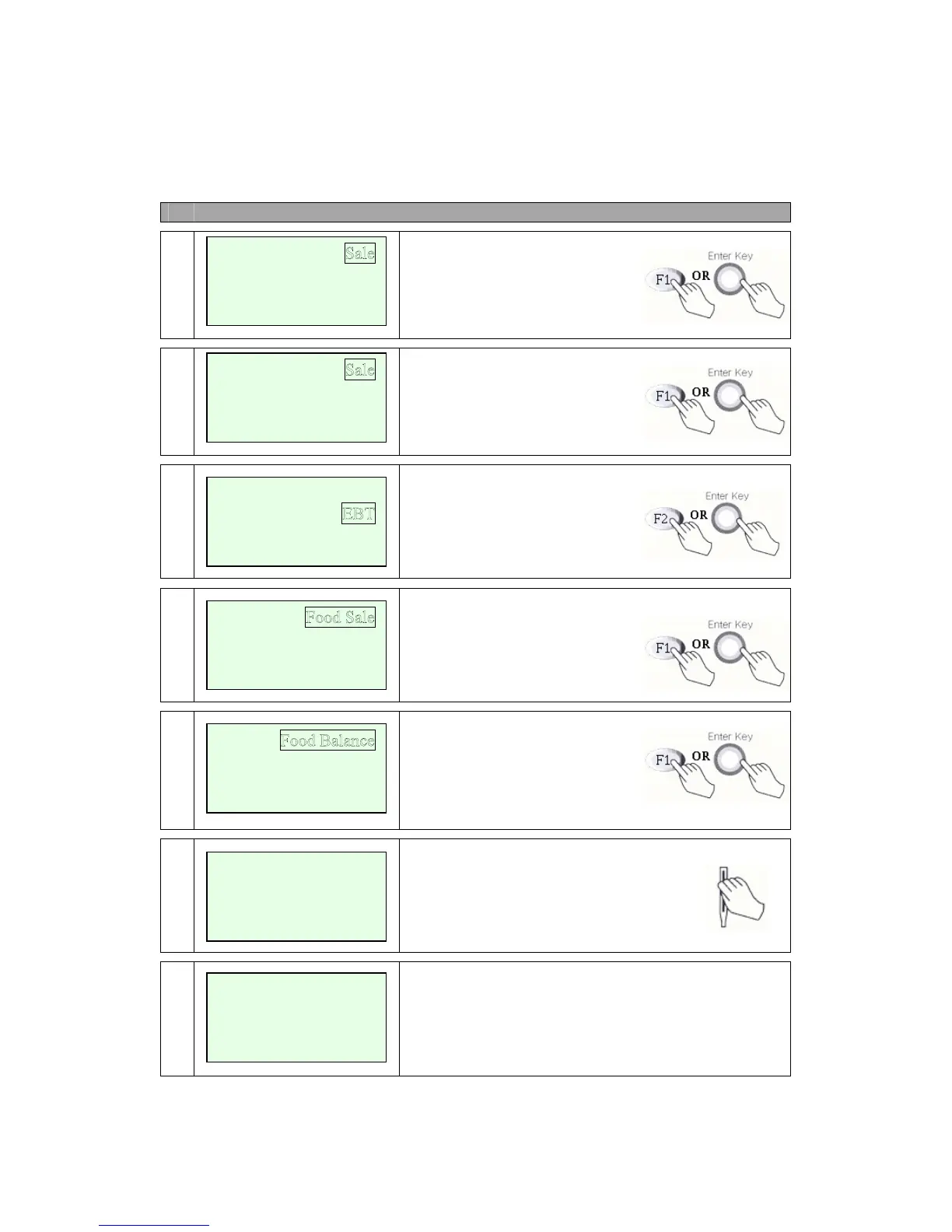
EBT – Food Balance, Cash Balance (B Type)
# Terminal Screen Descriptions for Key Operation and Summary
A
1
Press F1 or Enter key to begin
Sale transaction.
B
1
Press F1 or Enter key to begin
Sale transaction.
2
Press F2 for Mail / Phone Order.
3a
Use Scroll Key (*,#).
3b
Select Cash Sale or Cash Only.
Use Scroll Key (*,#).
4
Swipe Card or Key Account
Number.
5
Display on Terminal when External PIN Pad is used.
Refund
Void
<- -> Off-line Sale
Auth-Only
<- ->
Refund
Void
<- -> Ticket Onl
y
Food Return
Food VCHR Sale
Food VCHR Return
Cash Sale
Cash Only
Cash Balance
Swipe Card
Or
Key Account Number
Amount $00.00
Waiting for PIN


 To Next Page