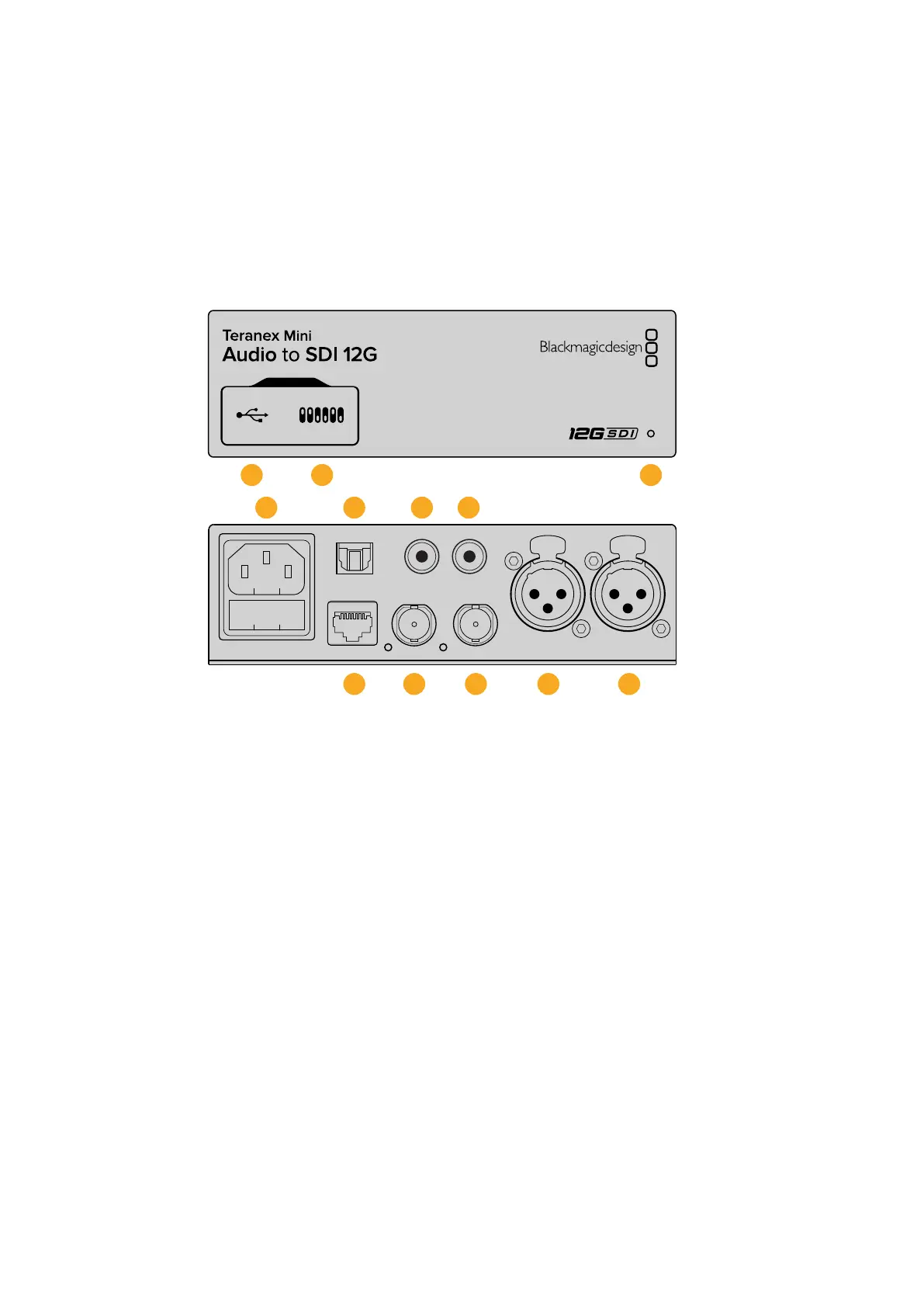
Teranex Mini – Audio to SDI 12G
With Teranex Mini Audio to SDI 12G, you can embed two channels of analog audio, or four
channels of AES/EBU digital audio into any SDI video connection. You can use this Teranex Mini
to embed audio from equipment, such as audio mixers and analog decks, into SDI video
connections for use with SDI routers and decks. Additional SDI audio channels can be
embedded by daisy chaining another Teranex Mini Audio to SDI 12G to your converter’s
SDI output.
SDI IN
L - ANALOG
AES/EBU
R - ANALOG
AES/EBU - T/C
PUSH PUSH
OPTICAL
AUDIO
STEREO IN
L R
SDI OUT
ETHERNET PoE+
1 2 3
SDI IN
L - ANALOG
AES/EBU
R - ANALOG
AES/EBU - T/C
PUSH PUSH
OPTICAL
AUDIO
STEREO IN
L R
SDI OUT
ETHERNET PoE+
4
8 9 10 11 12
5 6 7
Connectors
1 Mini-B USB Port
Connects to the Blackmagic Teranex Setup software via a Mac or Windows computer
for adjusting settings and updating your Teranex Mini’s internal software.
2 Switches
Adjustable switches for changing settings.
3 LED Status Indicator
Glows white when the converter is receiving power and green when a valid video input
signal is detected. Will flash on/off to identify individual converters via Blackmagic
Teranex Setup.
4 Power
Standard built in IEC C14 connector for 90 - 240 volt AC power supply.
5 Optical S/PDIF Audio Input
S/PDIF Signal with TOSLINK Connector.
6 L – Unbalanced HiFi Analog Line Level Input
Unbalanced left channel analog audio input RCA connector.
7 R – Unbalanced HiFi Analog Line Level Input
Unbalanced right channel analog audio input RCA connector.
49Teranex Mini – Audio to SDI 12G











 To Next Page