Switch 3 - Sample Rate Conversion, No Sample Rate Conversion
Set switch 3 to OFF to enable sample rate conversion, or ON to disable sample rate conversion.
This switch should almost always be set to OFF to ensure audio is embedded at the correct
sample rate for television.
When switch 3 is set to OFF this setting converts the sample rate of your analog or AES/EBU
audio and embeds audio into the SDI output at a sample rate of 48 kHz.
Switch 2 - Ch 2 or AES/EBU 3+4 Embed / Bypass
Once you have selected your audio channels, use switches 2 and 1 to select which channels to
embed or disable. The disable setting lets you avoid overwriting audio channels you wish to
keep in the audio signal.
Set switch 2 to ON to bypass channel 2, or AES/EBU channels 3 and 4. Set switch 1 to ON to
bypass channel 1, or AES/EBU channels 1 and 2.
Switch 1 - Ch 1 or AES/EBU 1+2 Embed/Bypass
See switch 2 description.
Audio Selection Tables
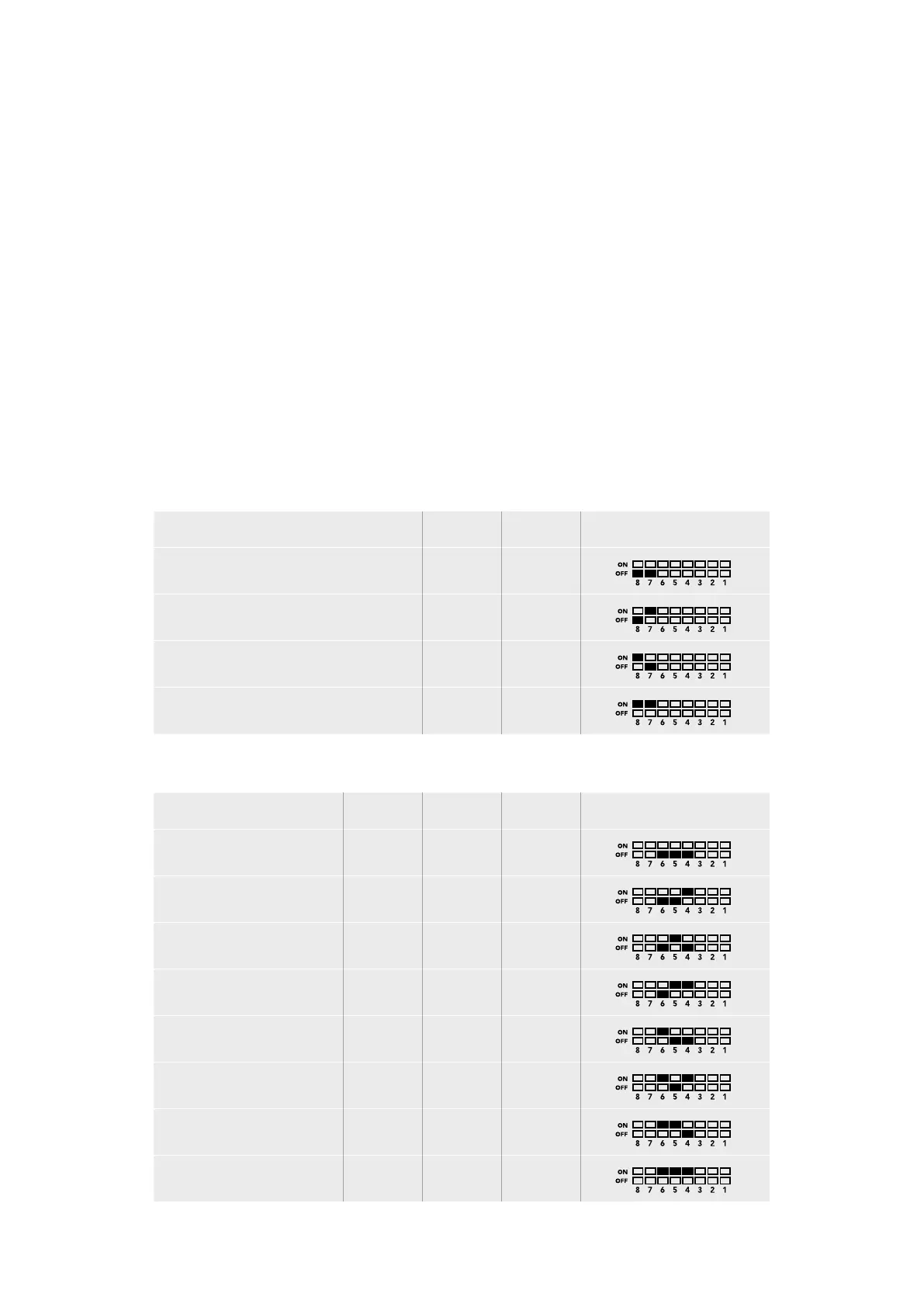
Input Audio Source Switch 8 Switch 7 Switch Diagram
XLR Analog OFF OFF
XLR AES/EBU OFF ON
Rca Analog ON OFF
Optical ON ON
SDI Channel Tables
Analog Audio Channels Switch 6 Switch 5 Switch 4 Switch Diagram
1-2 OFF OFF OFF
3-4 OFF OFF ON
5-6 OFF ON OFF
7-8 OFF ON ON
9-10 ON OFF OFF
11-12 ON OFF ON
13-14 ON ON OFF
15-16 ON ON ON
51Teranex Mini – Audio to SDI 12G











 To Next Page