CB9A-020 page 22
MAINTENANCE
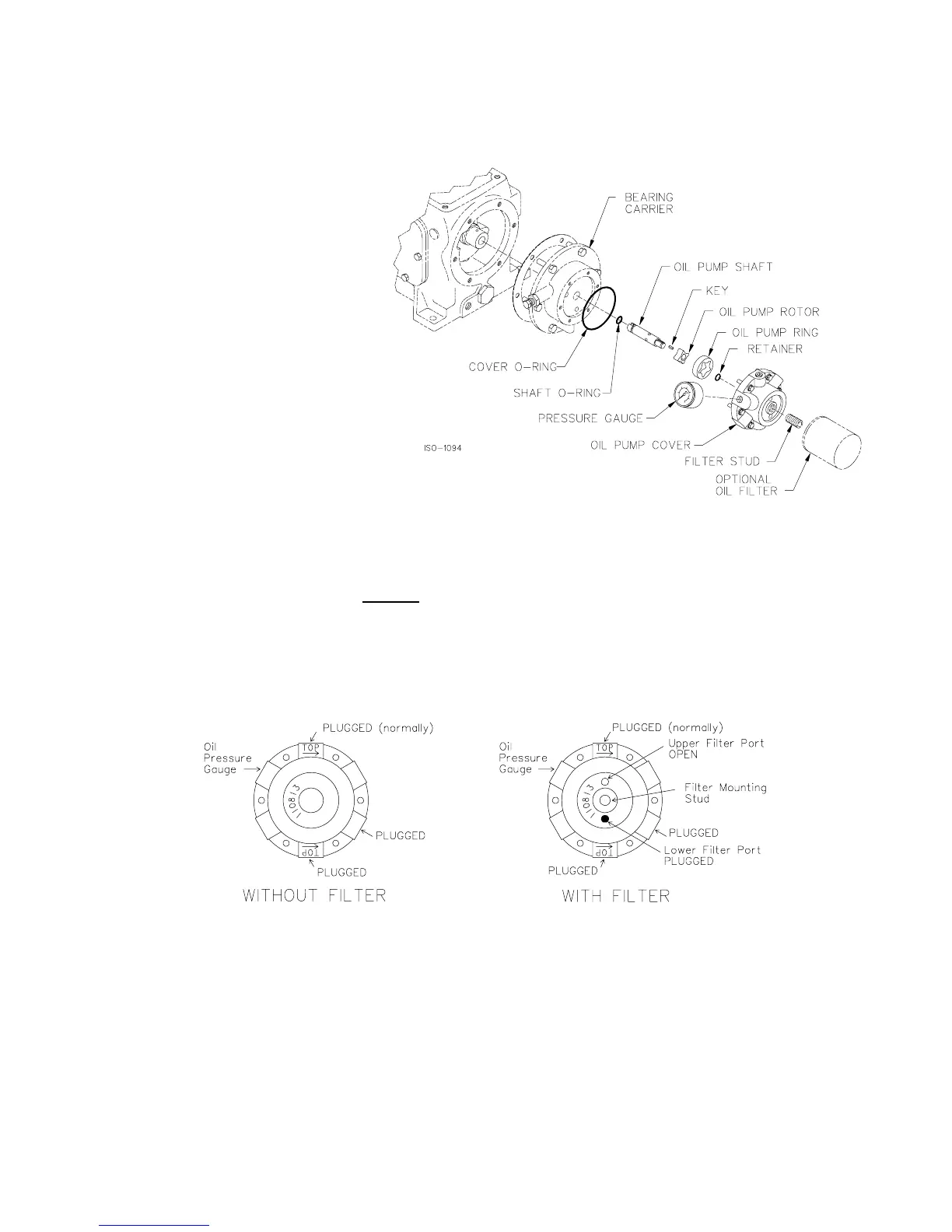
OIL PUMP REPLACEMENT
1. Remove the oil pump cover bolts and the oil pump cover.
2. Remove the cover O-ring, oil pump
ring and shaft assembly.
3. Clean, inspect and replace parts as
necessary.
4. Place the oil pump shaft assembly
(complete with oil pump rotor, key,
retainer ring and new shaft O-ring)
into the bearing housing. If the
bearing housing is bolted to the
crankcase, the slot in the end of the
oil pump shaft must align with the
pin in the end of the crankshaft.
5. Place the oil pump ring over the
rotor. Place the cover O-ring into
the bearing carrier (do not place it
on the oil pump cover).
6. Orient the oil pump cover with the upper direction arrow (the one labeled 'TOP') for the proper crankshaft
rotation direction.
7. Tighten the oil pump cover bolts by hand
. NOTE: If the pump cover cannot be drawn flush with the
bearing carrier by hand, either the oil pump shaft or other parts are not properly aligned. DO NOT
USE A WRENCH AT THIS POINT AS THE OIL PUMP WILL BE DAMAGED IF INSTALLED
INCORRECTLY.
8. Once the oil pump cover is secured by hand, the bolts may be evenly tightened per the Bolt Torque Table.
9. Verify that the proper plugs are installed in the oil pump cover per the above sketches.



 To Next Page