46
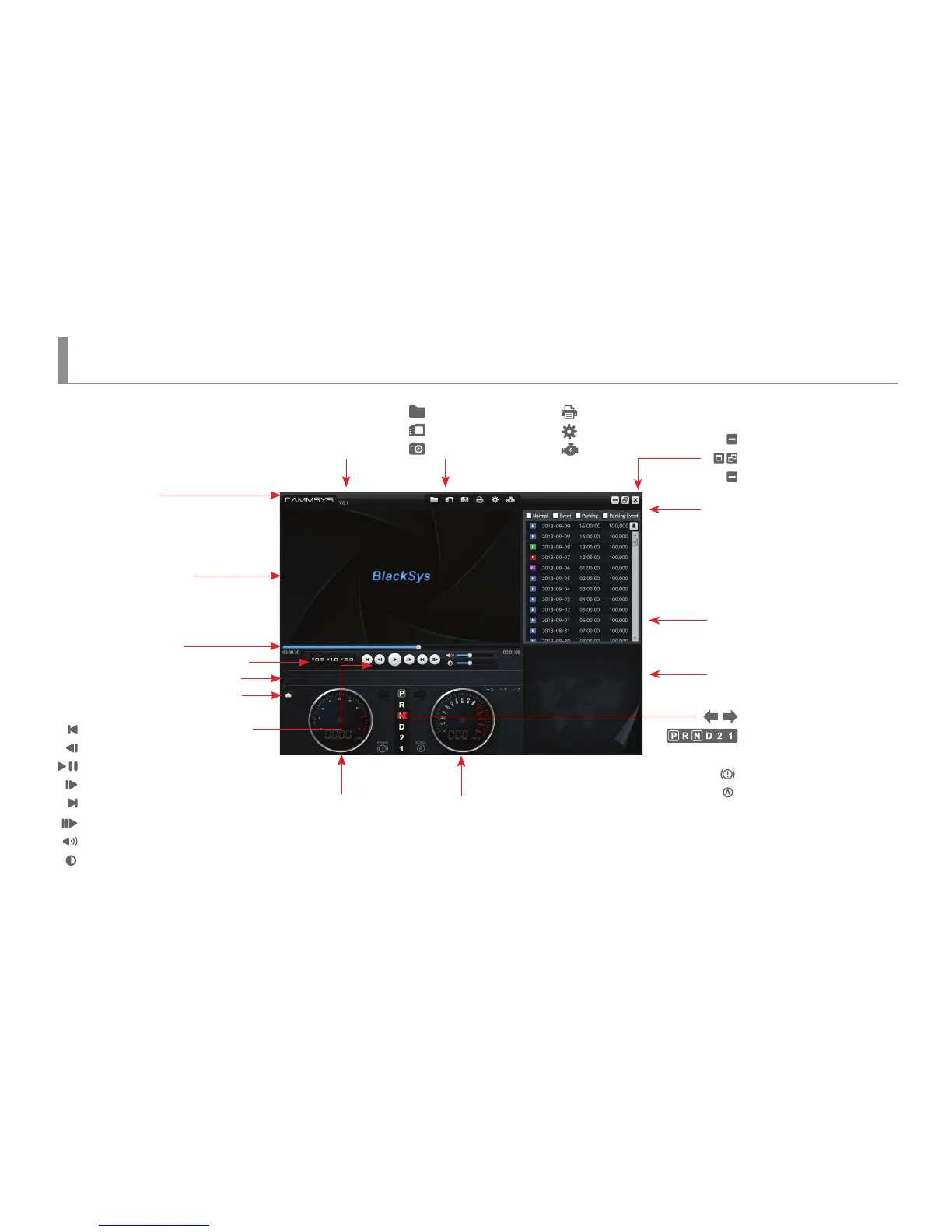
PC Viewer Layout
PC Viewer instructions
Viewer Screen
Progress bar
Version information
: Folder open
: Select drive
: Video Screen Capture
Normal : Normal video le list
Event : Event video le list
Parking : Parking Mode video le list
Parking Event : Parking Event video le list
Play list
Map view
: Move to Previous File in the List
: Move to 1sec. Before
: Playing video and pause
: Move to 1sec. After
: Move to Next File in the List
: Move to Next Frame
: Volume Control
: Image Brightness Control
: Screen Minimization
: Full Screen / Previous Screen
: Close
※ If scroll up mouse in front video while it’s playing, video size enlarge 0.2times. Max. 14 times is possible
and total 2.8 times enlarge screen would be available. (1~15 level)
※ PC viewer enlargement(full screen view) : 1~12 level is available in full screen view.
Update
: Print
: Conguration
: OBD
Video play speed control
G-Sensor Data Review
RPM Speed (Km/h)
: Turn Signal Indicator
: Display an auto transmission
selection lever
: Display a brake
: Display an accelerator
BRAKE
ACCEL
OBD data unfold/fold



 To Next Page