21
-
Cooking with delayed start and chosen
cooking end time
Proceed as with programmed cooking.
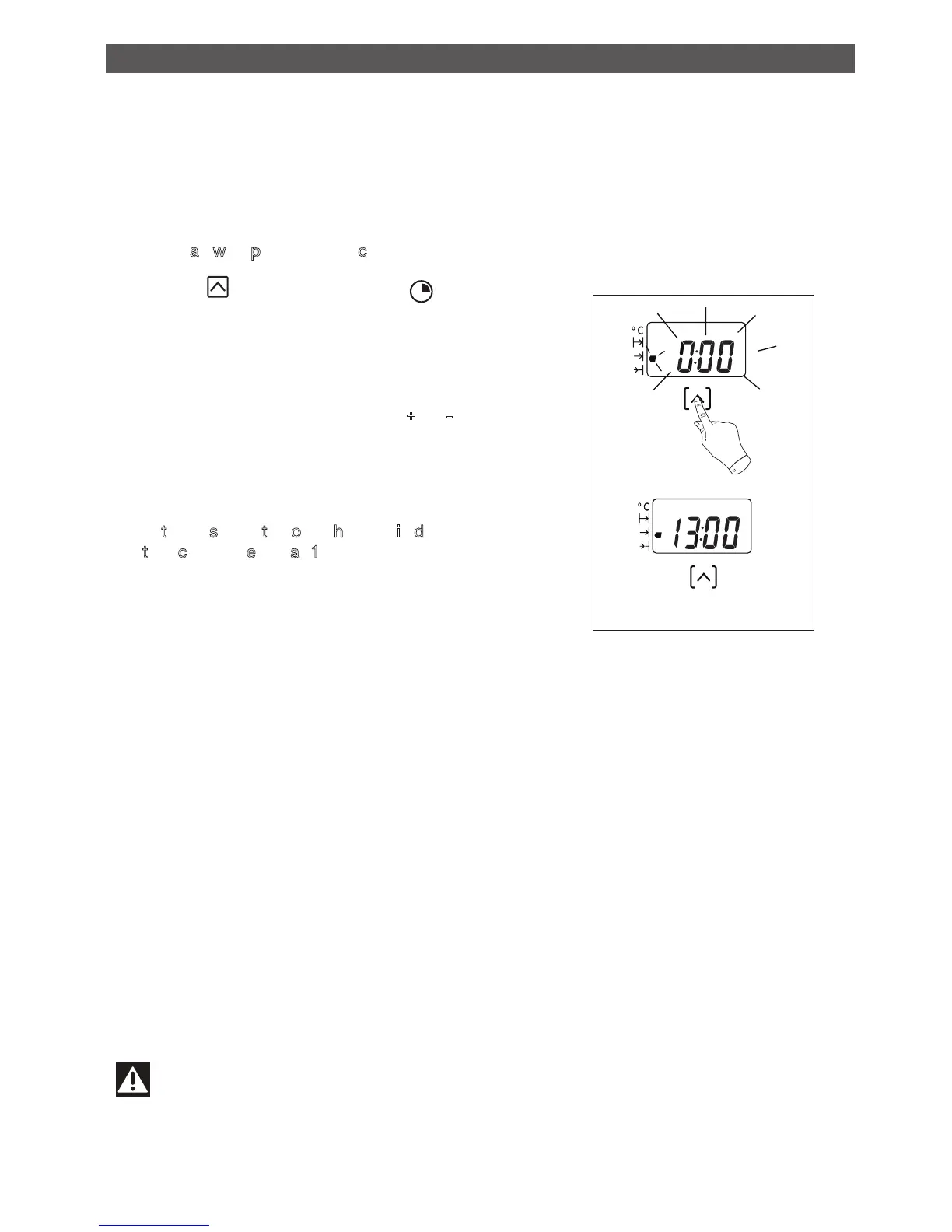
- Press the touch control until the icon
cooking time indicator starts to flash.
The display flashes 0:00 to indicate that you
can now adjust the setting.
- Move the setting selector toward +
or - to
choose the desired cooking end time.
Example: end of cooking at 13:00
A
fter these steps, the oven heating is delayed
so that cooking ends at 13:00.
At the end of cooking (end of programmed
time),
- the oven turns off,
- the cooking time indicator turns off ,
- 0:00 is displayed
,
- a series of beeps sounds for a few minutes.
The beeps are definitively deactivated by
returning the function selector to 0.
Warning
You cannot lock the oven if you have programmed a cooking cycle.
HOW TO USE YOUR LOWER OVEN
HOW TO SET A COOKING PROGRAMME
•


 To Next Page