29
Just Power On
10.1.3. Turn On UPS Function
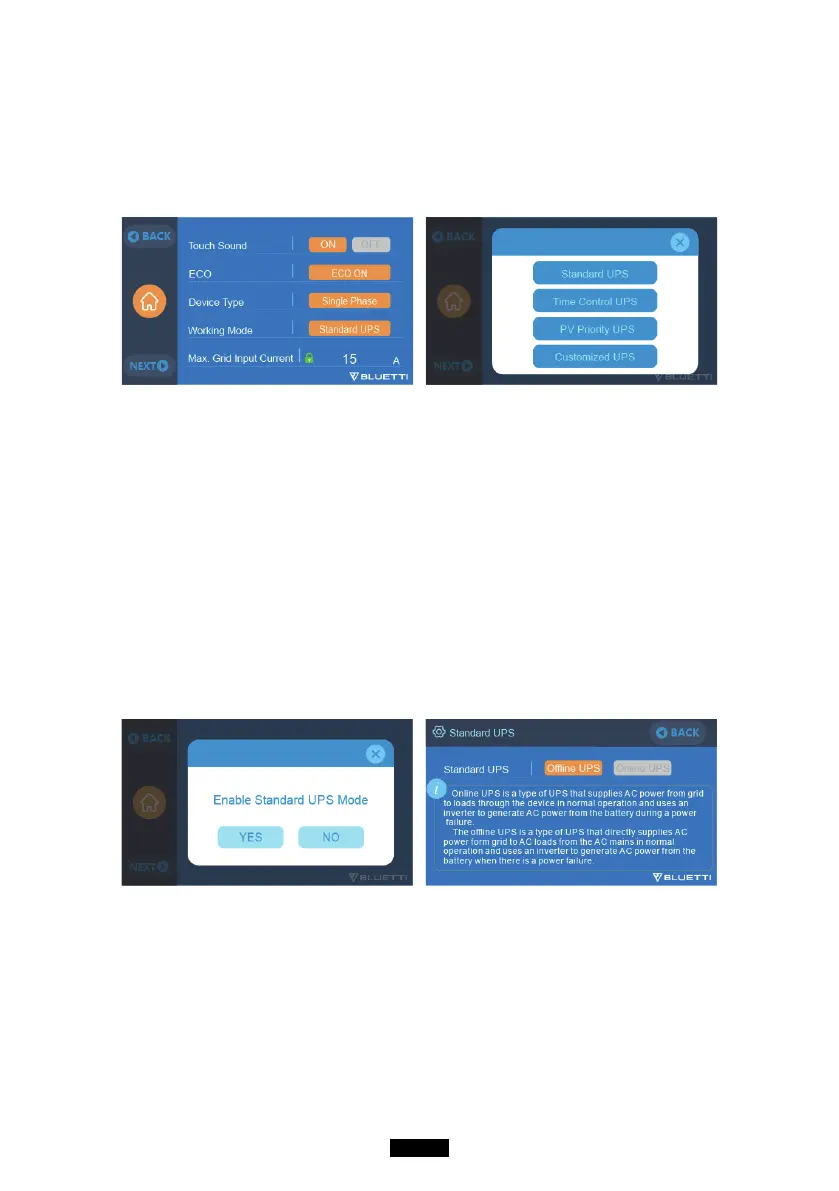
●Select “Setting” on the main touchscreen interface. Select “Next” and select
“Running Mode” to choose UPS Mode.
●The default working mode is “UPS Mode”.
10.2. Enable UPS Running Mode
10.2.1 Standard UPS Mode
●Oine UPS: Basic UPS working mode
EP500 will power your load or grid only when the power failure happened, or
EP500 will always be on standby and keep the capacity stayed at 100%.
●Online UPS: For better electricity quality
EP500 will charge from the grid when available.
Power for the load or home will come from the EP500 (not the grid),
regardless of whether there is a power outage or not.
10.2.2. PV Priority Mode
●PV Priority Mode: recommended for areas in stable power supply, the battery
will be recharged mainly via PV for power saving.
●Note: In PV Priority Mode EP500 can only be recharged via grid to 20
% capacity, and discharge to 20% of the capacity (you can tweak it to
100% for full grid charging manually on screen or App) as the Reserved
capacity setting in PV priority Mode. And rest of the capacity will be
fully charged by solar power and 2nd adaptor only.



 To Next Page