3.4 Filter
Changing the filter
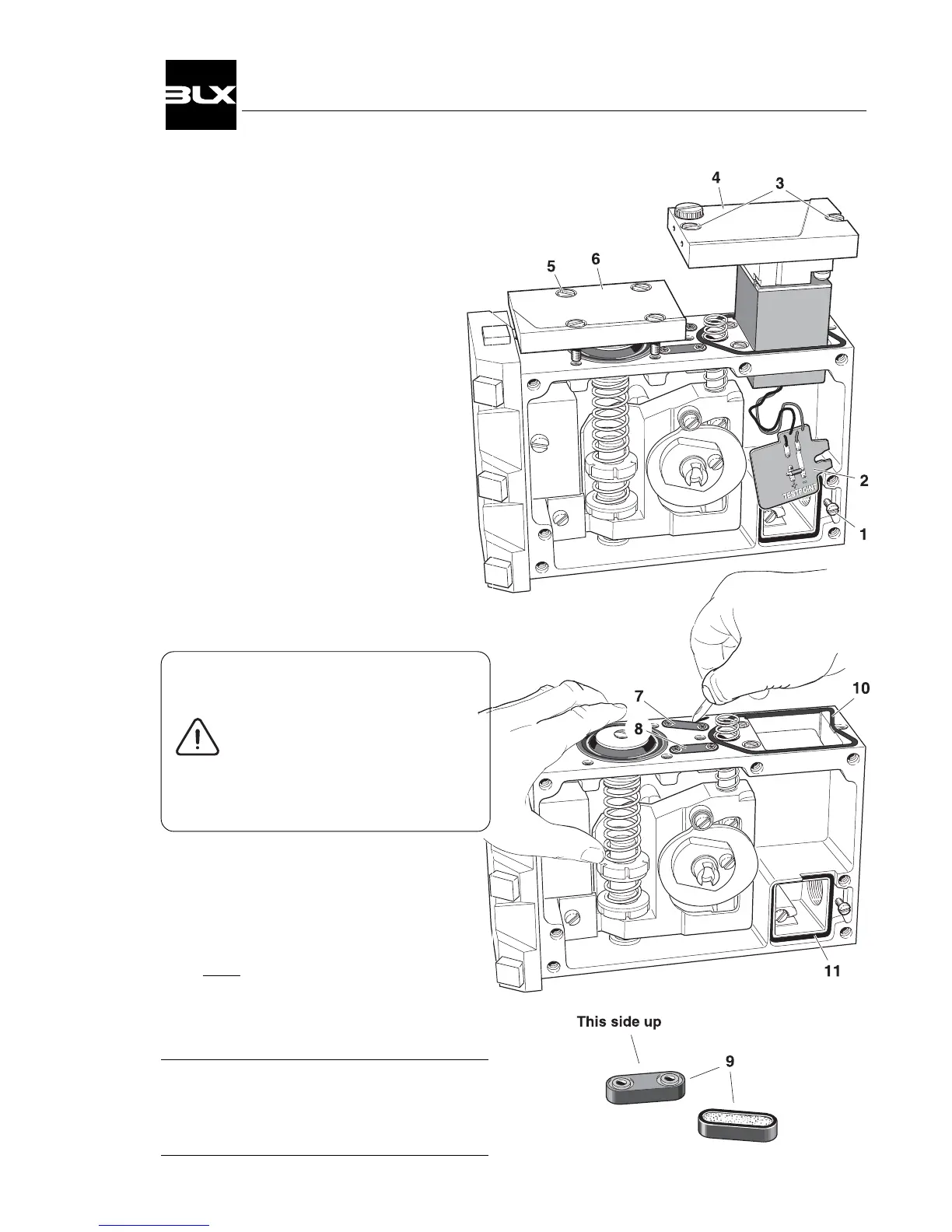
1. Remove the front cover and indicator.
(See page 12)
2. Loosen the screw(1) and lift out the card.
3. Loosen the screws(3) and lift out
the I/P-converter.
4. Loosen the screws(5) and remove
the membrane cover(6).
Please Note!
Be sure that the O-ring in the
cover(6) is not removed.
5. Cautiously remove the filter cap(7 & 8)
with a sharp pointed object e.g.
a pocket knife.
6. Remove the filter(9) from its rubber
envelope.
If the filter(9) shows traces of oil
or water, check the water/ oil
separator in the supply line.
Oil and water can cause
functional problems in
the I/P-converter.
7. Insert the new filter in the rubber enve-
lope.
8. Press the filter caps(9) into the housing.
To make installation in the housing easier,
a small amount of grease or oil can be
applied to the rubber.
9. Install the other parts in reverse order.
Please Note!
Also check the seals.(10 & 11)
Replace if they are damaged.
15
V100 Positioner


 To Next Page