PHERAstar FS Operating Manual BMG LABTECH
14/26 0471B0001A 2009-09-22
4.4.1 Built-in Barcode Reader for Optic Modules
With the built-in optic module barcode reader the PHERAstar FS will automatically detect the optic modules
installed and automatically transfer the information into the optic module list. If changes have been made,
they will automatically be recognized.
When no optic modules are in position, the barcode reader will detect an empty position and this information
is then transferred to the optic module list.
If the optic module is a customer inter-changeable type, a message will appear informing you manually to
type in wavelengths in the optic module table.
The barcode detection will be triggered by a) opening and closing the optic module door or b) performing a
connection check. After turning on reader and control software this will always be done automatically.
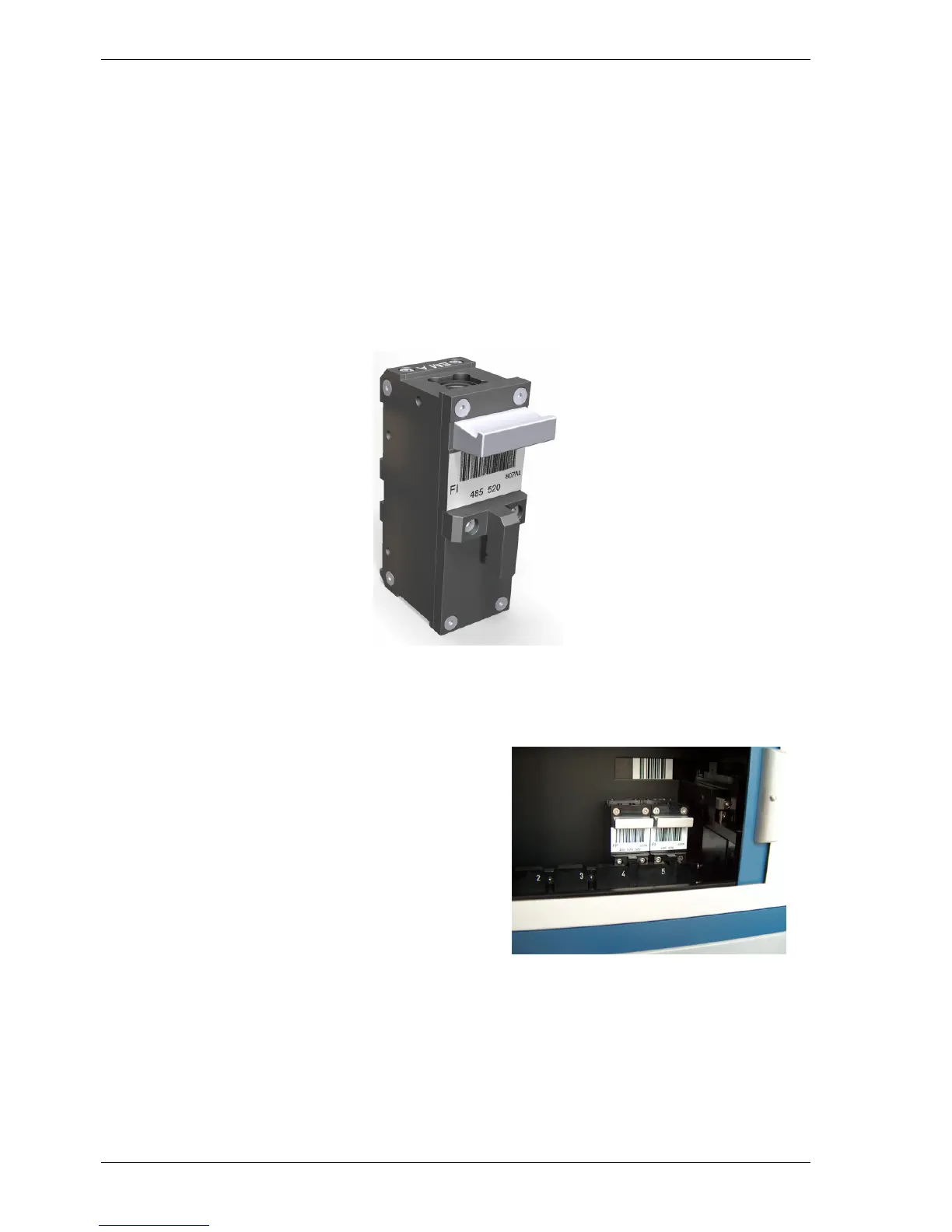
The barcode label on the optic module (figure 16) holds the information about optic module name, filter
wavelengths and bandwidths.
Figure 16: Barcode labeled Optic Module
The automatic barcode detection takes place in
the far right position of the optic module
chamber (figure 17).
If there is a position without optic module the
barcode label in the back of the compartment
will be detected.
Figure 17: Barcode detection of Optic Modules


 To Next Page