CONFIGURING A NEW BATTERY
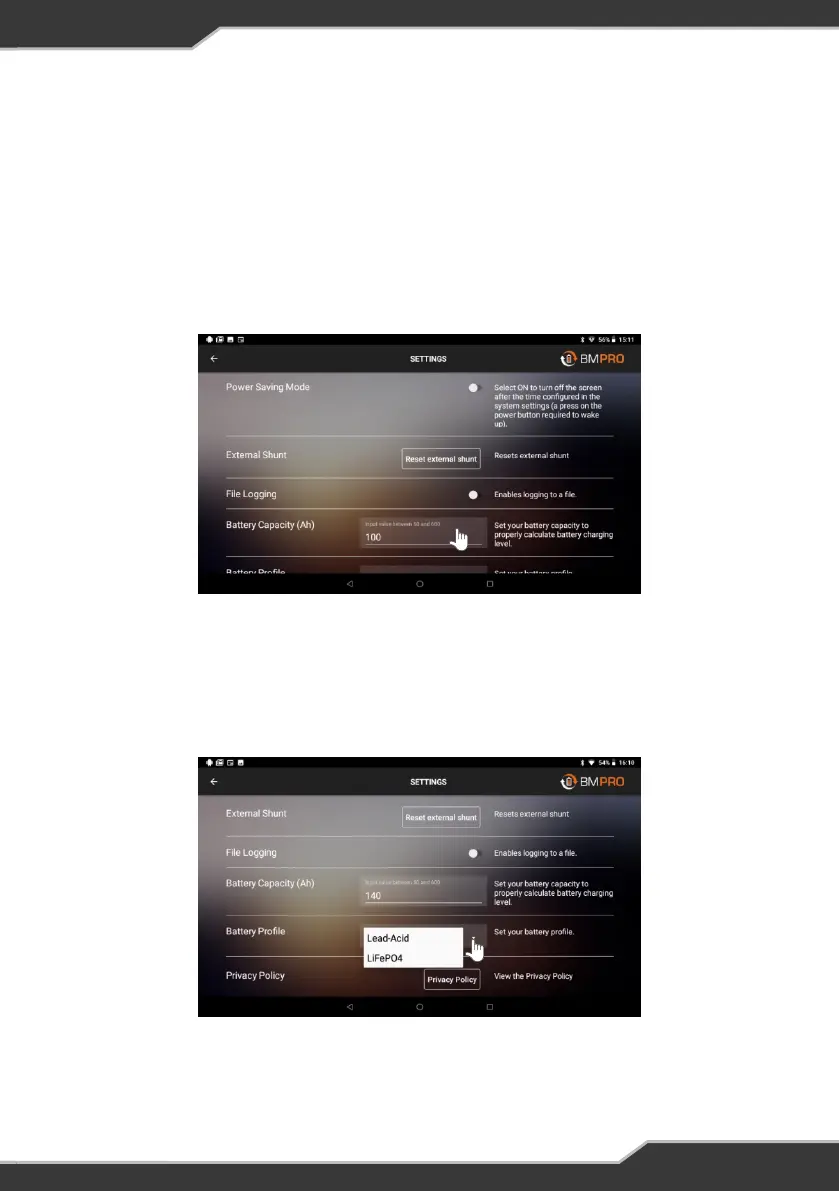
Whenever you replace your caravan battery, ensure that it is configured by the JHub.
Correctly configuring the battery capacity will ensure that the J35 will utilise the
best charging parameters for the caravan battery in use and the software accurately
estimates battery usage including Battery Capacity and Time Remaining.
1. Press the menu icon in the top left corner of the Home Screen.
2. Select “Settings” from the drop down list
3. Scroll Down to the Battery Capacity Field.
If using the JHub with J35D:
4. Scroll Down to the Battery Profile and select the appropriate battery type,
Lead Acid (default) or LiFeP04.
4. Enter your battery’s Battery Capacity in Amp-hours
5. Return to the JHub Home screen by the arrow in the top left of the screen.
Figure 8: Settings Screen
Figure 9: Configuring a new battery from the JHub App settings.
13


 To Next Page