CONTROLNODE
What do the different flash codes on the ControlNode mean?
The flash codes presented on the ControlNode LED indicate the operational/pairing
status of the ControlNode.
DATE AND TIME
How do I set the date and time on the JHub Tablet?
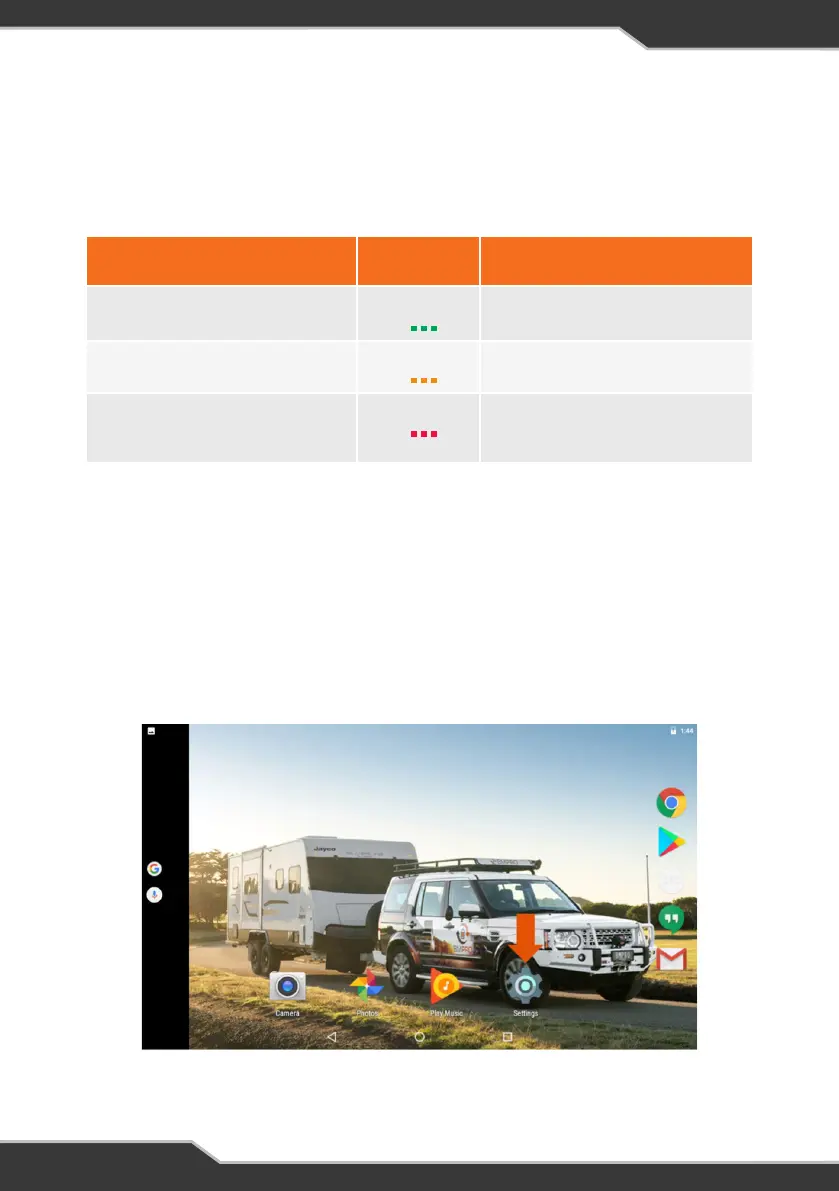
To set date and time, return to the tablet homescreen and click on the settings icon.
Scroll down and select ‘Date & Time’ from the settings menu to change the date, time
and time zone.
Figure 7: Accessing the JHub Tablet's settings
Table 3: ControlNode Operational Status and LED Flash Codes
After memory has been cleared, the ControlNode LED Status Indicator will immediately
flash green to enable pairing to a new mobile device.
*
Operational Status
Flashing
Status
Notes
ControlNode is ready to pair
Green 30 secs
ControlNode memory is full, cannot
pair to any new mobile devices
Orange 1 sec
To pair to a new mobile device, clear
the memory of the ControlNode
Clearing ControlNode memory*
Red 1 sec
Memory will only be cleared if the
user presses and holds the Pairing
Button for 10 seconds.
24


 To Next Page