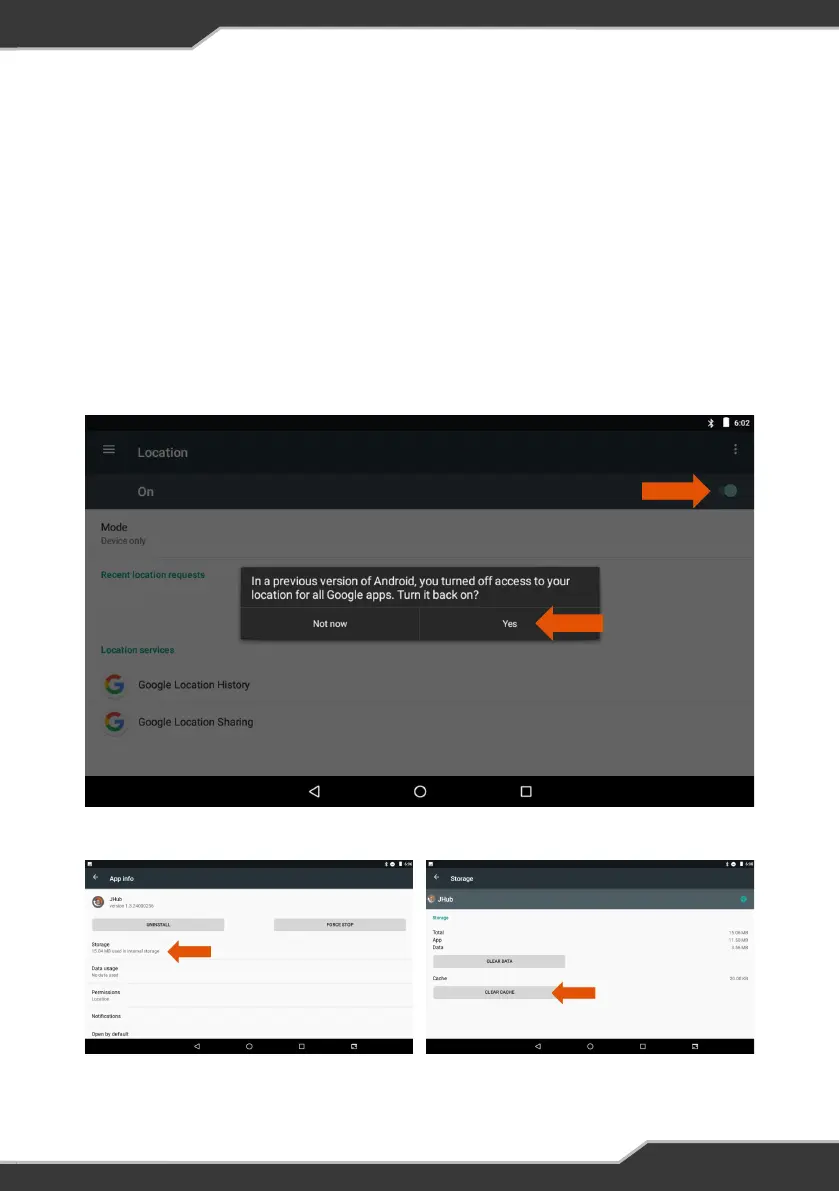
Figure 11: Checking the tablet’s Location and Location History
Figure 12: Clearing the JHub App Cache
I can’t pair my JHub Tablet?
If you are having difficulty pairing the JHub Tablet to the ControlNode, close the JHub
App then check the following:
1. Go to the tablet’s Settings menu (figure 7) and make sure Bluetooth is turned on
2. Go to the tablet’s Settings (figure 7) and make sure that Location is turned on and
check the Google Location History. If a previous version of Android has turned off
access to your locations for apps, click Yes to turn it back on (figure 11).
3. Go to the tablet’s Settings menu (figure 7) and select Apps, scroll down and
select the JHub App. Click on Storage then Clear the Cache (figure 12).
PAIRING
27


 To Next Page