28
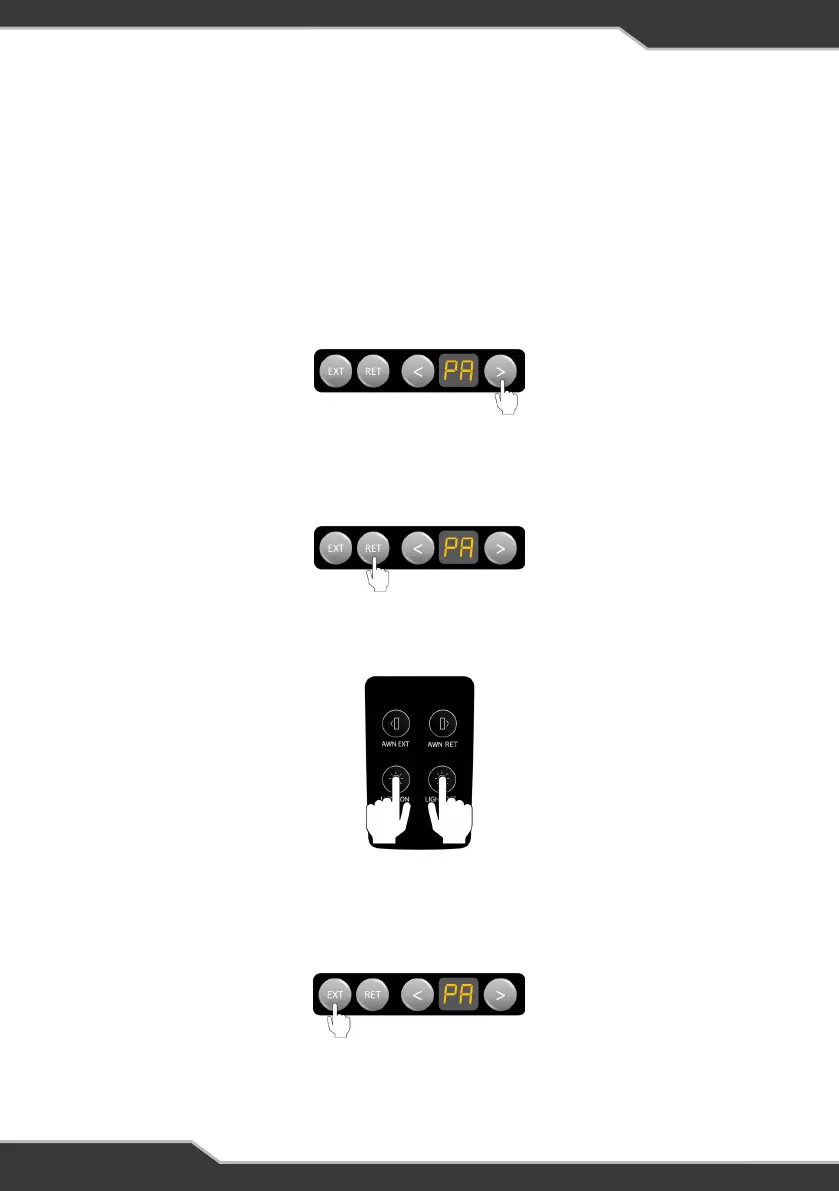
3. Press any two buttons on the RVMasterSwitch at the same time (Figure 32)
Figure 32: Press any two buttons on the RVMasterSwitch
4. Press EXT on the RVMasterController to accept the pairing of the RVMasterSwitch
to the RVMasterNode (Figure 33)
Figure 33: Press EXT to accept pairing
RVMASTERSWITCH
I’ve replaced the RVMasterSwitch in my RV, but it doesn’t work?
You need to pair the RVMasterSwitch to the RVMasterNode before you can use the
switch.
The RVMasterSwitch is paired to the RVMasterNode in four steps:
1. Using the < or > button on the RVMasterController, navigate to the ‘PA’ menu item
(Figure 30).
Figure 30: Use < or > to navigate to the ‘PA’ menu item
2. When ‘PA’ appears on the display, press the RET button to start the pairing process
between the RVMasterSwitch and RVMasterNode (Figure 31)
Figure 31: Press RET to start pairing



 To Next Page