T.O. BMS1F-16CM-1 BMS 4.34 Change 2.00
BMS 4.34 Dash 1
© Red Dog 2012-2019 Page: 42
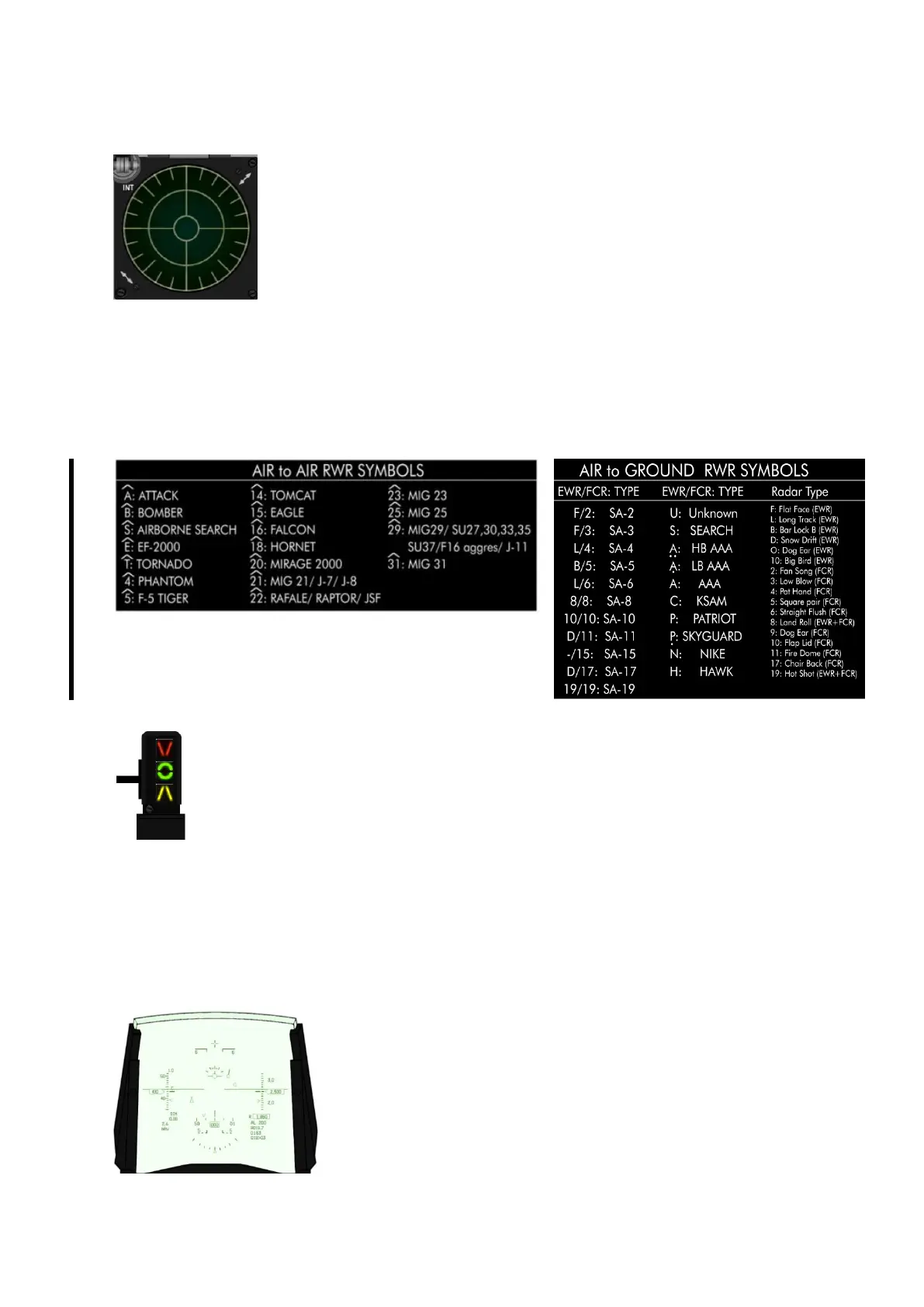
1.2.3.5 ALR-56 RWR
The ALR-56 RWR displays threat emitters depending on their azimuth relative
to your aircraft. It does not give distance information. The display is made of
two concentric circles: inner and outer. The threats are categorised by order of
importance; the more lethal threats are placed in the inner circle, while the
secondary threats are left in the outer.
The RWR scope also consists of four noise bars located around the centre
circle at 6, 9, 12 and 3 o’clock. They indicate the status of noise in the bands 0,
1, 2, and 3 respectively; however this is not implemented and is graphical only.
There is a cycle timer on the left end of the band 3 noise bar. This is a vertical bar that moves up and
down. As the RWR becomes saturated with signal activity the cycle timer moves progressively slower.
With no signal activity, it moves up and down once per second. With full RWR activity it moves up and
down every 2.6 seconds.
The symbols displayed on the RWR depend on their radar type, as seen below. Airborne symbols are
displayed with an inverted V on top of them to differentiate them from the ground emitters. Other
RWRs may be installed in other F-16s. For further information refer to the TO-BMS1F-16CM-34-1-1.
BMS Key Callbacks for the RWR:
SimRWRBrightnessUp
SimRWRBrightnessDown
1.2.3.6 Left INDEXER
The left indexer is made of three lights relevant to the Angle of Attack and is located to
the left of the HUD. It is a repeater of the AOA instrument on the centre console and the
HUD AOA tape.
The AOA is sensed by two conical sensors on each side of the nose of the F-16. AOA
indication is valid for two point landing.
The top light points down and comes on when the AOA is above 14° (on speed AOA too slow).
The centre light featuring a green doughnut comes on if the AOA is between 11 and 14° (13° = on
speed AOA for landing).
The bottom light points up and comes on when the AOA is below 11° (on speed AOA too fast for
approach).
These lights are always on even when the gear is retracted, allowing the pilot to quickly check his
AOA in every flight situation.
1.2.3.7 HUD
The HUD (Heads Up Display) displays a variety of flight information
through a collimating system. A more in depth explanation of the HUD
can be found in the relevant chapter later in this manual. The HUD is
powered on using the SYM wheel on the left of the ICP. That wheel
features a switch at the beginning of its course which toggles the HUD
on/off. Once the HUD is enabled the wheel adjusts HUD brightness.
Many settings on the HUD can be changed by the pilot through the
UFC or the HUD control panel on the right console (see right console
section).



 To Next Page