T.O. BMS1F-16CM-1 BMS 4.34 Change 2.00
BMS 4.34 Dash 1
© Red Dog 2012-2019 Page: 70
1.3.10. MARK page (7)
The MARK page is used to create markpoints. Ownship markpoints are stored in steerpoints 26-30.
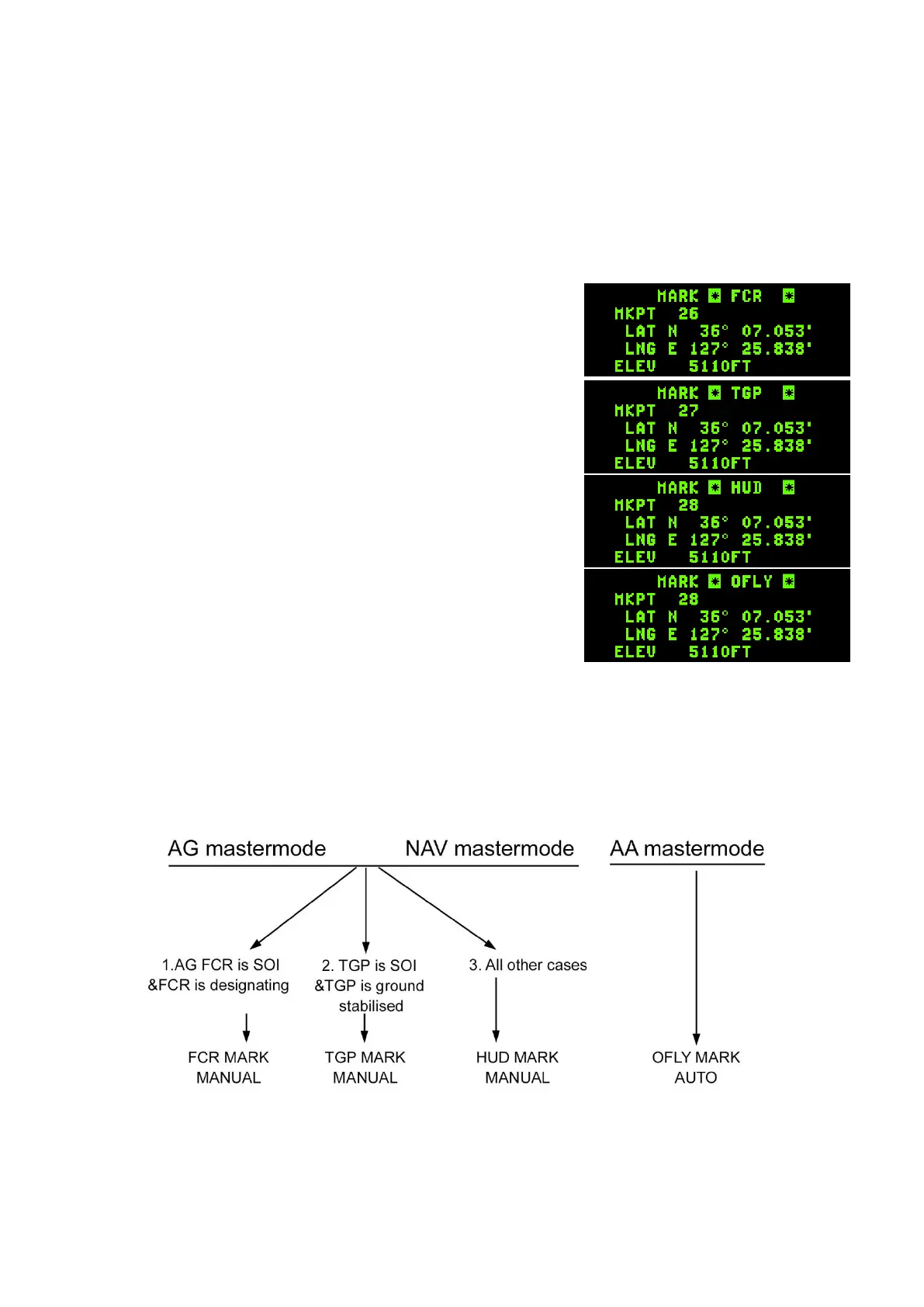
Mark points can be made from 4 different systems. OFLY (Overfly GPS/INS), FCR (Fire Control
Radar), HUD (Head Up Display) or TGP (Targeting Pod). There are thus 4 submodes in the MARK
page. To toggle between the submodes use DCS SEQ. The system defaults to a specific subpage
according to master mode and Sensor of Interest (SOI) and may enable automatic markpoint
recording.
• If master mode is NAV or A-G mode and the FCR is SOI &
designating entering the MARK page will default to FCR
MARK. The first markpoint will remain blank until TMS is
moved up. At that point, the markpoint is created.
• If master mode is NAV or A-G mode and the TGP is SOI
and ground stabilised entering the MARK page will default
to TGP MARK. As with FCR, TMS up will create the
markpoint.
• If master mode is NAV or A-G mode and the FCR or TGP
are not SOI & designating or ground stabilised entering the
MARK page will default to HUD MARK. A markpoint must
be created manually by moving the HUD mark cue (HMC
– a small slewable circle appearing near the FPM in pre-
designate) with the cursor (HUD SOI) and moving TMS
up. The first press of TMS up will ground stabilise the
HMC and the second TMS up will save the markpoint.
HMC must be on the ground for correct implementation,
pointing at the sky will not work obviously.
• If master mode is A-A entering the MARK page will default
to OFLY MARK and an automatic markpoint will be created.
Please note: the ICP ENTR key is no longer used to create markpoints – TMS forward (TMS up)
creates markpoints.
Mode selecting (M-SEL 0 button) any valid markpoint will make it the active steerpoint.



 To Next Page