T.O. BMS1F-16CM-1 BMS 4.34 Change 2.00
BMS 4.34 Dash 1
© Red Dog 2012-2019 Page: 88
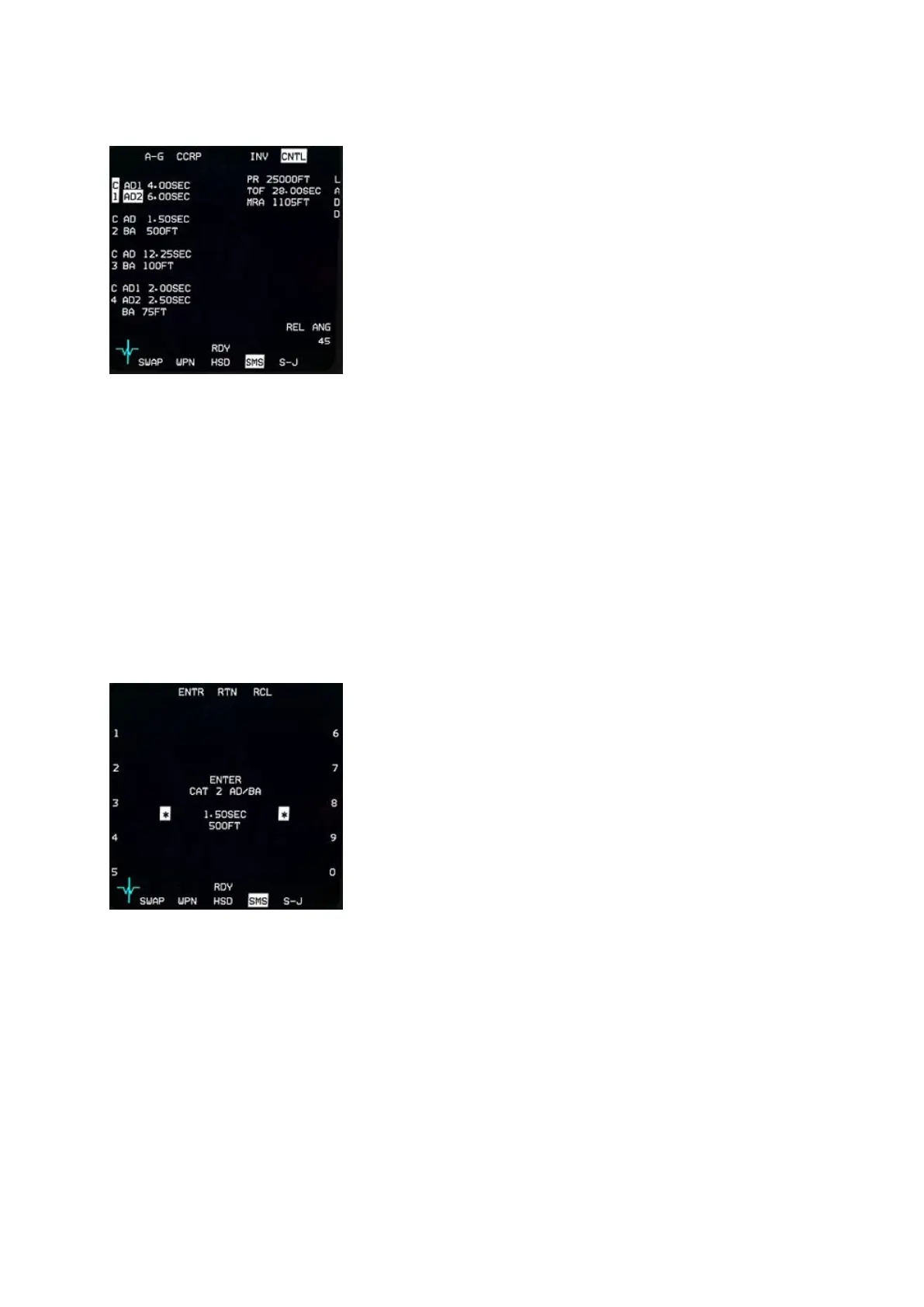
SMS A-G Control page
While the CNTL page is displayed OSB #5 remains highlighted.
The top & bottom OSB lines are the same as the main SMS page.
What is of interest is the left line of OSB buttons (#16 to 20) and
OSB #6 to the right, which give access to 5 different weapon
settings: C1, C2, C3, C4 and LADD.
C1 (OSB #20) is relevant to General Purpose weapons or Laser
guided weapons and provides two different arming delays. One for
the NOSE fuse and the second for the TAIL fuse. Depress OSB
#20 to enter a subpage where both timings can be set.
C2 is relevant to Cluster Bomb Units or any weapon requiring a
Burst Altitude (BA). Pressing OSB #19 will enter a SMS subpage where both the arming delay and the
burst altitude can be set.
C3 is an additional setting for CBUs, with the same Arming Delay (AD) and Burst Altitude (BA) options
as C2.
C4 is specifically for double fused CBUs. On this page AD1, AD2 and BA can be set.
LADD stands for Low Altitude Drogue Delivery and although OSB #6 has a profile for it, it is currently
not implemented in BMS.
OSB #10 is the setting for the planned release angle. This value is required by the computer to
calculate the correct symbology for DTOS deliveries.
Most of the time C1 and C2 are used if you deploy GP/LGBs or CBUs.
The way settings are input is always the same:
Depress the relevant OSB (C1 to C4) and the subpage is
displayed with the settings in the middle of the page.
The current active setting is displayed between the scratchpad
asterisks and numbers 0 to 9 are displayed next to the left and
right rows of OSB buttons.
To enter a new value simply use the OSB next to the number you
want until the correct value is set, then use OSB #2 ENTR to
confirm the value and the next line of setting will be selected for
change. If there is no next line available the ENTR button will exit
the CNTL page and return to the SMS base page.
OSB #3 (RTN) returns to the previous value or page.
OSB #4 (RCL) deletes the last alphanumerical value input.


 To Next Page