OZONE ANALYZER BMT 964 Manual, Rev. 04/2021
12
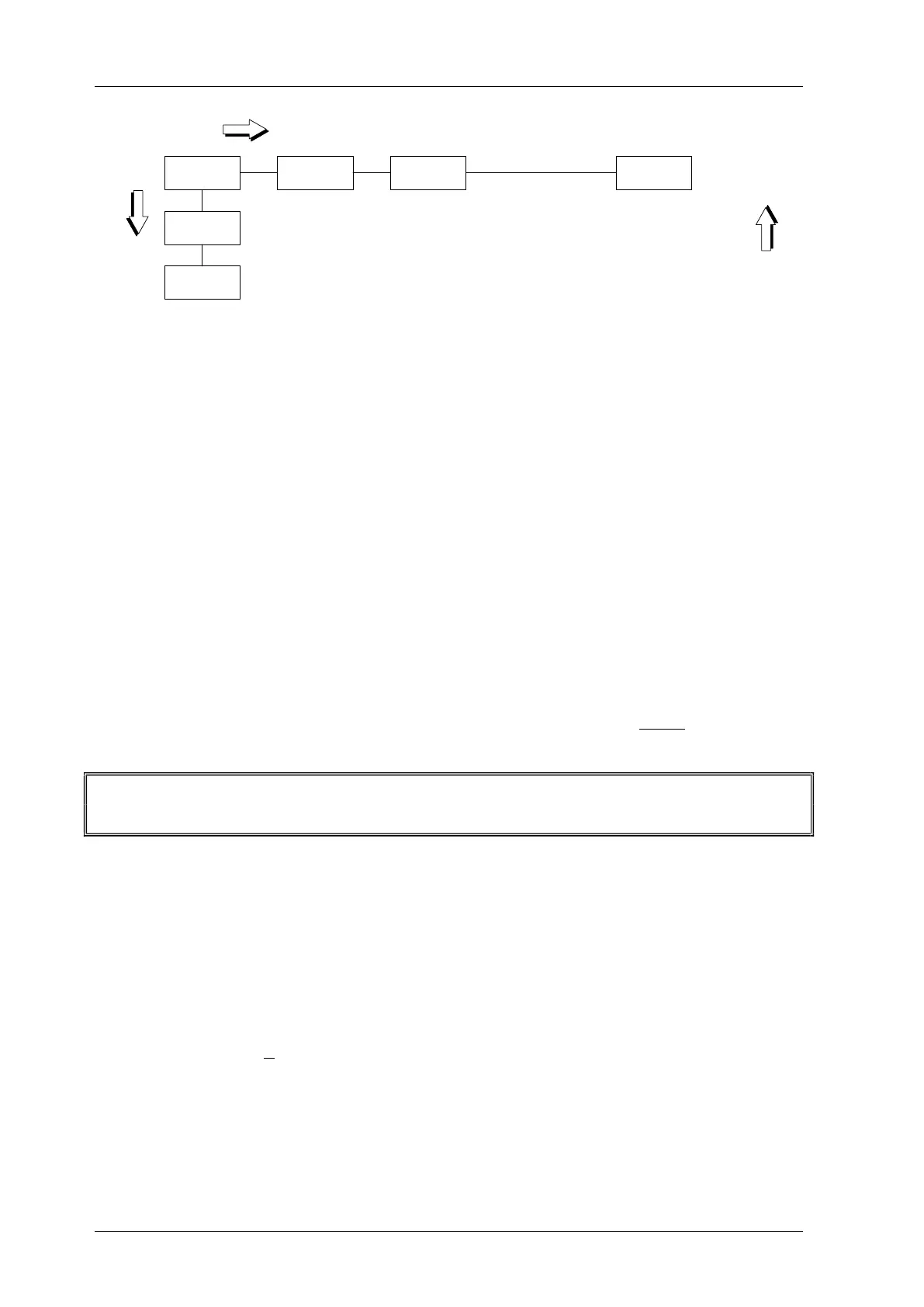
Concen-
tration
Pressure
View
Parameters
Set
Parameters
Main Menu
ZERO/
ENTER
SCROLL
BACK
Zeroing:
Sure?
Zeroing
Press Scroll for
at least 2 s
PIN-Protection
Expressions printed bold in the following sections of text always relate to the contents of the
instrument menus.
The button SCROLL / SET moves to the right within the menu, the key ZERO / ENTER
downwards and the button BACK moves upwards. The SCROLL action will continue on the left
side, once it has reached the right side of the diagram. This is also valid for the later explained
menus View Parameters and Set Parameters.
From now on, when relating to the multi-functional keys SCROLL / SET and ZERO / ENTER
only the function meant in the context will be mentioned.
Starting with Concentration pressing the button SCROLL will lead to Pressure. Here the pres-
sure inside the cuvette is displayed and updated every 0.3 s. One further push on SCROLL dis-
plays View Parameters. After pressing ENTER the parameters can be viewed, but they cannot
be changed.
Changing Parameters
If in the menu position View Parameters the button SCROLL is pushed briefly, the instrument
resumes display of the ozone concentration (Menu position Concentration).
In order to move from View Parameters to Set Parameters the SCROLL button has to be
held down for at least 2 seconds.
The menu Set Parameters is used to change properties of the instrument, like units, alarms etc.
In order to protect the instrument and the components connected to it from unqualified hand-
ling, the above mentioned procedure has to be performed. In addition, the instrument configura-
tion can be protected by a 4-digit PIN. This PIN is factory set to 0000, which means that after
pressing the SCROLL button for 2 s, properties can be changed freely. The Windows software
BMT 964 Link can be used to change this PIN to any other 4-digit number. If the PIN is differ-
ent from 0000, pressing the SCROLL key for 2 s will lead to the display of:
Enter PIN 0000:
Only the correct PIN will allow entry to Set Parameters, any other number will lead back to the
display of ozone concentration.
View Parameters and Set Parameters will be described on the following pages. During viewing
and setting of parameters the instrument continues measuring, i.e. new measurement results are
sent out on the analog outputs and the serial interface continuously.


 To Next Page