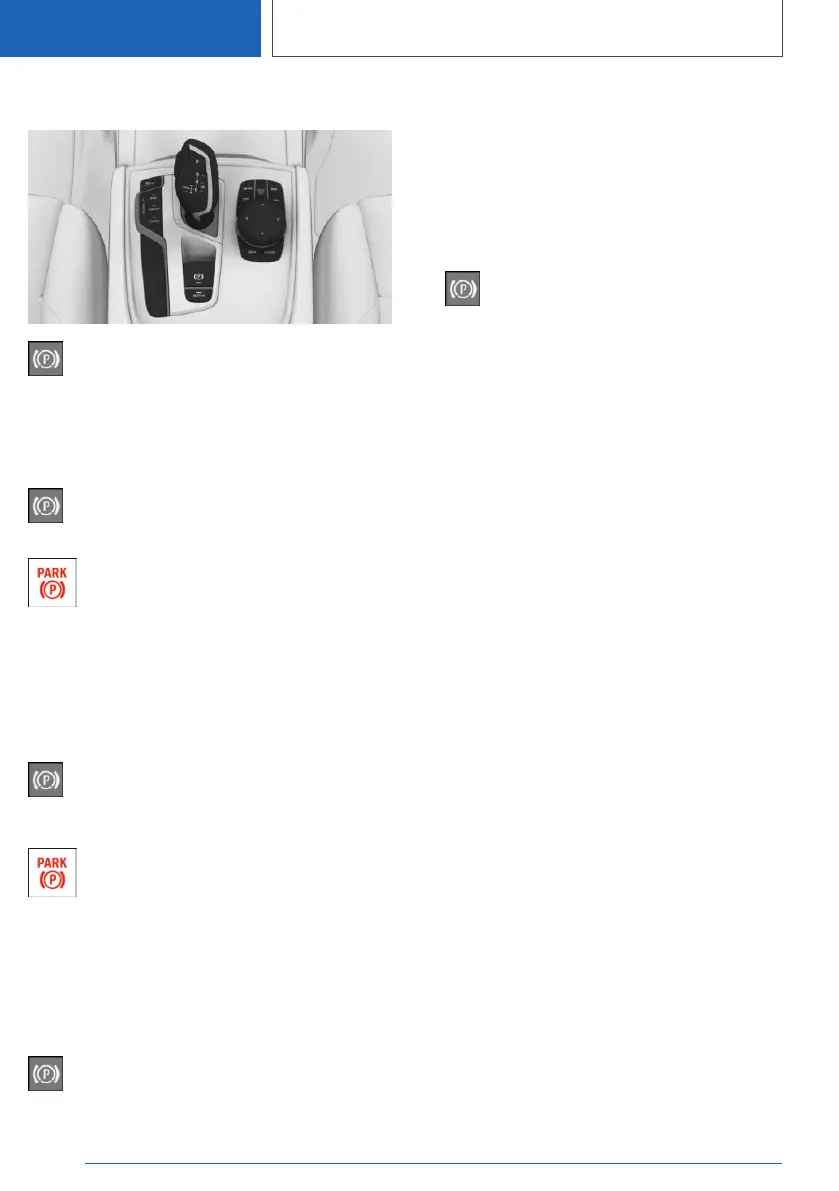
Overview
Parking brake
Setting
With a stationary vehicle
Pull the switch.
The LED lights up.
The indicator light in the instrument clus‐
ter illuminates red. The parking brake is
set.
While driving
General information
To use as emergency brake while driving.
Pull the switch and hold it. The vehicle
brakes hard while the switch is being
pulled.
The indicator light in the instrument clus‐
ter illuminates red, a signal sounds, and
the brake lights illuminate.
A Check Control message is displayed.
The parking brake is engaged when the vehicle
is stationary.
With Emergency Stop Assistant
Pull the switch briefly to activate the emer‐
gency stop function.
Additional information:
Emergency Stop Assistant, refer to page 205.
Releasing
Releasing manually
1. Switch on drive-ready state.
2.
Steptronic transmission: press the
switch while the brake is pressed or selector
lever position P is set.
The LED and indicator light go out.
The parking brake is released.
Automatic release
The parking brake is released automatically
when you drive away.
The LED and indicator light go out.
Steptronic transmission:
Automatic Hold
Concept
This system assists the driver by automatically
setting and releasing the brake, such as when
moving in stop-and-go traffic.
The vehicle is automatically held in place when it
is stationary.
On uphill grades the system prevents the vehicle
from rolling backward when driving off.
General information
Under the following conditions, the parking brake
is automatically engaged:
▷ Drive-ready state is switched off.
▷ The driver's door is opened while the vehicle
is stationary.
▷ The moving vehicle is brought to a standstill
using the parking brake.
Seite 140
CONTROLS
Driving
140
Online Edition for Part no. 01405A2C7F8 - II/21








 To Next Page