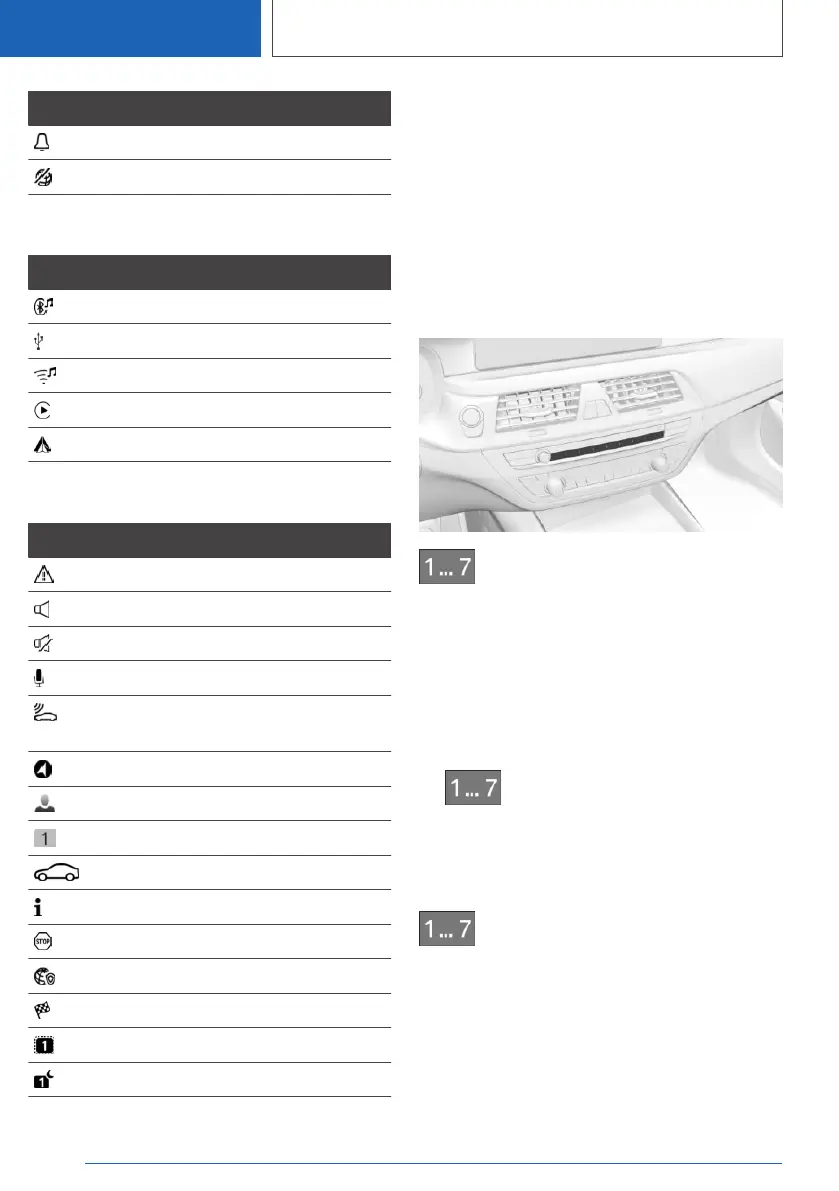
Icon Meaning
Reminder.
Sending not possible.
Entertainment symbols
Icon Meaning
Bluetooth audio.
USB device.
WLAN.
Apple CarPlay.
Android Auto.
Other symbols
Icon Meaning
Check Control message.
Sound output active.
Sound output deactivated.
Voice activation system active.
Request for the current vehicle posi‐
tion.
Checking the current vehicle position.
Driver profile.
Messages.
Service notifications.
Information.
Stop.
Data protection.
Destination guidance active.
Passengers on board.
Do not disturb.
Programmable memory buttons
General information
The iDrive functions can be stored on the pro‐
grammable memory buttons and called up di‐
rectly, for instance radio stations, navigation des‐
tinations, phone numbers and menu entries or
pages in the Integrated Owner's Manual.
Overview
Programmable memory buttons
Storing a function
A function can be stored on a programmable
memory button. A button with a stored function
can be overwritten with another function.
1.
Select function via iDrive, for instance radio
station.
2.
Press and hold the desired button
until the displayed bar on the Control Display
has loaded completely.
Executing a function
Press the button.
The function will work immediately. This means,
for instance that the number is dialed when a
phone number is selected.
Displaying the key assignment
Touch buttons with finger. Do not wear gloves or
use objects.
Seite 44
CONTROLS
iDrive
44
Online Edition for Part no. 01405A2C7F8 - II/21







 To Next Page