Copyright © by BOA Warenhandels-GmbH ● Germany
Rev 0, Stand: 01 / 2007
31
Remote control
Preparation before operation
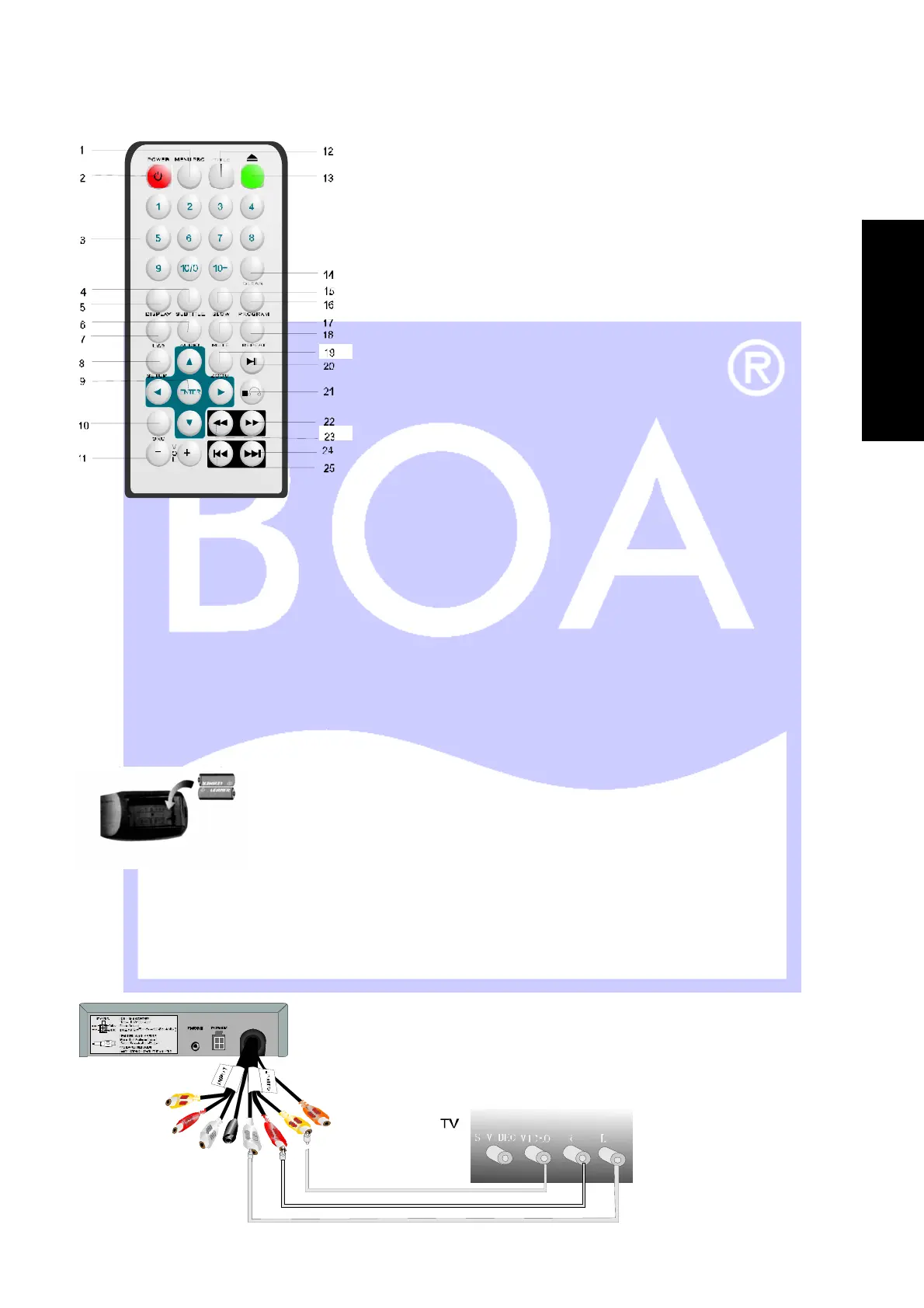
Remote control battery installation
Open battery compartment, insert two AAA batteries, make sure to match “+” and “-” of the batteries to the
marks in the battery compartment. While operating remote control, please point it to the front panel of the DVD
player.
Connections of DVD / TV
The video signal is transmitted through composite video output terminal, while audio Signal is transmitted by
either RCA terminal or coaxial terminal (digital).
1. MENU PBC
2. POWER
3. NUMMER
4. SUBTITLE
5. DISPLAY
6. AUDIO
7. USB
8. SETUP
9. ENTER/SELECT
10. SOURCE
11. VOLUME
12. TITLE
13. EJECT
14. CLEAR
15. SLOW
16. PROGRAMM
17. MUTE
18. REPEAT
19. ZOOM
20. PLAY / PAUSE
21. STOP
22. FORWARD
23. BACKWARD
24. NEXT
25. PREVIOUS
Gelb /
Yellow
R ot / R ed
Weiß / White
E
N
G
L
I
S
H


 To Next Page